Dreadknux
Clients
-
Joined
-
Last visited
Everything posted by Dreadknux
-
Couldn't you just add an additional category layer to solve this problem? So you'd have for example: CATEGORY 1 > CATEGORY 1.2 >> FORUM 1, FORUM 2, FORUM 3, FORUM 4 And do that for each category? That way the forums are nested an additional level, and the forum homepage will only display the one category group (Category 1.2 in this case) with, I imagine, posts from all four forums included in the feed.
-
Maybe I can help with this, as this is a feature I probably use the most 😅 @Chris59, as @Marc mentioned, when you sync a forum and pages database/category together, the comments between both the forum topic and the page record are always linked. That means, if a user visits the Page version of an article and decides to post a comment on that page, the comment will also automatically be posted in the Forum version of the content as well. An example (using V4) is here, on my site: Pages version of the content - you can see there are 48 Comments made on this Page record, but these have all been posted EITHER on this very Page or on the synced Forum topic. It doesn't matter where it is posted, it will show up in both. Forums version of the content - as you can see, again on this topic the same 48 Comments. Some users saw this topic on the Forums first and made a reply here, but others may have seen the Pages version of the content first and posted a Comment on the Page instead. Wherever a comment/reply was posted, they all are shown here too. All of that is to say, to directly answer your question, there is no need for you to offer a link on the Page to go to the Forum to make a comment... because posting comments on the Page also works as posting a reply in the Forum. Hopefully that makes sense. Having said that, you'll see on the Forums version of the content that there is a link to "View full story" at the bottom of the first post. This links back to the Pages article (but it doesn't appear the other way around)... this link doesn't seem to appear in V5 for some reason, but if you're still using V4 this will be a standard feature to cross-link forums to articles. (Please ignore any oddities you might have seen... for example, you might have seen that the original poster of the Forum topic is different to that of the Pages article... what happened here was that the Forum topic was made first, and the Pages record made after. V4 is supposed to automatically sync the Page and Topic authors together so it is the same person, but I think there is a small bug here that is not letting this happen immediately.) Also, in case you're wondering, the "Tips Credit" and "Original Post Content" boxes are just custom fields for the Pages Database (I use a Member Search field for the former, and a text field for the latter - I copy-paste the original forum topic author's content into the text field and search for their username with the Member Search), which is displayed on the Topic thanks to a modified template I made on the backend. It allows me to (manually) identify and credit the original authors of any Forum content that becomes a Page article on my community.
-
Just wanted to share my über-appreciation to you guys for all your hard work (as we don't really express that enough anyway), but specifically for this new Tag widget that you cooked up (is it brand new with Beta 1? Didn't notice it before). I know I asked for it in a Feature request topic on the preview site, but wasn't expecting it to drop with 5.0! There's some things that I'd like to see added (lack of carousel, various widget view options... but I can definitely work with what we have here for now) but what we have now looks great and I can't thank you enough - especially for the multi-tag feature which breaks down multiple tags into tabs on the widget! I just discovered this and hot dog, what a great feature! Just to make a small suggestion (for maybe 5.1 or something, not now!), would it be possible to manually order the multiple tags as they appear to be displayed in alphabetical order (in the example above, would make more sense for me to have 'News' at the very beginning and anything else to the right of it). It'd also be awesome to be able to manage Tags in AdminCP so that you could have 'nested' tags (like a sub-tag, so I could make a 'Comic News' tag sit underneath 'News' etc etc). Anyway, fantastic job! I'm playing around with the Beta now and it's all coming together beautifully. Really brilliant work guys, you have my thanks!

-
All of those user-focused links/menu features are positioned in the top right corner of the page, when the Sidebar is enabled (to the right of the breadcrumb).
-
Not sure we need that level of service, but always appreciate you guys taking things to the next level! 😅
-
Almost makes me feel bad for annoying them with suggestions that they know (but we don't) they're already working on. Almost 😙
-
I've done an audit myself, and besides some small 'QOL' third-party apps that I think will be easily re-made for V5 (such as Change Post Date, which is mostly helpful right now for backdating/restoring archive content from past iterations of my community), the main third party app that will likely cause me pain when V5 rolls around is the Member Shop and the Profile Gifts apps, which are being discontinued by the current app maintainer ahead of V5's launch. My community's been relying on the Profile Gifts app in particular quite a lot lately, so I will need to figure out a way that I can "bank" the information already stored on the database (as in, which user has which item/gift assigned to their account, how many shop points etc) so that I could potentially return to it later and 'restore' that information if a V5-compatible version of those apps become available. But generally, since two years ago or so I stopped actively thinking about third party extensions in anticipation for V5, so I wouldn't have to 'start over' after the upgrade. 😄
-
This is really incredible, thank you for all the really hard work that has clearly gone into this! I can't wait to try it out.
-
From what Matt has been saying, it sounds like that is correct. The preparation for V5 would be to make sure any tags you want to keep are listed as 'Defined Tags' in your AdminCP (you can find this under AdminCP > System > Settings > Posting and then the 'Tags' tab. Anything specified there will apparently be converted to the new tag system when you upgrade your community. I would expect that it would be down to us community admins to train our users on how to use the new tagging system in V5... I think once people understand that they can search for a tag, they will most likely: 1. search for words like "passion" and "intimacy" 2. find there are no matches, then 3. continue searching with alternative words until they find "love" 4. and voila, they use that "love" tag. If there is tag searching within the module dialog (which Matt confirmed there will be), I don't know if having aliases to tags would be absolutely necessary.
-
Would this include any tags that have been listed as "Defined Tags" in AdminCP (my community is currently set to 'Open Tags', but there are many Defined Tags I have built myself in the field below the 'Tagging Mode' option in AdminCP > Posting > Tags)
-
Thanks Matt - I do think there's value to having a portal where all tags are listed, as well. If I may be so bold as to suggest... perhaps there could still be a landing page that exists at www.site.com/tags/ that displays all tags through the site, while the Featured Content page (www.site.com/featured or whatever) can be a little more bespoke/selective based on what tags the admin wants to put front and centre? That seems like an elegant solution to me (and it offers users a useful place to go and browse through content if they ever get bored - at the moment in V4 /tag/ or /tags/ doesn't lead anywhere so it might also put something contextually useful there?) Thanks also for the added detail on how the Featured options work - based on the "Featured Reply" GIF you shared, would that reply also appear on the Featured Content landing page, or will that reply simply appear at the top of the topic?
-
Me, having used the alpha V5 site for a while, upon seeing the topic be about tags... Me, after having read Matt's post... This sounds really cool - a fantastic way to revitalise both the tagging system and content discovery across the platform. In my community, I did try to let users tag things themselves, but they often didn't bother and it was usually left to mods/staff - so I am not mourning the lack of open tags going forward... But this new cross-functional tagging system, coupled with the Featured Content page, sounds like it will be a godsend for my community. Oftentimes community members will post news in the forum before our 'official news staff' get round to writing about it, so being able to tag the forum post as 'news' and guaranteeing it will sit in the same "news" space as our 'official' news articles is something I've been dreaming about! The only piece of the puzzle missing for me in that regard is how well this feature will pair with the CMS/Pages "Copy to Database" system, which my 'official news team' uses a lot (both in terms of avoiding duplicate records appearing in the tag page, making sure linked Page/Topics are unified in search results, and ensuring Topic OPs are kept visible when converted while still prioritising any Page content as the 'canonical content'). I had a couple questions regarding the tag pages and featured content section: What determines the posts that appear at the very top of the Featured Content page (the top three items)? Is it the most recent 'Featured' posts across any/all tags? Can we decide which tags can be included on the Featured Content page, or is it automated? Regarding the URL, are we able to set alternative FURLs for certain tag pages (for example, I might want the news tag page to be our site's actual news homepage, so it would be better to have the URL for this as www.site.com/news rather than www.site.com/tags/news)? I hate to ask this but needs must... what are the opportunities for ad placements on the Featured Content/tags page? Will there be ad blocks we can use for the post grid, or will be only be able to place ads above/below certain sections/areas? Thanks so much for another amazing feature update. Really surprised me with this one. 🙂 BTW, it looks like I'll be setting a calendar alert for the 21st June then... 😉

-
I think Matt is simply saying that all users invited into the testing stage will only have a cloud version of V5 to try out. It's not about cloud customers versus classic customers.
-
Looking forward to the next stage!
-
I tend to use the Source button these days simply to debug HTML that kind of goes wonky in custom CKEditor buttons I make. But if IPS adds an 'inline gallery' button in the new editor that allows me to insert groups of images in rows (the same way I can on a Wordpress blog), I won't really have a need to even do that. I think there's merit to having more advanced functions in the editor that allows for adding custom CSS classes to headers etc so admins/power users can really customise their content, but that's going outside of the realm of "common user" stuff. Just something I think would be great to add as the new editor evolves.
-
If you do not want the solution as presented, because it is apparently "not usable for the common user", what is the alternative? The 'white space' suggestion is not workable, and the only other option is to keep people using the Source button and dig into the HTML, which is even less accessible for the common user. So the two discussions aren't really galaxies apart. All I'm saying is wait and try it in V5 before declaring things aren't usable by a broad range of users. The users themselves will inform you in a live environment if that is or isn't really the case.
-
It's really not, to be honest. Seriously, this weird "unmarked white space that exists but doesn't really unless you click it" idea is a nonsense - both in usability terms and in WYSIWYG standards. If your community members can't discern what a 'Title' field is, they're definitely not going to figure out whatever esoteric suggestion this is. 🙂 And I dare say that, if you know that your community mostly consists of people who are unable to operate forums, a small change to the post editor is really not going to move the needle for you one way or the other. I also don't know why you would decline to offer email support to people asking for help, but that is probably doing more harm to your cause than a blue arrow button ever could. Agreed. It's a pretty bizarre argument; "these contextual buttons that add lines above and below a quote box are simply too complicated for the common user! What they really need is a Source button to click on so they can dig into the HTML code, scroll to the line they need on their tiny mobile screen and add extra p tags and div containers!" 😂
-
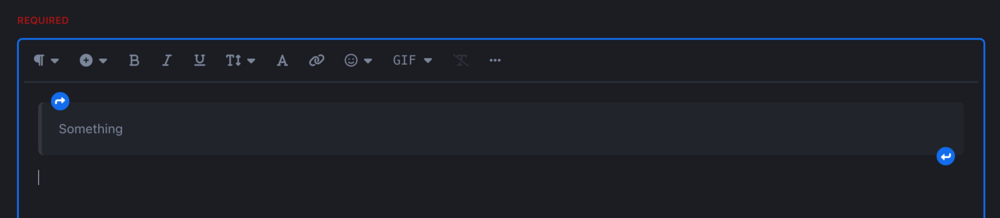
Whaaaaaat Matt F coming in with the clutch MVP post of the thread!? That's awesome news, thanks for sharing/teasing! Respectfully, I do not think your suggestion would really solve anything and in fact would make UX worse. Having extra space above/below the box area that is clickable-to-enable-text-input but is otherwise redundant will be super confusing to users, and would make the post editor not WYSIWYG compliant. Users need to see that what they're typing in the editor (and especially how it is presented in the editor) will be 100% accurate to how the post will appear on publish. I would recommend waiting for V5 to come out and trying out the icon. While every user's experience will of course be different and there will likely be room for improvement in the UI, in my view I really do not think any user (no matter their level of experience) will miss these two clear icons sitting in the box area: If a user is so inexperienced that you think they will not know what those buttons do, I will imagine the first thing said user would do is experiment and click those buttons to see what function they served. And there, problem solved. My only suggestion regarding this topic is that, perhaps the arrow buttons should be permanently visible on the box in the post editor (at present in the V5 alpha those blue icons only appear if you hover your mouse over the box - and that's a scenario where I do believe that inexperienced users may have difficulty, as they may not think to hover over the box in order to reveal a solution they're looking for).
-
Haha, I had meant to tag @Matt Finger but when I was typing my original post the mention function was going screwy! Thanks Matt (the other one)!
-
This is one of the more exciting features about IC5, and as a sort-of-power user the sticky toolbar and mobile considerations in particular are a godsend. Thanks for all your hard work, Matt! I had a few questions about the new post editor; 1. Can we remove certain options from the post editor (for instance, I don't necessarily like the idea of my community's users being able to change the font size/style of their content, so being able to enable/disable certain toolbar buttons would be great for me)? 2. The boxes are great, but from a design perspective the box header area ("How to write JavaScript", for example) doesn't seem to stand out from the rest of the box content (and the padding seems a bit too much for my liking). Is there a chance of having a box header bgcolor implemented that's maybe a little darker/lighter than the box content background to make it pop (I can always use custom CSS to fix this myself but figured I'd ask if it was something that could be done out of the box)? 3. Will you be publishing a full FAQ/guide on what kind of markup code will be supported on this? One of the least desirable aspects of Invision V4 has been a lack of official documentation/glossaries regarding IPS template code and what is actually there for designers to use (making a custom theme has often been a matter of either accidentally finding out there is a 'native' CSS class for what I want a particular div to do, or creating new CSS classes myself and duplicating styles in ignorance), and it'd be a shame for me to ask end-users to guess what kind of markdown code works via trial and error. 😄 4. I like the idea that text colours change dynamically with light/dark theme - but is that only relating to the default IC5 theme, or will that also be the case for custom themes as well? I remember @Ehren's amazing walkthrough of the new theme editor a few months ago, and what seemed space-age to me was that changing a primary/secondary colour for a theme would also dynamically alter a container/button's text colour. Will post editor text colours work in the same way, or will I need to consider custom CSS classes to make a 'yellow' text colour readable on a similar-coloured post area background? Thanks again!
-
Quick, let's try to find clues in Matt's emojis 👀
-
Sorry, it's probably a bit complicated what I mean. So if I have a Pages Database called 'Music' and from there I have a Page that can be accessed in one of two ways: 1. Via the Pages app (i.e. [domain.com]/music/category/this-is-a-page) 2. Via a Club through which the Pages Database is connected (i.e. [domain.com]/clubs/1-this-is-a-club > click 'Pages' tab) Would the Page design/template look different depending on how/from where it is viewed? I imagine when accessing a Page via #2 above (through a club link), the Club Header would appear above the Page content (as it does if you create a Forum within a Club). But would the Club Header also appear if the same Page is accessed via #1 above (through usual browsing/navigation of the site)?
-
This is a nice update - and great that you guys are still adding features to v4, wasn't expecting that! QQ on this, as I'm more on the 'mildly curious' side of things with this particular feature and I'm thinking about possible content redundancy across the suite; is this feature just about creating new club-specific page databases that are exclusively tied to those clubs? Or is it the case that an existing pages database could be tied to one (or more?) Clubs and the content for that database could be accessed/viewed from either the Club space or the standard Page space? To offer a use-case example; suppose I have an existing Pages database, that works like a wiki. I want to keep that wiki visible and accessible as it always has been, but I might have a category called '1990s Movies' that might work well if linked to an existing '90s Lovers' Club. This way, Club users (who like to stay on the Club app and don't leave) will be able to see and enjoy the Pages content, without them needing to create a brand new Pages DB for that purpose (and risk duplicating content across the site)? Hope that makes sense? I only ask because there's talk of linked Pages db permissions being honoured at the Database level (and not necessarily the Clubs level), which makes me think that this could be possible. EDIT: Also another question. 😄 About templates/theming, would pages be displayed as per the templates selected in the database settings in AdminCP? And if a Page is viewed from the Club space, would the Clubs header appear above that template?
-
I'm enjoying the story so far, but can we get some more chapters to complete the book? 😄 I enjoyed the once-a-week cadence of reveals a few months ago, and I'm hoping we're near the end of our mid-season break and can return to that? 🙏
-
I have a general question relating to the new V5 design philosophy/restructure if that's okay @Ehren. I've been using sticky nav headers in my current V4 setup, where the navigation strip underneath the header area follows the user as they scroll down. That's working very well, with one caveat; I've had to try and shoehorn in a bunch of additional CSS for as many anchored areas on-page as I can think of(i.e. pagination rows, anchored H2s etc) to ensure those anchored areas do not appear hidden behind the sticky navbar. Unfortunately it's a little bit of a janky/inelegant solution - my code for each anchored part in my custom CSS goes something like this: [data-resort="listResort"][data-tableid="topics"]::before, [data-resort="listResort"]::before { display: block; content: " "; height: 60px; margin-top: -60px; visibility: hidden; pointer-events: none; background: none; } The above code tends to help make sure that anchors are set underneath the sticky navbar (which is 60px in height), but it has the side-effect of pulling the ipsBox design up and above its container, which makes sense logically but is a little annoying (and I've had to find alternative way to fix this by modifying the container CSS further to resolve, on a per-section/per-anchor area basis) So basically what I'm interested in knowing about is, do you think there is something in V5's design approach that accounts for this kind of customisation that a community admin might want to do, without requiring custom CSS for a hundred different containers to make it work? I don't necessarily mean that there needs to be an option for sticky headers in the theme editor or anything (because there are too many variables at play - different heights of sticky containers, whereabouts that sticky area might be, etc), but perhaps there is a custom CSS variable baked into V5 for advanced CSS editors, where they can input a value for a sticky anchor height, and then the admin can add one additional line of custom CSS to set their desired navbar/area as 'sticky'... and then the set variable would ensure that all anchored on-page areas would be automatically adjusted to account for the sticky header (so nothing appears hidden behind the sticky container). It's probably quite a complex thing to ask about, but interested to hear your thoughts on feasibility etc?