Jump to content
View in the app

A better way to browse. Learn more.

Invision Community

A full-screen app on your home screen with push notifications, badges and more.

To install this app on iOS and iPadOS
  1. Tap the Share icon in Safari
  2. Scroll the menu and tap Add to Home Screen.
  3. Tap Add in the top-right corner.
To install this app on Android
  1. Tap the 3-dot menu (⋮) in the top-right corner of the browser.
  2. Tap Add to Home screen or Install app.
  3. Confirm by tapping Install.
Solutions

Micro communities.

A community within a community.

Benefits

Segment your community and let your members niche down

Using Clubs, members can flex their leadership skills by managing their own micro-community inside the framework of your main community.
  • Creates new pathways for members to venture into and contribute.

  • Offers new opportunities for a variety of content.

  • Self-managed by its Club leader, allowing for moderators to focus their attention elsewhere.

  • Promotes togetherness or exclusivity based on Club conditions and permissions.

  • Houses Club-specific content in its own ecosystem separate from the main community.

  • Grants managed power to your superstar members.

  • Builds and fosters unforeseen connections.

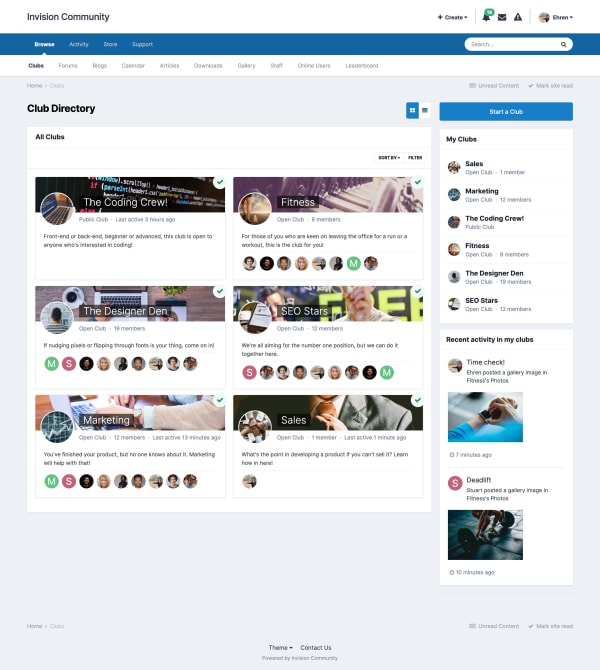
Screenshot of Clubs index page
Inclusions

Each Club features its own...

Showcase

Our clients love their micro-communities:

Ready for community inception?

  • 30-day free trial
  • No commitments

Account

Navigation

Search

Search

Configure browser push notifications

Chrome (Android)
  1. Tap the lock icon next to the address bar.
  2. Tap Permissions → Notifications.
  3. Adjust your preference.
Chrome (Desktop)
  1. Click the padlock icon in the address bar.
  2. Select Site settings.
  3. Find Notifications and adjust your preference.