


Everything posted by Marco Junior
-
Marco Junior replied to Marco Junior's topic in Invision Community 5: Beta Testing's Beta DiscussionSo that's the problem, your guide doesn't have javascript code just CSS and templates, so I was assuming that the ajax events were loaded through a standard template identifier. You can show-me the example code for this ?
-
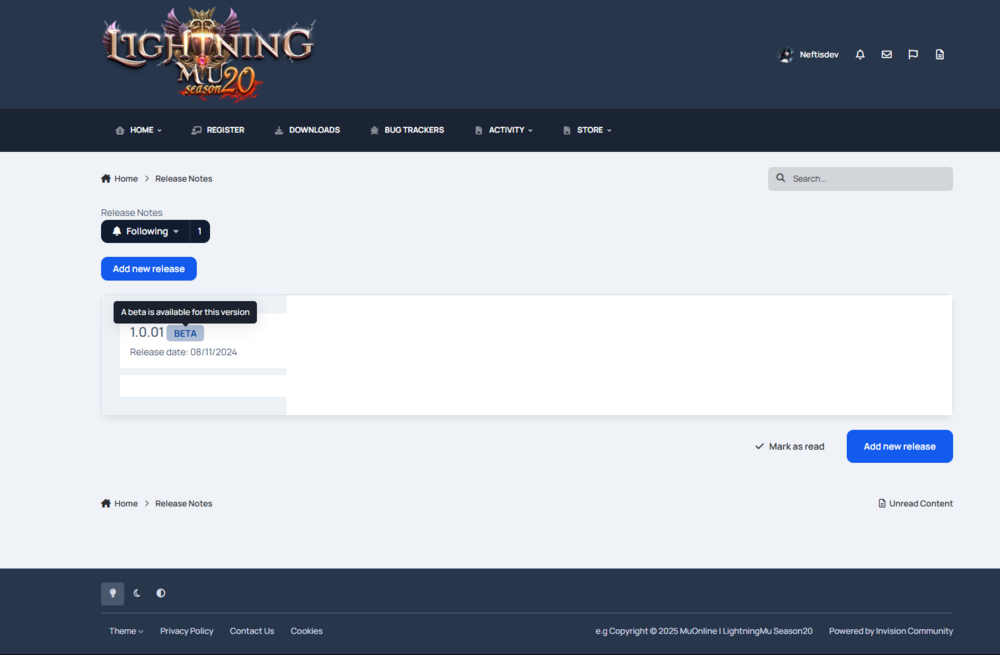
Hello everyone, I started development the (releases note) using the "Pages application", but I have an small doubt/problem. I make new template for the release notes, but the ajax load does not work on my page, if you have more experience with development application and customs for IPS maybe you can help-me, I will be happy ! Because I don't have experience with IPS development and the documentation IPS5 does not available for now. This is result my current release note: I need put the content notes on the white area, but when I click on any patch update notes, I will be send for the another URL / page, but I don't understand why it's behaving like this, because I follow the old tutorial, but following the current logic of v5 templates Code: {{$rowIds = array();}} {{foreach $rows as $row}} {{$idField = $row::$databaseColumnId;}} {{$rowIds[] = $row->$idField;}} {{endforeach}} {{$iposted = ( $table AND method_exists( $table, 'container' ) AND $table->container() !== NULL ) ? $table->container()->contentPostedIn( null, $rowIds ) : array();}} {{foreach $rows as $row}} {{$idField = $row::$databaseColumnId;}} <div class="ipsAreaBackground i-padding_2" data-baseurl="" data-resort="listResort" data-controller="core.global.core.table"> <div class="ipsAreaBackground_reset ipsColumns ipsColumns_collapsePhone" data-controller="pages.front.releaseNotes.main"> <div class="ipsColumn ipsColumn_wide ipsAreaBackground cReleaseColumn" data-role="releases"> <ol class="ipsDataList ipsDataList_zebra ipsClear cCmsListing" id="" data-role="tableRows"> <li class="cCmsRecord_row {{if $row->hidden()}}ipsModerated{{endif}}" data-rowid="{$row->$idField}"> <a id="cReleaseId" data-ajax href='{$row->url()}' class='cRelease' data-releaseID='{$row->$idField}' {{if $row->fieldValues()['field_29']}}data-currentRelease{{endif}}> <h3 class="ipsType_sectionHead ipsType_break"> {{if $row->_title}}{$row->_title}{{else}}<em class="ipsType_light">{lang="content_deleted"}</em>{{endif}} {$row->customFieldDisplayByKey('current_release', 'listing')|raw} {$row->customFieldDisplayByKey('beta_release', 'listing')|raw} {{if $row->isFutureDate() || $row->mapped('pinned') || $row->mapped('featured') || $row->hidden() === -1 || $row->hidden() === 1}} <span> {{if $row->isFutureDate()}} <span class="ipsBadge ipsBadge_icon ipsBadge_small ipsBadge_warning" data-ipsTooltip title='{$row->futureDateBlurb()}'><i class='fa fa-clock-o'></i></span> {{elseif $row->hidden() === -1}} <span class="ipsBadge ipsBadge_icon ipsBadge_small ipsBadge_warning" data-ipsTooltip title='{$row->hiddenBlurb()}'><i class='fa fa-eye-slash'></i></span> {{elseif $row->hidden() === 1}} <span class="ipsBadge ipsBadge_icon ipsBadge_small ipsBadge_warning" data-ipsTooltip title='{lang="pending_approval"}'><i class='fa fa-warning'></i></span> {{endif}} {{if $row->mapped('pinned')}} <span class="ipsBadge ipsBadge_icon ipsBadge_small ipsBadge_positive" data-ipsTooltip title='{lang="pinned"}'><i class='fa fa-thumb-tack'></i></span> {{endif}} {{if $row->mapped('featured')}} <span class="ipsBadge ipsBadge_icon ipsBadge_small ipsBadge_positive" data-ipsTooltip title='{lang="featured"}'><i class='fa fa-star'></i></span> {{endif}} </span> {{endif}} </h3> {{if count( $row->customFieldsForDisplay('listing') )}} <div class="ipsDataItem_meta"> {{foreach $row->customFieldsForDisplay('listing') as $fieldId => $fieldValue}} {{if $fieldValue && $fieldId != 'current_release' && $fieldId != 'beta_release' && $fieldId != 'security_release'}} {$fieldValue|raw} {{endif}} {{endforeach}} </div> {{endif}} </a> </li> </ol> </div> </div> </div> {{endforeach}} Here the code records: <div class="ipsColumn ipsColumn_fluid"> {{if \count($record->getMessages())}} <div class="i-padding_2"> {template="contentItemMessages" group="global" app="core" params="$record->getMessages(), $record"} </div> {{endif}} <article> <div class='i-padding_3'> {{if \count($record->customFieldsForDisplay('display_top'))}} <ul class="ipsDatabaseFields i-margin-bottom_3"> {{foreach $record->customFieldsForDisplay('display_top') as $fieldId => $fieldValue}} {{if $fieldValue}} <li>{$fieldValue|raw}</li> {{endif}} {{endforeach}} </ul> {{endif}} <section class="ipsRichText ipsRichText--user" data-controller='pages.front.releaseNotes.main'>{$record->_content|raw}</section> {{if $record->editLine()}} {$record->editLine()|raw} {{endif}} {{if $records = $record->getReciprocalItems()}} {{foreach $records as $fieldId => $items}} {{$infoLineShown = FALSE;}} <ul class="ipsList ipsList--csv i-margin-top_3"> {{foreach $items as $item}} <li>{{if ! $infoLineShown}}{{$infoLineShown=TRUE;}}{lang="records_linking_to_me" sprintf="$item::database()->recordWord(0,TRUE), $record::database()->recordWord(1)"}: {{endif}}<a href="{$item->url()}">{$item->_title}</a></li> {{endforeach}} </ul> {{endforeach}} {{endif}} </div> {{if $bottomFields = $record->customFieldsForDisplay('display_bottom')}} <hr class='ipsHr'> <div class="ipsRichText ipsRichText--user i-padding_3" data-controller='pages.front.releaseNotes.main'> {{foreach $bottomFields as $fieldId => $fieldValue}} {{if $fieldValue}} {$fieldValue|raw} {{endif}} {{endforeach}} </div> {{endif}} <div class='ipsEntry__footer'> <menu class='ipsEntry__controls'> <li> {$record->menu()|raw} </li> {{if $record->canManageRevisions()}} <li><a href='{$record->url('revisions')}' title="{lang="content_view_revisions"}">{lang="content_view_revisions"}</a></li> {{endif}} </menu> {{if \IPS\IPS::classUsesTrait( $record, 'IPS\Content\Reactable' ) and settings.reputation_enabled}} {template="reputation" app="core" group="global" params="$record"} {{endif}} </div> </article> </div>

-
Marco Junior replied to Marco Junior's topic in Invision Community 5: Beta Testing's Beta DiscussionMaybe it's a force of habit to tag members with @ I'm sorry!
-
Marco Junior replied to Marco Junior's topic in Invision Community 5: Beta Testing's Beta DiscussionBut when he will open the eyes ( My question will be here, waiting for he ) 😇
-
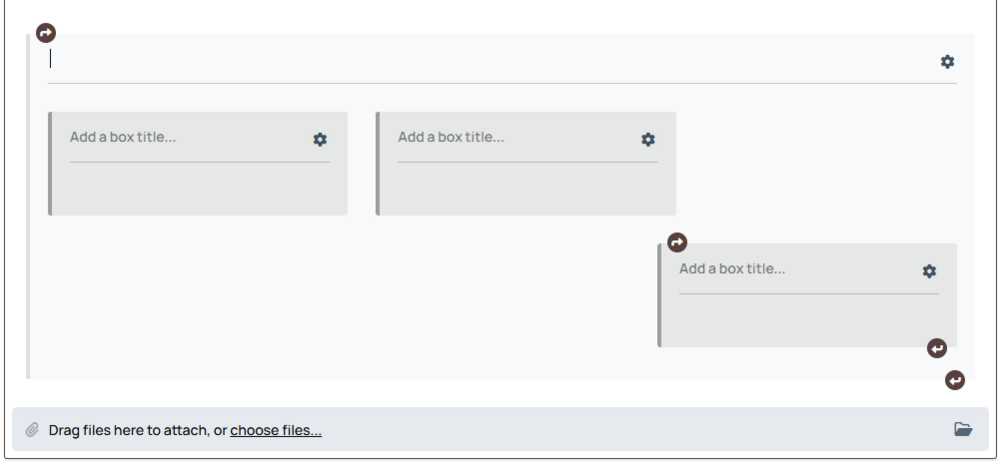
Hello @Marc how are you? I have an small question for you ! I need make 3 warp box for make an guide on my community with the new (IC5), but the system does not allow move the box on the content editor system. Example: I need put the three warp box on my content topic, after the center (current box) you can see on the image. How to performance this ? Because the warp box does not allow move function or resize with select element with the same behavior images and movie. Maybe this is possible ? Or is possible add the function (Move and resize element after selecting the element == images ? ) If you add this, maybe I can make tables with this ! 🙂
-
Hello everyone, I am hereby asking you to add an entry action button (Editing, moderation, etc.) At the beginning of the topic/blog When the content is too large, it is horrible to have to scroll all the way down to be able to edit the topic/blog. Maybe in the block where it shows the publication date and who published it, in the right corner > below the "Follow" button

-
https://community.lightningmu.net/ I still release more changes but, I love the new IPS V5 (The new possibles editing with the various widgets 😄 ) Congratulations for the all contributor (of the Invision - company )
-
Still development ! Without documentation the process is low, but I will release this on this weekend 😄
-
Custom template does not work, I reported this on this version. You need wait the next version with the problem has resolved !
-
This is nice improvement 🙂
-
@Chris59 PS: The custom file .JS load fine on the page, I try now and after infecte the element of the page I can see there is on the page.@Chris59 Editing or assigning a new template to any page in IC5 is the same as nothing. It doesn't even load the information from that template into the custom page. Even if you create something specific, the system is still loading the basic page of every layout. It works if you directly change the Global template, but this is not a good practice since it changes a lot of things. I'll wait for a fix and then I'll return to the release notes. I can share it when it's ready.@Chris59 I can do it : ) as long as the custom function works I tried everything but it doesn't load my custom css and js. Maybe if I do a workaround who knows? Temporarily, I'll try something now.Oh and you report this ? Thanks ! I will wait a fix for try modify my custom page then.@Gary You can help with this guide? Because I follow full steps but on IC5 I have an question: Page Includes Page includes will not work unless your content or custom wrapper template contains the following tags: {template="includeCSS" app="core" group="global" location="global" params=""} {template="includeJS" app="core" group="global" location="global" params=""} Just copy this and paste on my template page ? Or I need release any ? Because my CSS and Js does not load. Because on my customWrapper these tags already exist there. But CSS and JS custom does not load.
 Marco Junior replied to Manuel Molina's topic in Invision Community 5: Beta Testing's Beta DiscussionYes, I remember that when HTML posts were allowed, there was a warning in IC4 that said something about security. And yes I understand this. However, it was possible to enable or disable it for a specific type of group. I never enabled it for members. It was only available to us, Administrators and/or developers. To answer your question, no, it is not possible to do this with the current editor. However, the maximum styling I have for titles is the size and a color. For dark sites, badges were a superior style option to traditional styles, so it was easier to use them to give greater visibility to certain important texts.Marco Junior replied to Manuel Molina's topic in Invision Community 5: Beta Testing's Beta DiscussionFor add a specific style on title example here:
 Marco Junior replied to Manuel Molina's topic in Invision Community 5: Beta Testing's Beta Discussion@SoloInter I reply you on another post ! I'm not saying the product is bad or anything like that. I'm just giving my point of view as a customer, I really appreciate how the community and its employees work. But some things need to be said! All the new widgets, UI and other features of IC5 are fantastic. However, what made me come back here and accept a new licensing term even though I have a community that doesn't generate any profits for me other than expenses, were the new features. Topic subscription is something that every community needs, I mentioned this in another topic, but considering the whole situation built for cloud services, it's enough for me to have my answer. On the other hand, some suggestions for improvements need to be mentioned and one of them is related to the text editor, to some essential changes in the CMS after all, isn't that the idea of the tracker? Listen to all customers? Whether it's cloud or self-hostedMarco Junior replied to Manuel Molina's topic in Invision Community 5: Beta Testing's Beta Discussion@Marc Another very important point: to developers, I understand your intention to renew the text editor. I truly understand everything that is behind the development of IC5, as I am also a developer and I know how much work such features can be. However, I think you have limited the text editor too much. We can no longer build: Tables Define custom titles with specific classes, such as class badges Basic HTML tags or content Colors edit Title type edit and much more These are simple things, but they make a huge difference for those who manage gaming communities. I talked to some people and many of them do not want to update or do not intend to make this migration, not even when the final product is released, due to the way we conduct projects/communities at IC4! What I mean is that some things cannot be missing from this editor. I believe you need to think strategically, remembering that you work with software (CMS) that encompasses a variety of different niches and segmentations, and that for each of these segmentations there is a different way of presenting our content. Example basic on IC4 for badges: <span class="ipsBadge ipsBadge_large ipsBadge_style2">TITLE HERE</span> It's such a small thing but it makes a huge difference. I feel like my content is all exactly the same. Is this perhaps the behavior you want from now on?Marco Junior replied to Manuel Molina's topic in Invision Community 5: Beta Testing's Beta DiscussionI use the IC5 em production server and test server: https://community.lightningmu.net I confess that I'm a bit discouraged. Although the version is good, many things that were announced in the videos cannot be seen. And this has left me quite discouraged, by the way, the presentation teases are inviting, I paid for the license renewal, eager to see the new features. I know that it has not yet been defined who will be able to use them or not, but considering it is a new product, it is more than obvious that we (Self-hosted) will not have the features. Not even in the testing stage, I believe that in the testing stage all the features should be available. For example: Signed topics Live community features Summaries The current version looks like a more limited version of IC4 with a new UI. I'm sorry if this offends the developers, it is not my intention but it is what I am feeling and it is so frustrating.@Chris59
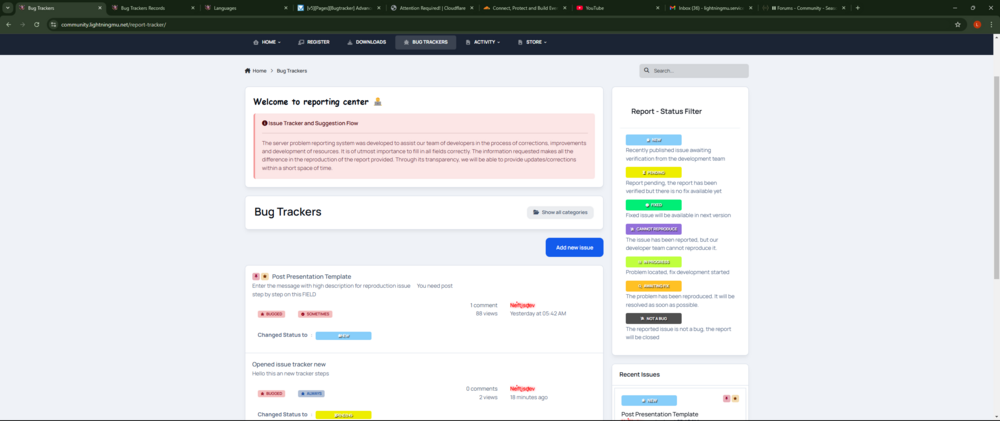 @Daniel F I have an question for you. Let's say I want to add a message every time my status changes automatically, without having to go to the post and add the message manually. How can I do this directly using my custom code? Example: Every time I change the status of the report to any type of status, a message needs to be added as a response to that report. Note: I don't know which variable to use to print the name of the member who is updating the post information. I assume there is one. I looked for information in the section dedicated to developers, but everything I found is intended for IPS4, I see that a lot of things in IPS5 have been changed. For example: Classes Variables The way the front-end and back-end were built has become challenging since there is still no official documentation for IPS5! But I have already managed to do a lot, especially in relation to the front-endYou can use an list order on description front-end, is better and it looks visually better, it's just a suggestion. {{if $formValue}} {{$items=explode(',',$formValue);}} <div class="ipsCmsEntries__meta i-padding_2 i-flex i-align-items_center i-gap_2 i-flex-wrap_wrap i-color_soft"> {{foreach $items as $item}} <ul class="ipsList ipsList--inline"> {{if $item == "bug_tracker_no_selected"}} <li> <strong> {lang="tracker_not_selected"} </strong> </li> {{elseif $item == "status_to_new"}} <li> <strong> {lang="changed_status_text"} </strong> : <span class="ipsBadge ipsTracker-system ipsTracker-new"> <i class="fa fa-solid fa-bug ipsTitle--h4" >{lang="changed_to_new"}</i> </span> </li> {{elseif $item == "status_to_pending"}} <li> <strong> {lang="changed_status_text"} </strong> : <span class="ipsBadge ipsTracker-system ipsTracker-pending"> <i class="fa-solid fa-hourglass-half ipsTitle--h4" >{lang="changed_to_pending"}</i> </span> </li> {{elseif $item == "status_to_resolved"}} <li> <strong> {lang="changed_status_text"} </strong> : <span class="ipsBadge ipsTracker-system ipsTracker-resolved"> <i class="fa-solid fa-circle-check ipsTitle--h4" >{lang="changed_to_resolved"}</i> </span> </li> {{elseif $item == "status_to_cannot_reproduce"}} <li> <strong> {lang="changed_status_text"} </strong> : <span class="ipsBadge ipsTracker-system ipsTracker-canotreproduce"> <i class="fa-solid fa-bug-slash ipsTitle--h4" >{lang="changed_to_cannot_repro"}</i> </span> </li> {{elseif $item == "status_to_inprogress"}} <li> <strong> {lang="changed_status_text"} </strong> : <span class="ipsBadge ipsTracker-system ipsTracker-inprogress"> <i class="fa-solid fa-list-check ipsTitle--h4" >{lang="changed_to_inprogress"}</i> </span> </li> {{elseif $item == "status_to_waiting_fix"}} <li> <strong> {lang="changed_status_text"} </strong> : <span class="ipsBadge ipsTracker-system ipsTracker-waiting"> <i class="fa-solid fa-magnifying-glass ipsTitle--h4" >{lang="changed_to_waiting_fix"}</i> </span> </li> {{elseif $item == "status_to_notbug"}} <li> <strong> {lang="changed_status_text"} </strong> : <span class="ipsBadge ipsTracker-system ipsTracker-notabug"> <i class="fa-solid fa-bug-slash ipsTitle--h4" >{lang="changed_to_not_a_bug"}</i> </span> </li> {{endif}} </ul> {{endforeach}} </div> {{endif}} You can use this if you want of course! @Chris59Yes, there is a plan, that's why we are at this stage of development. Everything IPS develops has a plan, and if you look at the topics in Insiders you will understand that the level of professionalism of the entire team involved is extremely high quality. In another topic it was mentioned that this version still has some bugs. I assume that in another 3 or 4 releases we will have an official version. The version is good, and the developers are excited about delivering this new product. The way you responded gave the impression that we are relying on goodwill and that is not the case here. As a customer of other software (CMS), I chose to respond to you with the intention of explaining that IPS is not a community of amateurs, this is a quality company committed to delivering quality services. Remember: This is not a discussion, it is just an observation.







