


Moestuin
Clients
-
Joined
-
Last visited
Everything posted by Moestuin
-
Ah ok. Understandable as this site seems to have more custom code on it then the normal forum software. Reading release notes. What where the advertisements improvements? Where that only code improvements, or also placement or someting else? I was hoping this update would fix the search issue, that when users click a search result item it goes to the wrong (last)post on the page, instead of going to the users comment on the page itself? Also seems like a very small fix as the url is wrong. Could this be prioritized in the next update? Do we manual download 5.0.10 beta 1 or does it supose to come in on the Get Support page. As it it not showing there on my Dev site.
-
Did you do the upgrade the site 2days ago? When the website was showing the updating page for about an hour, and then errors for a while afterwards? I will test this on my dev site first to make sure...
-
What the the reasoning behind that? On other big websites you can get your data without a human having to approve this.
-
Is there a setting that this can this be automaticly approved?
-
Default group = Members (unless you have renamed that group) I also looked for a setting to setup the default group. but could not find it.
-
I would like the same, especially for pages.
-
@Jordan Miller Tried that a few times on my test install with 5.0.9. I don't have that issue.
-
Tought i was reacting to an other topic. Your right it does not belong here.
-
Just to let you know, on 5.0.8 we do have an Edit button.
-
Oops wrong topic!
-
Members are really missing the options for frequently used Emoji, to find them at the top of the list. So that is an other feature request for the editor.
-
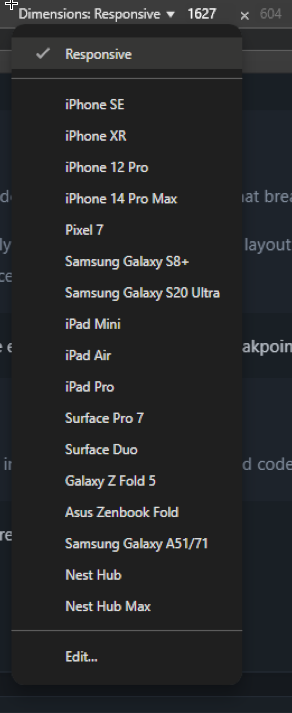
Yes it might be a bit confusing. But not all tables have the same resolution. Invision only have one view for tablets, and in that view there is enough space to load the website itself, without the need of the mobile footer menu. I have some users now testing with some older ipads, and those do get the mobile footer menu. However your ofcouse free to adjust the css to give the footer menu also to bigger screen sizes. If you want to test mobile/tablets in a better view. Close the theme editor. And then use Chrome inspect element, and select a device from the list. Or add some custom devices under edit.
-
For others that read this, i made a typo. the last </in> should be </li> Thanks for spotting that @Como
-
Ok works like a charm. First open you hook, copy out all code to temp txt, then delete the hook. Open up the css, and delete the CSS .ipsMobileFooter { position: fixed; bottom: 0; left: 0; width: 100%; z-index: 9999; } .ipsMobileFooter:nth-of-type(2) { display: none; } @media (max-width: 979px) { .ipsLayout__app { margin-bottom: 55px; } } Then go to admin CP, to your theme, then open CSS/Javascript. Open javascript tab to add javascript. Goto you txt, and copy out your piece of code for the button. From: <li data-el="chat" class="ipsMobileFooter__item"> everything inbetween and </in> (function(){ const mobileMoreButton = document.querySelector('[data-ips-hook="mobileFooter"] [data-el="more"]'); mobileMoreButton.insertAdjacentHTML("beforebegin", ` COPY THE <li> </li> HERE `); })();Then save. And it shoot be good.
-
Yes that is a more elegant solution, without using an hook, and it also prevents running the code two times. Later tonight i will adjust my code test it, and post instruction how to alter yours.
-
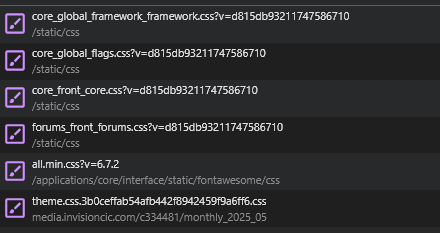
The image shows that caching service is disabled for those files. Looking on your site, printscreen below. What files are loaded double? I see none? Maybe you have setup 2 times the CSS? One time in the Theme Editor. One time in CP under the Theme in the admin only CSS? Could that be possbile?
-
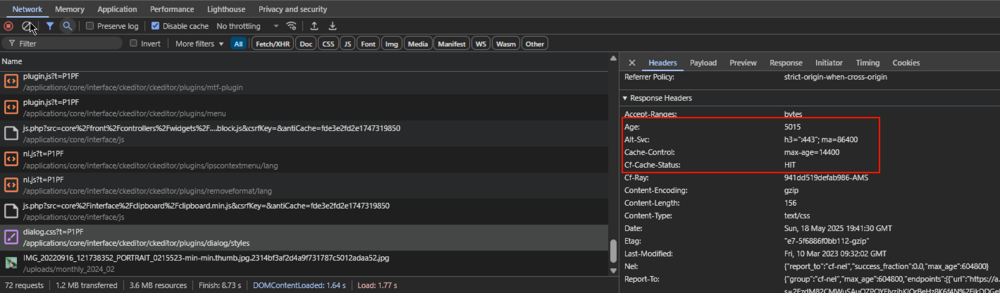
Can you show printscreen of you 2 css classes? For example on my main website, i use cloudflare, and it takes up 4hours to update the cached items on clients. This way once in the 4hours cloudflare connects to server and gets a new css style. And then distrubutes it to all clients. I guess the hosted envoirment of invision uses some of the same principle. On my dev server i turned off caching, so i don't have this issues. Can you check in chrome, inspect element, network tab, refresh the page, select the css that you want. Look at the right side: Only when max age has expired the caching server will get a new file from server. (Rember, this caching server is a server, this has nothing to do with f5, or ctrl+f5. as that only gets a new file from caching server, and not from hosting server.)
-
Good that you got it working. From the web; Using stroke="currentColor" and fill="currentColor" in an SVG means that the stroke (outline) and fill (interior) of the SVG will inherit the current text color (usually defined by CSS). Why use currentColor?It allows SVGs to automatically match the surrounding text or element color without hardcoding a specific color. This is especially useful for theming and dark mode support.
-
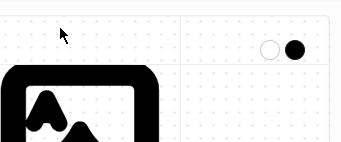
You must adjust css inside svg, its a single image. On the website i linked earlyer you have 2 dots white and black, where you can style them. https://www.svgrepo.com/svg/509705/ace-of-spades?edit=true If you want to do it manual; https://stackoverflow.com/questions/67187091/creating-svg-that-appears-black-in-light-mode-and-light-in-dark-mode
-
Thanks i have adjusted it aswel.
-
Hi 1 <h3 data-ips-hook="postUsername" class='ipsEntry__username'> 2 3 </h3> 4Yes this is exactly how hooks work, you can insert before, insert after. But all orginial code keeps running. So you cannot just copy a template, and insert it into position 1,2,3 or 4. Or the code will run twise, one time as original, and one time your adjust code, in the position where you want. So that will result in double output. (as see in mobile footer). Normaly hooks are used, to add something before that template, or just in the template at top, or at bottom, or after the template. Like a line or text. Not to change the template itself. In 4.7 it was however possbile to change the templates like you want, but to my knowlage that was removed in version 5. If i am wrong i would like to know, if a moderator can jump in here?
-
Don't think you can do that from within a hook. As the hook goes before or after that part of the template, or you have the orginal part. But that means, the orinal parts still loads, but have to be hidden. Just like your mobilefooter button. however you can redact it with some javascript, only depends on pc speed of the viewer how fast it is redacted.. That means username could be visable for a fraction of a second. document.addEventListener('DOMContentLoaded', () => { const signUpSpan = document.querySelector('.ipsUserNav__text'); const text = signUpSpan?.textContent || ''; // List of keywords to check for const keywords = ['Sign Up', 'Sign In']; // Check if any keyword is included in the text const hasKeyword = keywords.some(keyword => text.includes(keyword)); //console.log('User nav text:', `"${text}"`); //console.log('Contains any keyword:', hasKeyword); if (hasKeyword) { //console.log('Sign Up or Sign In detected - replacing usernames with "redacted"'); // Function to replace username links inside a given container function replaceUsernames(containerSelector) { const usernameLinks = document.querySelectorAll(`${containerSelector} .ipsUsername`); //console.log(`Found username links in ${containerSelector}:`, usernameLinks.length); usernameLinks.forEach(link => { //console.log('Replacing username link:', link.outerHTML); const redactedText = document.createTextNode('redacted'); link.parentNode.replaceChild(redactedText, link); }); } // Replace usernames in all target containers replaceUsernames('.ipsData__last-primary'); replaceUsernames('.ipsData__meta'); replaceUsernames('.ipsData__last-secondary'); //console.log('Replacement complete'); } else { //console.log('Neither Sign Up nor Sign In found, no changes made'); } });Wrote this script fast, that when Sign Up is shown on the website, it redacts usernames. Perhaps there are more elements then ipsData__last-primary, ipsData__meta,ipsData__last-secondary but those can be added. Not a very nice solution, but kinda does work.. however is users logged in, also does not have to see it, you beter hide those elements in css as that is a faster way. But css depends then for all users.
-
I would be ok with that, for some pages to be locked and not be edited by users, and only admins could edit those post with html code. That also gives admin the oppertunity to migrate there pages, and pages that could not be migrated are admin edit only. That would at least solve most of my issues. Then new pages should be only made with the current editor capabilities.
-
Ok, do your button like tike this: <button class="ipsMobileFooter__link" aria-expanded="false" data-chat-trigger="true">change javascript to: document.addEventListener('DOMContentLoaded', function () { const customChatButton = document.querySelector('[data-chat-trigger="true"]'); if (customChatButton) { customChatButton.addEventListener('click', function () { const realIcon = document.getElementById('floating-chat-icon'); realIcon.click(); }); } });just hide the orginal chat button on mobile: css style @media (max-width: 768px) { #floating-chat-icon { display: none !important; } }
-
I see that is not working. See PM.




