Jump to content
View in the app

A better way to browse. Learn more.

Invision Community

A full-screen app on your home screen with push notifications, badges and more.

To install this app on iOS and iPadOS
  1. Tap the Share icon in Safari
  2. Scroll the menu and tap Add to Home Screen.
  3. Tap Add in the top-right corner.
To install this app on Android
  1. Tap the 3-dot menu (⋮) in the top-right corner of the browser.
  2. Tap Add to Home screen or Install app.
  3. Confirm by tapping Install.

Cruizin

Clients
  • Joined

  • Last visited

Everything posted by Cruizin

  1. I updated my iphone to latest ios update, I filled out manifest. My iphone 11 still cannot receive push notifications. My notification settings still says push not supported in this browser. Im using safari. Am I missing some step??
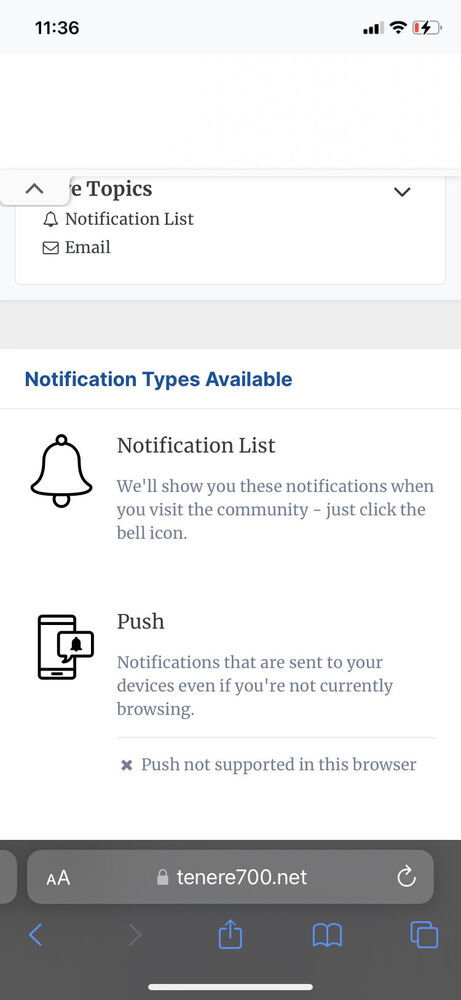
  2. thank you! updating my phone to 16.4, will set up manifest and test phone notifications. This is a game changer to get members back from facebook groups.
  3. crazy question, but where do I find manifest? I dont see it in icons?logos section of acp.

Account

Navigation

Search

Search

Configure browser push notifications

Chrome (Android)
  1. Tap the lock icon next to the address bar.
  2. Tap Permissions → Notifications.
  3. Adjust your preference.
Chrome (Desktop)
  1. Click the padlock icon in the address bar.
  2. Select Site settings.
  3. Find Notifications and adjust your preference.

