


.jpg.8bee3ef0d29a4d71eeb8df6e4274603b.jpg)

dmaidon1
Clients
-
Joined
-
Last visited
-
-
-
-
-
-
-
This one worked perfectly.
-
-
I do need to ask, when will we be getting started on v6? <GDAR>💣

-
Congrats! and thanks for allowing me to be a part of the Alpha and Beta test teams. I learned a lot about the software even after running Invision since 2001. "We've had some bad times, lived through some sad times" but we made it. Shutting down my Beta site and upgrading my main site this weekend.
-
At the bottom of the screen. Not sure where it is if you are on a mobile phone.

-
Upgrade 10->11 went without a hitch.
-
I rather see 10 or more betas than upgrade my forums with a very buggy product.
-
The post I responded to did not mention phone. That's why I responded. had it said phone, I would have not responded. BTW, I do have a smartphone. It's an Android. I use it quite extensively. I just happen to prefer my desktop as I spend a lot of time one in working on my forums, designing my woodworking projects and programming my weather apps.
-
I just use my phone to check if someone posts a topic or sends me a message while I am away from my computer. I just don't use a phone for the site. Even if I were to use my phone for a post, it definitely would not be to create a table. I'm retired and most of my time on the forums is in front of 1 of my 3 computers on my desk.
-
Don't know. I do not and would ever own one.
-
Put your cursor on the column divider and drag. You can make the columns wider. Hitting the enter key in the cell will make the rows taller.

-
ß8 -> ß9 without a hitch. The new "Table" function is a great addition to the Editor.
-
The editor is nowhere near the top for my users. Just way too many clicks to find the feature they want/need to use.
-
GACE Online Forums Beta Test https://forums.gaceonline.net/
-
The user popout dates no longer appear on top of each other but, I do have a suggestion. Instead of just wrapping, go ahead and make the text into 2 or 4 lines. Either allow the dates to follow the "Joined" and "Last visited" or move the "Last visited" to the left and have 4 lines. it would look more professional, to me. JMHO
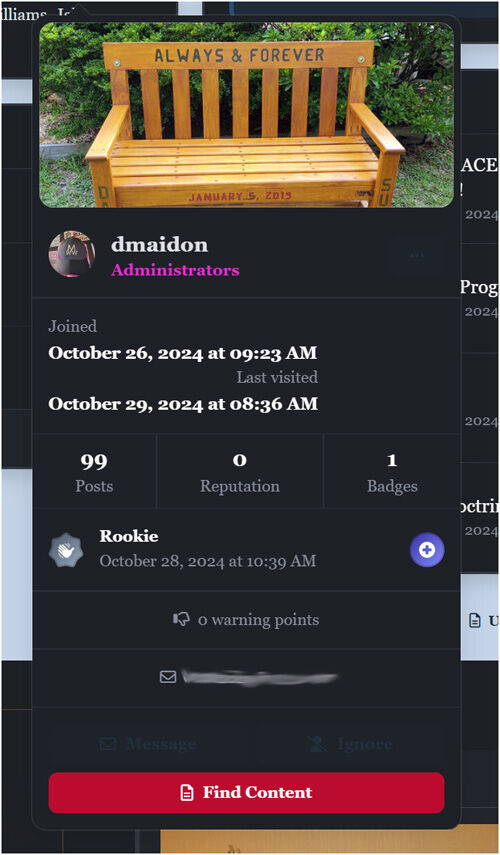
-
Ok, solved my PixaBay problem. It was a setting but not a folder permission. My Php version was set to 8.3. Once I set it back to 8.2, PixaBay images are now uploading. Whew!





