


MythonPonty
Clients
-
Joined
Everything posted by MythonPonty
-
Correct...
-
a new baby is born.. glad to hear the good news… now let us watch how it grows ☺️ thanks for the long trip that we goes hand in hand … it was interesting to follow you guys during the whole Alpha and Beta testing..
-
Congratulations Mike... Looks fine. Now it's time to let it grow ! I'm doing some design Stuff in the background and will going forward next year... But now i'm happy that the end of the year is near. It was a hard year, not only for the IC-Community, also in private stuff... Thanks so far @Matt and the whole IC-Team for a stunning fresh product... Cheers. Enjoy the holidays and stay safe, but more important is, take a deeeeeeeeep breath... See you next year guys...
-
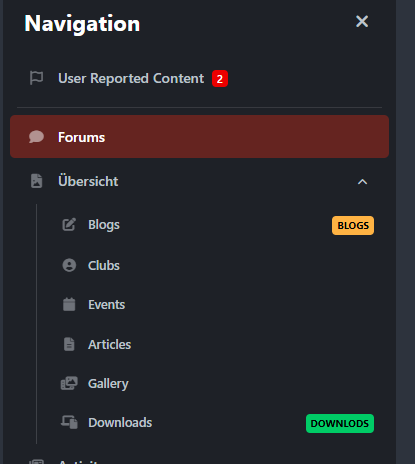
If you want to do this for the mobile view... Here is a solution. document.querySelectorAll('.ipsOffCanvas__label').forEach(label => { if (label.textContent.trim() === "Blogs") { label.insertAdjacentHTML( 'afterend', `<span style=" display: inline-block; background: #FFB343; padding: 2px 5px; font-size: 10px; text-transform: uppercase; border-radius: 4px; color: black; font-weight: bold; margin-left: 10px; ">Blogs</span>` ); } if (label.textContent.trim() === "Downloads") { label.insertAdjacentHTML( 'afterend', `<span style=" display: inline-block; background: #00cc66; padding: 2px 5px; font-size: 10px; text-transform: uppercase; border-radius: 4px; color: black; font-weight: bold; margin-left: 10px; ">Downloads</span>` ); } }); But this is not a CSS Code, you have to add this into the Design Area --> JavaScript
-
Correct... first i've tried it with this /* Blogs */ li a span.ipsOffCanvas__label:contains("Blogs")::after { content: "Neu"; display: inline-block; background: #00cc66; padding: 2px 5px; font-size: 10px; text-transform: uppercase; border-radius: 4px; color: black; font-weight: bold; margin-left: 10px; letter-spacing: 0em; } I actually wanted to check if the value of the label is “Blogs”, that the CSS rule then takes effect. But that doesn't seem to work. Maybe Ehren has a better solution. 🙂
-
Count the position and change it here... If the gallery is on position 5 Change the 2 in 5 li:nth-child(2) span.ipsOffCanvas__label::after {
-
/* Blogs */ li:nth-child(2) span.ipsOffCanvas__label::after { content: "Pro"; display: inline-block; background: #00cc66; padding: 2px 5px; font-size: 10px; text-transform: uppercase; border-radius: 4px; color: black; font-weight: bold; margin-left: 10px; } /* Downloads */ li:nth-child(6) span.ipsOffCanvas__label::after { content: "Neu"; display: inline-block; background: #FFB343; padding: 2px 5px; font-size: 10px; text-transform: uppercase; border-radius: 4px; color: black; font-weight: bold; margin-left: 10px; } Here only this works, currently. Maybe @Ehren have a better idea for the mobile view ?
-
You can do it with this short snippet li[data-navapp="blog"] .fa-solid { color: #007BFF; font-size: 16px; transition: color 0.3s ease; } li[data-navapp="blog"]:hover .fa-solid { color: #FF5733; }
-
/* Menütags */ li[data-navapp="blog"] span:nth-child(2)::after { content: "Pro"; display: inline-block; background: #FFB343; padding: 2px 5px; font-size: 10px; text-transform: uppercase; border-radius: 4px; color: black; font-weight: bold; margin-left: 10px; letter-spacing: 0em; } li[data-navapp="gallery"] span:nth-child(2)::after { content: "Neu"; display: inline-block; background: #00cc66; padding: 2px 5px; font-size: 10px; text-transform: uppercase; border-radius: 4px; color: black; font-weight: bold; margin-left: 10px; letter-spacing: 0em; } I did this for my testsite... here you control which app it should affect
-
I am very grateful for what the great team has achieved. And I don't want to debate how others have already done it. I just mentioned that it would be great, because this function would bring really great added value. But I'll go with what comes next... I just wanted to point out that this function is “super” and would bring added value to all community owners.
-
I have to speak up, it's not a moan or a groan, but just to raise my finger once and say that if I could wish for it, I would love it if the function “assign topics to moderators” would also be available for Classic Hosting. The Community Experts okay, is nice to have. But we have a lot of posts that are moderated and it would be really helpful if we had this feature. Then we would know which posts are already under observation by which moderator. Otherwise we keep getting in each other's way. And once again... Thank you very much for the great update to the next level.
-
Hey guys. I hope everyone is as busy testing and experimenting as I am 🙂 Today I would like to test the “most helpful” and “Community Expert” function. The summary of posts works great, but I have not yet been able to get the system to the point where a user has received the “Community Expert” badge. Is it possible to provoke this so that you can see it live in Beta 6? What about the metrics ? How can i test this in my dev environment ?
-
Hey guys... I have a simple question. If I have 4.7.19 as a Live system and I install a new version in my development environment, then the settings in the admin panel of the development environment are set to default. Now I would like to export all settings from the “live system” and import them into the “development system”. I have not found a function for this. Can anyone help me? Why only 4.7.19 although this is the v5 beta discussion, simply because I will do an intermediate migration with my forum. I'm starting from scratch, but want to keep the settings.
-
Soooooo guys... I'm happy now. Short step list of what I did to finally use a working installation of 5.0.0 Beta 4. 1. fresh installation of 4.7.19 (without existing data) 2. conversion of data from the production environment to the new fresh installation environment. 3. standard procedure to upgrade from 4.7.19 to 5.0.0 Beta4. Exchange all files as supplied and then start domain.tld/admin/upgrade. Lo and behold, everything works perfectly and without any error messages. Now it's time to get down to business.
-
I had already tested it before with 4.7.18. I had the same result here. Perhaps an application is interfering in the background, even if it has been “deactivated”. Therefore, my plan would be to install a fresh installation with 4.7.19 after the release, migrate the data from the database once, and then perform another upgrade based on the fresh installation (without applications and plug-ins).
-
ok i'll give up... will try the last chance. Install a fresh 4.7.19 instance. Convert the productive site to the demo site, without any apps and so on, migrate the User, Forums... and so on, and try to upgrade again.
-
I have checked twice. All files were transferred according to Filezilla. Without any problems. However, the hottopics.php file is also not included in the v5 upgrade
-
@Jim M
-
After a second try i got the following message and this one on my start page
-
I'll try it again... 🙂
-
Hey Guys. Who of you can tell me the easiest way to upgrade from 4.7.18 in a short step-by-step list? I have tried to upgrade every time from beta 1 to beta 4 (v5). I go and copy all the new files into my old 4.7.18 environment. Then I start domain.tld/admin/upgrade and let the upgrader update everything once. After that, my start page is never accessible. I always get errors. For example this one A clean installation is not the problem, but currently the Converter isn't ready Is it necessary to uninstall all modules and applications before?
-
I've switched both Licenses long time ago, and my Communities works.
-
Biiiiig Thanks to you @Matt and the whole team. You've spend so much time last year... I'll check the upgrade for my community tonight (German Time) 😉
-
What about the possibility to convert / replace different Tags to aliases... Members could currently use for "love" similar words. e.g. Feeling Warmth of heart Devotion Intimacy Affection Passion I could well imagine that the different words for love could be combined into one main tag --> love. This would allow me to reduce many of the existing tags.




