


Kyle_H
Clients
-
Joined
-
Last visited
Everything posted by Kyle_H
-
Thanks, I'll use this as a starting point!
-
Hi there, hard for me to describe the actual feature I need, but is there a way to make the 'breadcrumbs' at the top of the forum to be persistent and remain visible when vertical scrolling? Is this something that can be done with CSS or Javascript or an actual feature that can be triggered with the theme editor?

-
Can't really even sell physical items because there is no shipping fee tab. lol. I guess I have to use Shopify or some other hellhole. Darn.
-
This also goes for webhooks. I see a lot of webhooks for stuff like posting, editing, moderating, etc of posts and topics and even for product reviews, but nothing relating to e-commerce. Gelato also supports webhooks so this would help with my problem.
-
Hello, I'm using Gelato which is an on-demand printing company to sell shirts. I'm trying to see if there is a possibility of getting the IC5 e-commerce platform to integrate with Gelato somehow so when a user interacts with the IC5 e-commerce portal, the sale goes through on Gelato. Gelato has many different storefront integrations available, including API access, but I don't know how to get that working with IC5 or if it's possible. This would solve a huge headache for me if we could get IC5 and Gelato's API working with each other.
-
Zapier is also handy for that. I have a Zapier connection that sends a Discord message to a private discord channel with the new user's date of joining, IP, Location, Username and Email address.
-
Folks, just discovered that images, gifs, videos, and hyperlinks were not being hidden in the block spoilers. I see this is going to be a work in progress so maybe follow this thread for updates, or take the code and contribute to it if you see that it's missing something. Here is the updated CSS that will make everything beyond text hidden as well. You might need to adjust some of the coloring to work with your particular themes (especially block background). /* Enhanced Spoiler Styles - Hides ALL content types */ .spoiler-tag { background-color: #333; color: #333; padding: 2px 4px; border-radius: 0px; cursor: pointer; transition: all 0.3s ease; user-select: none; position: relative; display: inline-block; overflow: hidden; } .spoiler-tag:hover { background-color: #555; } .spoiler-tag.revealed { background-color: transparent; color: inherit; } .spoiler-tag::after { content: " "; font-size: 12px; opacity: 0.7; } .spoiler-tag.revealed::after { display: none; } /* Block Spoiler - Enhanced to hide ALL content */ .spoiler-block { background-color: #2c2c2c; color: #2c2c2c; padding: 15px; border-radius: 5px; cursor: pointer; margin: 10px 0; transition: all 0.3s ease; position: relative; border: 2px solid #444; overflow: hidden; min-height: 60px; /* Force hide ALL child content when not revealed */ } .spoiler-block:hover { border-color: #666; } .spoiler-block.revealed { background-color: #262626; color: inherit; border-color: #000000; } /* Hide ALL content inside spoiler blocks when not revealed */ .spoiler-block:not(.revealed) * { visibility: hidden !important; opacity: 0 !important; color: transparent !important; background-color: transparent !important; border-color: transparent !important; box-shadow: none !important; } /* Hide images, videos, iframes, and embedded content */ .spoiler-block:not(.revealed) img, .spoiler-block:not(.revealed) video, .spoiler-block:not(.revealed) iframe, .spoiler-block:not(.revealed) embed, .spoiler-block:not(.revealed) object, .spoiler-block:not(.revealed) svg, .spoiler-block:not(.revealed) canvas { visibility: hidden !important; opacity: 0 !important; width: 0 !important; height: 0 !important; max-width: 0 !important; max-height: 0 !important; overflow: hidden !important; display: none !important; } /* Hide links and their content */ .spoiler-block:not(.revealed) a { visibility: hidden !important; opacity: 0 !important; color: transparent !important; text-decoration: none !important; pointer-events: none !important; } /* Hide any forum-specific content classes */ .spoiler-block:not(.revealed) .ipsImage, .spoiler-block:not(.revealed) .ipsAttachment, .spoiler-block:not(.revealed) .ipsEmbeddedVideo, .spoiler-block:not(.revealed) .ipsQuote, .spoiler-block:not(.revealed) .ipsCode, .spoiler-block:not(.revealed) .ipsSpoiler, .spoiler-block:not(.revealed) .ipsEmbed { visibility: hidden !important; opacity: 0 !important; display: none !important; } /* Hide any user-uploaded content */ .spoiler-block:not(.revealed) [data-fileid], .spoiler-block:not(.revealed) [data-role="attachmentLink"], .spoiler-block:not(.revealed) .cAttachment { visibility: hidden !important; opacity: 0 !important; display: none !important; } /* Show the spoiler reveal message */ .spoiler-block::before { content: " Spoiler Content - Click to Reveal"; position: absolute; top: 50%; left: 50%; transform: translate(-50%, -50%); font-weight: bold; color: #999; pointer-events: none; visibility: visible !important; opacity: 1 !important; z-index: 10; background: rgba(44, 44, 44, 0.9); padding: 8px 16px; border-radius: 4px; font-size: 14px; white-space: nowrap; } .spoiler-block.revealed::before { display: none; } /* Ensure revealed content shows properly */ .spoiler-block.revealed * { visibility: visible !important; opacity: 1 !important; color: inherit !important; display: initial !important; width: auto !important; height: auto !important; max-width: 100% !important; max-height: none !important; pointer-events: auto !important; } .spoiler-block.revealed img, .spoiler-block.revealed video, .spoiler-block.revealed iframe, .spoiler-block.revealed embed, .spoiler-block.revealed object, .spoiler-block.revealed svg, .spoiler-block.revealed canvas { display: initial !important; visibility: visible !important; opacity: 1 !important; width: auto !important; height: auto !important; max-width: 100% !important; max-height: none !important; } /* Dark theme support */ .ipsTheme_dark .spoiler-block { background-color: #1a1a1a; border-color: #333; } .ipsTheme_dark .spoiler-block:hover { border-color: #555; } .ipsTheme_dark .spoiler-block.revealed { background-color: #2c2c2c; border-color: #555; } .ipsTheme_dark .spoiler-block::before { color: #ccc; background: rgba(26, 26, 26, 0.9); } /* IC5 Spoiler Button Styling (keep existing) */ .ipsEditor__toolbar-item-wrap[data-toolbar-item="spoiler-inline"] .spoiler-icon, .ipsEditor__toolbar-item-wrap[data-toolbar-item="spoiler-block"] .spoiler-icon { font-style: normal; font-size: 14px; line-height: 1; } .ipsEditor__toolbar-item-wrap[data-toolbar-item="spoiler-inline"] .ipsEditor__toolbar-item, .ipsEditor__toolbar-item-wrap[data-toolbar-item="spoiler-block"] .ipsEditor__toolbar-item { background: transparent; border: none; color: inherit; padding: 8px; border-radius: 4px; transition: background-color 0.2s ease; } .ipsEditor__toolbar-item-wrap[data-toolbar-item="spoiler-inline"] .ipsEditor__toolbar-item:hover, .ipsEditor__toolbar-item-wrap[data-toolbar-item="spoiler-block"] .ipsEditor__toolbar-item:hover { background-color: rgba(0,0,0,0.05); } .ipsEditor__toolbar-item-wrap[data-toolbar-item="spoiler-inline"] .ipsEditor__toolbar-item:active, .ipsEditor__toolbar-item-wrap[data-toolbar-item="spoiler-block"] .ipsEditor__toolbar-item:active { background-color: rgba(0,0,0,0.1); } .ipsTheme_dark .ipsEditor__toolbar-item-wrap[data-toolbar-item="spoiler-inline"] .ipsEditor__toolbar-item:hover, .ipsTheme_dark .ipsEditor__toolbar-item-wrap[data-toolbar-item="spoiler-block"] .ipsEditor__toolbar-item:hover { background-color: rgba(255,255,255,0.1); } .ipsTheme_dark .ipsEditor__toolbar-item-wrap[data-toolbar-item="spoiler-inline"] .ipsEditor__toolbar-item:active, .ipsTheme_dark .ipsEditor__toolbar-item-wrap[data-toolbar-item="spoiler-block"] .ipsEditor__toolbar-item:active { background-color: rgba(255,255,255,0.15); }
-
For those who need to know where to add these two bits of code: In the Admin Control Panel, head to Customization > Themes > ['Your Theme Name'] > Navigate to Theme Designer: Core CSS & JS.
-
Yes, here is the updated Javascript and CSS that is needed to add spoilers with buttons to your forum. I can't say it's perfect of course because I don't know how to write code, but the computer did a decent job of making functional spoilers and even created a diagnostic script that allowed us to determine the correct toolbar identifiers. Javascript & CSS to add True Spoilers to your forum. Again, this is just barely 'vibe-coding' (not) AI generated nonsense, but it works. Feel free to adjust and adapt and provide your thoughts.
-
Working on that next.
-
Edit: this was generated by Claude.AI. Sometimes you just have to play around to get stuff done.
-
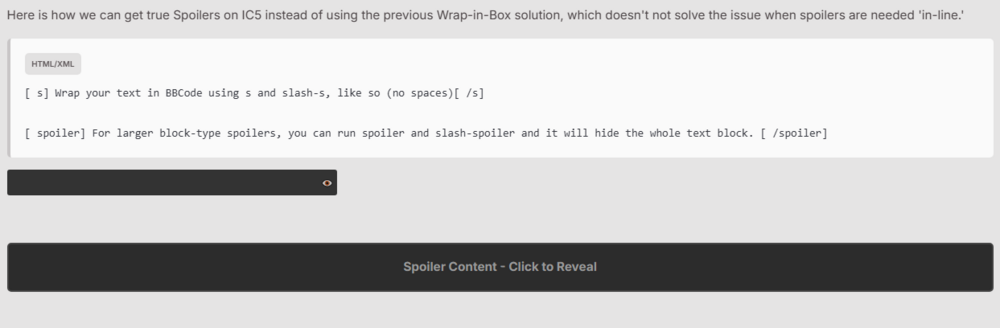
Folks, please try this solution. I got this to work on my forum. It allows you to use BBCode to transform highlighted text to black text with black background, then you can mouseover and it will reappear. It will also provide a larger block spoiler solution. [s] [/s] for simple in-line spoilers [spoiler] [/spoiler] for larger block type spoilers .spoiler-tag { background-color: #333; color: #333; padding: 2px 4px; border-radius: 3px; cursor: pointer; transition: all 0.3s ease; user-select: none; position: relative; display: inline-block; } .spoiler-tag:hover { background-color: #555; } .spoiler-tag.revealed { background-color: transparent; color: inherit; } .spoiler-tag::after { content: " "; font-size: 12px; opacity: 0.7; } .spoiler-tag.revealed::after { display: none; } .spoiler-block { background-color: #2c2c2c; color: #2c2c2c; padding: 15px; border-radius: 5px; cursor: pointer; margin: 10px 0; transition: all 0.3s ease; position: relative; border: 2px solid #444; } .spoiler-block:hover { border-color: #666; } .spoiler-block.revealed { background-color: #f8f9fa; color: inherit; border-color: #dee2e6; } .spoiler-block::before { content: "Spoiler Content - Click to Reveal"; position: absolute; top: 50%; left: 50%; transform: translate(-50%, -50%); font-weight: bold; color: #999; pointer-events: none; } .spoiler-block.revealed::before { display: none; }(function() { 'use strict'; function initSpoilers() { // Find all post content areas const contentAreas = document.querySelectorAll('[data-role="commentContent"], .cPost_contentWrap, .ipsType_richText, .ipsContained'); contentAreas.forEach(function(area) { if (area.hasAttribute('data-spoiler-processed')) return; let html = area.innerHTML; let modified = false; // Process block spoilers [spoiler]...[/spoiler] html = html.replace(/\[spoiler\]([\s\S]*?)\[\/spoiler\]/gi, function(match, content) { modified = true; return '<div class="spoiler-block" onclick="toggleSpoiler(this)">' + content.trim() + '</div>'; }); // Process inline spoilers [s]...[/s] html = html.replace(/\[s\](.*?)\[\/s\]/gi, function(match, content) { modified = true; return '<span class="spoiler-tag" onclick="toggleSpoiler(this)">' + content + '</span>'; }); if (modified) { area.innerHTML = html; } area.setAttribute('data-spoiler-processed', 'true'); }); } // Global function for spoiler toggling window.toggleSpoiler = function(element) { element.classList.toggle('revealed'); }; // Initialize on page load document.addEventListener('DOMContentLoaded', initSpoilers); // Re-initialize when new content loads (AJAX) const observer = new MutationObserver(function(mutations) { let shouldProcess = false; mutations.forEach(function(mutation) { if (mutation.addedNodes.length > 0) { mutation.addedNodes.forEach(function(node) { if (node.nodeType === 1 && ( node.matches && ( node.matches('[data-role="commentContent"]') || node.matches('.cPost_contentWrap') || node.querySelector('[data-role="commentContent"]') || node.querySelector('.cPost_contentWrap') ) )) { shouldProcess = true; } }); } }); if (shouldProcess) { setTimeout(initSpoilers, 100); } }); observer.observe(document.body, { childList: true, subtree: true }); })();
-
Hello, I've integrated a live stream into my own forum using Owncast and DigitalOcean. I wanted to do a Live Topic test with a live stream but I noticed the link only allows Youtube video currently. Is there a way we can whitelist our own self-hosted video stream?

-
Threw an error when upgrading... ERROR BAD_JSON #0 /var/www/html/5000904/applications/cloud/sources/Media/Handler.php(106): IPS\Http\Response->decodeJson() #1 /var/www/html/5000904/system/File/File.php(279): IPS\cloud\Media\Handler->__construct(Array) #2 /var/www/html/5000904/system/Theme/Theme.php(3632): IPS\File::getClass('core_Theme') #3 /var/www/html/5000904/system/Theme/Theme.php(4260): IPS\Theme::deleteCompiledResources(NULL) #4 /var/www/html/5000904/applications/core/sources/Setup/Upgrade.php(1025): IPS\Theme::clearFiles(4) #5 /var/www/html/5000904/applications/core/sources/Setup/Upgrade.php(369): IPS\core\Setup\Upgrade->step8(Array) #6 /var/www/html/5000904/applications/core/modules/setup/upgrade/upgrade.php(60): IPS\core\Setup\Upgrade->process(Array) #7 /var/www/html/5000904/system/Helpers/MultipleRedirect/MultipleRedirect.php(104): IPS\core\modules\setup\upgrade\upgrade->IPS\core\modules\setup\upgrade\{closure}(Array) #8 /var/www/html/5000904/applications/core/modules/setup/upgrade/upgrade.php(90): IPS\Helpers\MultipleRedirect->__construct(Object(IPS\Http\Url), Object(Closure), Object(Closure)) #9 /var/www/html/5000904/system/Dispatcher/Controller.php(139): IPS\core\modules\setup\upgrade\upgrade->manage() #10 /var/www/html/5000904/system/Dispatcher/Setup.php(261): IPS\Dispatcher\Controller->execute() #11 /var/www/html/5000904/admin/upgrade/index.php(38): IPS\Dispatcher\Setup->run() #12 {main} /var/www/html/5000904/system/Http/Response.php::244 BAD_JSON #0 /var/www/html/5000904/applications/cloud/sources/Media/Handler.php(106): IPS\Http\Response->decodeJson() #1 /var/www/html/5000904/system/File/File.php(279): IPS\cloud\Media\Handler->__construct(Array) #2 /var/www/html/5000904/system/Theme/Theme.php(3632): IPS\File::getClass('core_Theme') #3 /var/www/html/5000904/system/Theme/Theme.php(4260): IPS\Theme::deleteCompiledResources(NULL) #4 /var/www/html/5000904/applications/core/sources/Setup/Upgrade.php(1025): IPS\Theme::clearFiles(4) #5 /var/www/html/5000904/applications/core/sources/Setup/Upgrade.php(369): IPS\core\Setup\Upgrade->step8(Array) #6 /var/www/html/5000904/applications/core/modules/setup/upgrade/upgrade.php(60): IPS\core\Setup\Upgrade->process(Array) #7 /var/www/html/5000904/system/Helpers/MultipleRedirect/MultipleRedirect.php(104): IPS\core\modules\setup\upgrade\upgrade->IPS\core\modules\setup\upgrade\{closure}(Array) #8 /var/www/html/5000904/applications/core/modules/setup/upgrade/upgrade.php(90): IPS\Helpers\MultipleRedirect->__construct(Object(IPS\Http\Url), Object(Closure), Object(Closure)) #9 /var/www/html/5000904/system/Dispatcher/Controller.php(139): IPS\core\modules\setup\upgrade\upgrade->manage() #10 /var/www/html/5000904/system/Dispatcher/Setup.php(261): IPS\Dispatcher\Controller->execute() #11 /var/www/html/5000904/admin/upgrade/index.php(38): IPS\Dispatcher\Setup->run() #12 {main} /var/www/html/5000904/system/Http/Response.php::244 Uh oh, it's down... bad news.
-
Thank you, I will explore this!
-
I have over 5 themes for my forum, each with its own color scheme, as well as across day and night mode, I have two sidebar images (each in its own image widget) that I would like to have for each theme but I'd like to use unique images per theme, each with matching color schemes. How do I get unique images to show in the sidebar in page editor for each theme? This is what it looks like now (shjowing three of the themes as an example): Optimally each theme has it's own 'version' of these two images to match.






