


EliasM
Clients
-
Joined
Everything posted by EliasM
-
It would be better if there was an option to select the application directly, where this selection changes based on the user's permissions, I found that it appears to the visitor on another name😂
-
I changed it to this and it didn't affect the speed of the site
-
I already got it, thanks
-
How can I select it for the gallery
-
I set it to 3 minutes I will try to increase it and check the difference
-
Is there an option for that in ACP or is it from the server?
-
How to make it appear on mobile?
-
For me beta 8 gives a very good performance
-
It would be better if you told us now how to do it😃
-
Yes, unfortunately there is no change, after modifying the file due to caching the thumbnail is not deleted, but after minutes it is deleted, if you open the site through the hidden browser immediately after modification you will find that it has been deleted I can't understand how hard it can be🤦.
-
Unfortunately, the thumbnail screenshots still crash after edit the file
-
Are you sure that it has been updated in the client area😅
-
I will never use it as long as it only supports AWS, there must be cheap alternatives.
-
I hope it's not uglier, as I like this feature, it just needs some improvements
-
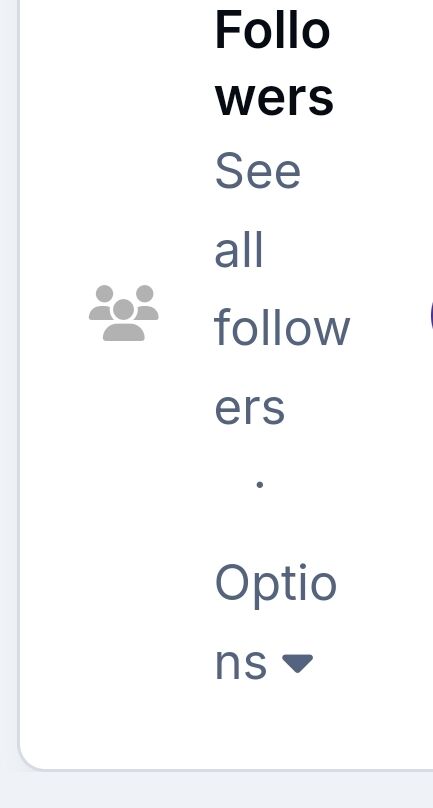
I attached a picture showing how it was before That's not just the problem, whenever this box has a lot of content, there are other boxes that don't have a lot of content and ugly like this:

-
Try adding another follower, I also see that the shape of the followers box is ugly for you. It would be better if this follower box were restored

-
You must have at least 7 followers to appear like this, Note that this problem only appears on the mobile phone
-
Tested through test licensing on localhost
-
In the beta 7 version, some changes were made in the profile, including the good and the bad, such as changing the followers box I demand that the followers box be returned as it was on the mobile phone, as it looks ugly like this when you have a lot of followers
-
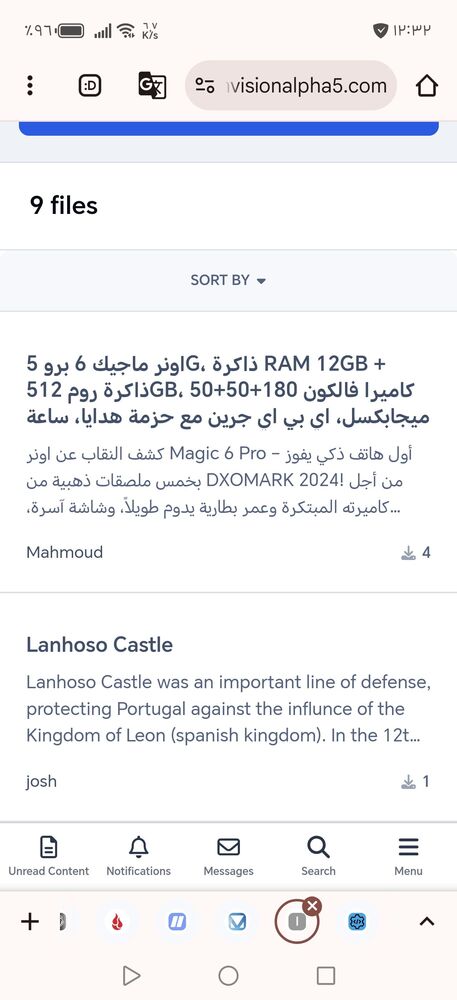
I advise you to upgrade, as the speed of the site has increased a lot, The only thing that will bother you is that the files appear like this😅
-
My words are not directed at you, but do not worry, there is no site that starts big, you will definitely succeed
-
This means that the content of your site is minimal😂 But I have already noticed that the speed of the site increased significantly after the update
-
It is not limited to widgets, Currently the screenshots no longer appear when browsing the file, If there is a way to fix the problem without waiting for the next update it would be better I think that's the problem actually.
-
Unfortunately the problem still exists When you edit the file, the screenshots are deleted
-



