


Como
Clients
-
Joined
-
Last visited
Everything posted by Como
-
Urgh. That's it! I had no idea that was there in v5. And I have no idea how my CSS ended up there. @Moestuin has steered me right. Thanks anyway @Marc.
-
@Moestuin will understand that far better than me, but I think I get the gist of if it. Thank you @Ehren. I'll test it out later.
-
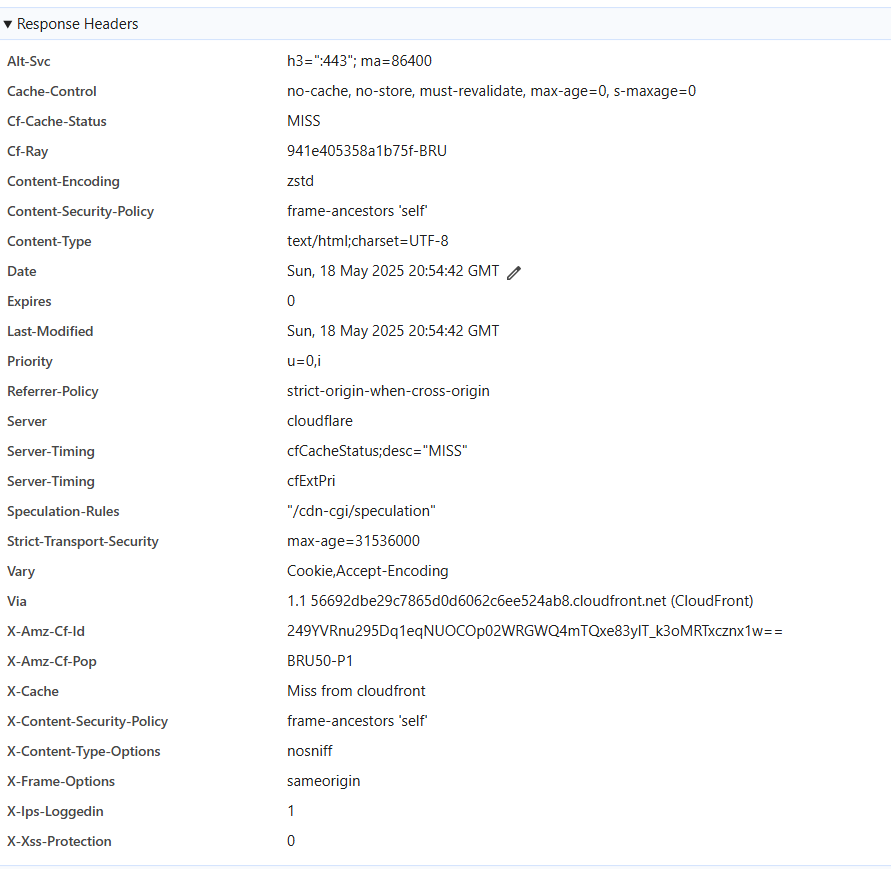
Hi @Moestuin, It is very late here. But I've just taken a quick look and will look again in the morning. The two versions of selectors still appear. (And there is definitely only one in the custom CSS). I did as you suggested, for the cached CSS. This is what I see. I am unsure what it indicates about what you explained. Thanks for the explanation. I am unsure how I can properly test out a Cloud installation if there are long-lasting caches I cannot control.
-
V5 Cloud (test installation) I seem to have two copies of my custom CSS. I see in the inspector the exact same selector and attributes twice, except one appears to be cached. When I edit the CSS, I have to disable the attributes in the cached version, else they override my changes. Inspector indicates that the CSS file is at this location, which I do not understand: https://xxxxxx.invisionservice.com/?_fromLogin=1 I have cleared the cache at the site and used an incognito window for the browser to be sure of fresh cache. (And when that did not work, I made doubly certain by using the browser inspector in another browser.) If someone here could explain to me what's going on, it would be appreciated. This is messing up my attempts to edit the CSS. It is probably just something I do not properly understand. Thanks.
-
Hi @Moestuin I just finished this. In the end, I actually just needed to add: stroke="currentColor" fill="currentColor" to the path attribute. I did not need two images. I can't pretend to fully understand it.
-
Hi all, I managed to create a new icon for the mobile footer menu bar, but it does not work in dark mode. I created my image and copied the colour from an existing footer image in light mode. Do I need another image or is there something I am missing and the colour somehow changes in a single image? Either way, what's the correct approach?
-
Note: The black footer area was not playing nice with the footer menu bar at some widths - dropping below the menu bar - I had to change @media (max-width: 768px to 979px.
-
Hmm. I probably do not understand something fundamental about hooks, so bear with me here. Is it not possible to add conditions which would prevent the original code running? An 'if guest' type argument? I thought 'hooks' kept the original, and potentially adds code/HTML at the four hook points. A couple of days ago I know that - because we had no choice due to the absence of a suitable hook point - we reproduced the whole mobile footer menu (with some additional code), placed this before the original using a hook, and then hid the original template HTML output content with CSS - that worked in that situation. Here, I presumed that we could add up to four sections of code at the various hook point options (probably just points 2 & 3) to add some kind of if condition to the original code so that it is skipped when the page is viewed by a guest, and else to add '...' or similar. This would result in keeping the h3 tags and alternative content (...) for guests. Apologies - I am just trying to gain a better understanding of how hooks work. And all this might be moot anyway. I would also need to do this for @mentions but I cannot locate this in any of the templates.
-
Hi @Moestuin Unfortunately, I am looking for a programmatic solution, which prevents usernames from ever being loaded. Else, I would have tried out a CSS hack.. It is to ensure that usernames cannot be indexed - I suspect that a JS solution, like with CSS, would not ensure that they are not indexed. I probably do not properly understand how hooks are used. I thought there were four options and they would allow some elseif code to replace the username with a generic '..' (or similar) for the username. I thought there were four places the hooked code might be employed: 1 <h3 data-ips-hook="postUsername" class='ipsEntry__username'> 2 3 </h3> 4 I also assumed that, potentially, code could be to each of the four points.
-
v5 Cloud I'd like to use hooks to replace usernames in posts and @mentions with '...' or 'redacted' or similar. I see there is a hook available to potentially achieve this in posts, but I cannot code. Hook Application: Forums > front/topics/postContainer > postUsername <h3 data-ips-hook="postUsername" class='ipsEntry__username'> {{if $comment->author()->isOnline() AND ( !$comment->author()->isOnlineAnonymously() OR ( $comment->author()->isOnlineAnonymously() AND \IPS\Member::loggedIn()->isAdmin() ) )}} <span class='ipsOnline' data-ipsTooltip title='{{if $comment->author()->isOnlineAnonymously()}}{lang="online_now_anon" sprintf="$comment->author()->name"}{{elseif $comment->author()->isOnline()}}{lang="online_now" sprintf="$comment->author()->name"}{{endif}}'></span> {{endif}} {template="userLink" group="global" app="core" params="$comment->author(), $comment->warningRef(), FALSE, $comment->isAnonymous()"} {{if $comment->isAnonymous() and \IPS\Member::loggedIn()->modPermission('can_view_anonymous_posters')}} <a data-ipsHover data-ipsHover-width="370" data-ipsHover-onClick href="{{if $comment->isFirst()}}{$comment->item()->url( 'reveal' )->csrf()}{{else}}{$comment->url( 'reveal' )->csrf()}{{endif}}" rel="nofollow"><span class="ipsAnonymous" data-ipsTooltip title="{lang="post_anonymously_reveal"}"></span></a> {{endif}} </h3> How would go about replacing the usernames with 'redacted' when viewed by guests? Thanks.
-
Yes, having the 'Hide' option is important for moderation and management reasons. Will this be brought back?
-
OK. It is working at the moment (or appears to be), but I'll as you advise there. I'll report back in a few moments. Yes - that works!! Thank you, @Moestuin.
-
Functionally, that works. But it messes up the button: the icon is display left-top of the button, and hover effects have disappeared. So I placed back the button line I suggested a little further up and removed: aria-controls='ipsOffCanvas--notifications'It seems to now work flawlessly! I will test it out more fully, and there are a few other things to take of (removing the original button, and change when the regular button (for PC ) is triggered. But I am pretty sure I can work out how to do them. Thank you so much @Moestuin ! :-) Ah. Only just seen this. I'll check.
-
Edit: heh - no. That, of course, brings up notifications.
-
Thank you, @Moestuin. I've done all that. And what do I do with the following line? I'm guessing this: <button class="ipsMobileFooter__link" aria-controls='ipsOffCanvas--notifications' aria-expanded='false' data-ipscontrols data-ipsoffcanvascontent>
-
It is. I'll send you a PM. Thanks.
-
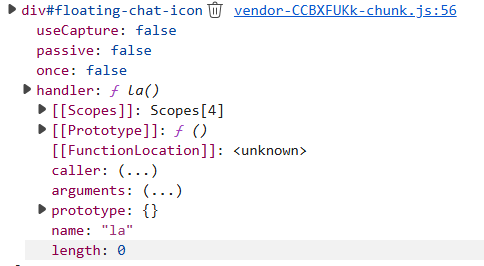
Hi @Moestuin I might have something. This appears to be the relevant event. I can provide a fully expanded view if necessary. The following is a 'click' event. Linked JS file: vendor-CCBXFUKk-chunk.js
-
Hi @Moestuin I really wasn't expecting more help from you. But since I have not yet heard back from the chat room developers... :) Having said that, I am unsure of how to find the information you seek. I can see the HTML for the button, but I have no idea how that's involved in triggering the JS event (or where to find the event). I'll give the developers another 24 hours to see if/what I get back from them. The chat room is supposed to work (with only moderate effort) on nearly any platform, so I expect they should be able to help me. But if not, I'll be back. But thank you for your offer of further assistance. And in the interim, I'll have a look using the Inspect Tools and see what I can make of your code.
-
It does feel that way, doesn't it. Given that this approach is sometimes necessary, and Invision have decided that we should not be able to edit the original templates, would it make sense to have a function to duplicate the template (which then takes over) and the original is kept in reserve for possible reversion? Now, there might well be reasons for Invision to disallow the editing of original templates I do not at all appreciate, and duplicating/archiving original templates might be at odds with Invision's rationale for the change - I don't know. I'm just throwing this out there in case it holds any value. Because from my (possibly/probably) naive perspective, being able to create a parallel template this way - which contains its own (possibly conflicting) code - and then using CSS to hide the original outputted content is not intuitive to me. Anyway, using your instructions, @Moestuin, I created a new mobile footer menu bar last night. It all looks perfect - thank you! The only wrinkle is that I do not know how to use the new button to trigger the JS event for the chat room - a link is not going to cut it. Beyond a small amount of JS and some added CSS to make the chat room play nicely within the theme, there is nothing for me to edit at my Invision site. I am waiting on some instructions from the chat room host/provider.
-
I see. It seems like something which should be more straightforward - to edit a menu.
-
Ah. I see. That's within the 'menu' item in that bar. But I remain confused by we are creating a whole new footer. Is it because it is not possible to add an item to the existing one? I'll copy your exact process before I post again. Again, thank you. Ha! I've just found my menu item in there. It is not remotely right, but it is there.
-
Maybe we are using different terminology for the same thing. I do mean the bar, at the very bottom in mobile view, with (by default and logged in): unread content; notifications; messages; search; menu. I though this would be System: from/global/mobileFooterBar Hook target: mobile footer menu But I see that you have selected mobileFooter. I have already created an svg for this - I believe this is correct: <svg width="16" height="16" version="1.1" viewBox="0 0 210 297" xmlns="http://www.w3.org/2000/svg"> <path d="m59.14 79.053c-4.1655 0-7.5189 3.3534-7.5189 7.5189v26.316c0 4.1655 3.3534 7.5189 7.5189 7.5189h2.9528l1.3854 10.493 12.468-9.5746 1.1963-0.91881h20.46c4.1655 0 7.5189-3.3534 7.5189-7.5189v-26.316c0-4.1655-3.3534-7.5189-7.5189-7.5189h-38.463z" fill-opacity="0" stroke="#28364c" stroke-width="7.365"/> </svg>
-
You've got further than me. I managed to add an item before the mobile footer menu - it appeared above. I tried creating an svg file (for a chat icon), but I could not get that to display. And I have been unable to find out how to add a new language string. I'll now look through what you have posted now to see how you did it. Thank you so much for going to this effort! It is greatly appreciated.
-
Thank you for posting your instructions, @Moestuin. Actually, it in the menu bar at the very bottom (the mobile footer menu bar), between 'search' and 'menu' where I need the additional button. I have managed to locate the correct template and will be looking at how to use a hook to add the button. There is fair bit of code - I am unsure how much I can borrow from elsewhere in the menu bar - I'll probably need some help once I've had a deeper look into this.
-
I am using test installation of v5 Cloud. Just a small bug report - I copied the default theme, I waited, and it timed out. I back-buttoned and there are three copies of the default them. I only clicked it once. Update on copy bug: I delete them and tried again - same result. Since it timed out, I cannot be certain that the theme copied properly. I do not know which way the copies stacked, so I selected the middle one and deleted the other two.


