


OhSoRy
Clients
-
Joined
-
Last visited
Everything posted by OhSoRy
-
Thank you so much for this. I apologize for not replying sooner, I've been been busy with grad school. I'm gonna look this overwith my team today.
-
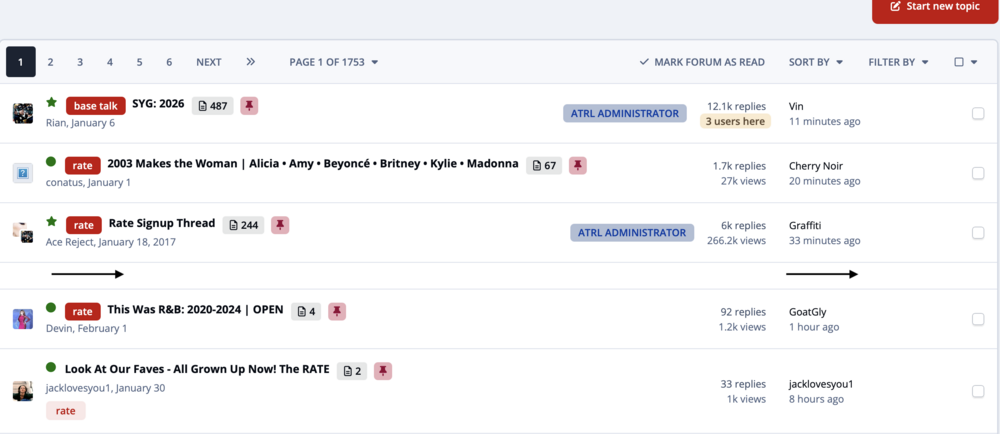
Thank you, Marc. I have another question. For some reason, ads that are set to show between topics/rows aren't appearing. Do you know why that might me? I've checked Adsense for help and nothing. I saw this is something that has happened to a few other users since Invision 5.0 and nothing was resolved. You can see the example here and the attached screenshot: https://atrl.net/forums/45-base/
-
I understand the concept of the options about where to show the ads: Just below the page header Just above the page footer In the site sidebar Forum view, between topic rows Fluid view topic listing, between topic rows Topic view, between posts But I'm confused about the settings for List Position (at regular intervals and fixed positions) and Repeated. Furthermore, are there any plugins that give us a little more flexibility with the settings? I'm open to suggestions.
-
This was intermittently present in the other version too.
-
Thank you so much! Yes, I'm curious about this too. Despite being on the cloud system, I still run into the "Locked Task: Queue" issue almost every day.
-
Any update on a timeline for this? It’s impossible to apply penalties
-
There was no third party item that allowed this that was installed. We have different permission groups that involve restricted access to certain forums, etc and right now they’re in a random order. It was easier when they were grouped together. Now it’s a bit more time consuming to have to scroll to find the right one.
-
Prior to 5.0, we could drag and drop our user groups to be in any order we wanted. We cannot do that now.
-
One of the small but meaningful features many long-running forums used to rely on was the ability to use off-site images for avatars and profile photos. Invision previously supported this through a third-party plugin called HQ Avis, which allowed members to link externally hosted images rather than uploading files directly to the server. That plugin eventually became obsolete, and the functionality disappeared with it. Bringing this capability back at a native level could serve both communities and infrastructure. Allowing off-site avatars would reduce local storage and bandwidth demands, while giving users more freedom to maintain consistent visual identities, especially in communities where avatars are part of recognition and culture rather than decoration. From a moderation and platform perspective, this could remain fully optional. Permissions, file-type limits, or size restrictions could still apply, and communities that prefer local-only hosting could simply leave the feature disabled. As Invision 5 continues to focus on performance and modernization, this feels like a small quality-of-life feature that aligns with both. It restores flexibility that many communities once depended on, while offering practical benefits on the backend. Just wanted to put the idea forward for consideration.
-
Hi Team, When I’m browsing my community on Invision 5.0, the bottom mobile menu always feels like it’s almost there but not quite. It gives me All Activity, Notifications, Messages, and the hamburger menu—useful, sure, but not necessarily the things my members reach for first. What I’d really like is the ability to swap those out. Maybe put a Home button where All Activity is. Maybe surface a page that actually defines what our community is about. Even being able to reorder the icons would go a long way toward making the mobile experience feel intuitive rather than fixed. Different communities have different priorities, and it would be great if the mobile navigation could reflect that instead of locking everyone into the same layout.
-
Hi Team, Incredible work with Invision 5.0. I am super impressed with everything y'all have done and cannot wait for my forum to move from self-hosted to the Cloud platform. In the past, my forum used the plugin Radical Tags for organization and color coordination on the forum. Obviously that plugin in DOA, and with Invision including its own internal tagging system, things could be a lot easier. My only concern is right now tagging prefixes are optional. It would be nice if we could turn on an option to require a prefix to be selected before a thread is made. And possibly be able to change their colors. Once again, thank you so much. I hope this can be taken into consideration for a future release.



