Ryan Ashbrook
Invision Community Team
-
Joined
Everything posted by Ryan Ashbrook
-
This is an entry about our IPS Community Suite 4.2 release We have introduced a feature which will allow moderators, with permission, to copy topics from the Forums application, into any custom database in the Pages application. New Moderation Item This feature will copy the contents of the first post of a topic, and copy it as the body of the new record. The moderator copying the topic will then be given a pre-populated form which will have the Title and Content fields automatically filled with the topic title and first post contents, which then can be modified to add any additional notes (such as an editors note at the bottom). The form will also include any custom fields that can be filled in, as well as all moderation options you would normally see when creating a record. Form Input In addition to all of the normal options you would typically see, there are two additional options. The first is the ability to copy all posts in the topic as comments on the new record. The second is the ability to post the record as the original topic author, or as the moderator copying the topic. This new feature is very useful when you might see a topic in the forums that you want to copy to an article or keep in a permanent knowledge base.
-
These files are required to use developer mode in IPS Community Suite. The developer files for IC5 are located in the download popup in your client area.Free
- 1 review
-
-

-

-

- 108
-
-
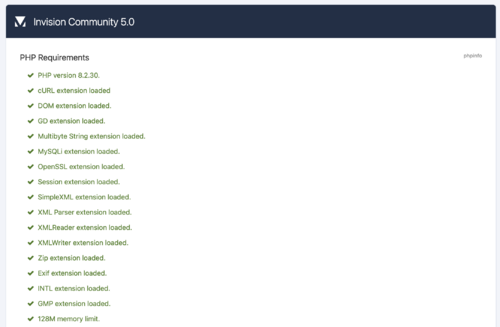 This script will check if you are ready to use Invision Community on your own server. Simply upload the script either to the directory where your current installation is (if you want to test if you're ready to upgrade) or anywhere else on your server (if you want to test if you can perform a fresh install) and run it in your web browser. Looking for the v4 requirements checker? Select 'see changelog' below > select the most recent 4.x version > Click the download link that appears.Free
- 3 reviews
-
-
-
-

-
- 53
-
-
Back in June, we announced several updates to our proprietary Spam Service, which includes influences from existing spam mitigation services (Project Honeypot and Stop Forum Spam). Today, we are announcing the release of more options to help you fine-tune the spam service for your site. These features are being released as a part of our new Enterprise Spam Service package, which is available now. Weighting The first feature added, as a part of this new package, is “Weighting.” With this feature, you will be able to adjust how influential the Spam Service is against registrations to your site. As you can see, the slider here presents several options to help fine-tune the service for your site. The options presented are fairly straightforward. If you find your site to be a heavy target of spam, you can adjust the slider to Strict or Very Strict as a means of telling the spam service that registrations to your site should be evaluated more vigorously than normal, and treat all registrations with higher caution than normal. Conversely, if you find the spam service to be too rough on registrations to your site, you can adjust the slider to Loose or Very Loose. Doing so will tell the spam service to take a step back on registrations, and treat them with less verbosity than normal. And finally, the middle option (Normal) will simply tell the spam service to act as it does now, with no preferential influence one way or another. Whitelisting / Blacklisting Another feature added as the ability to define your own custom White and Black Lists for your site, providing even more granular control in addition to weighting. First, you can define your own custom Whitelist entries. Using this interface, you will be able to add any Email Address or IP Address to your own custom whitelist. If a member registers, and is using any IP Address or Email Address defined here, then they will automatically be flagged as Not a Spammer, and no action taken against the account by the spam service. This is useful for Administrators, Moderators, and Developers who frequently test registrations on their own sites, allowing them to do so without turning the service off. Further, you can also define a custom Blacklist. If you find that the spam service may not be catching a newly released spammer fast enough, and need to prevent them from accessing the site immediately, then you may add their email address or IP Address to the Blacklist. Once added, any registrations from either of those will be flagged as a spammer and will be denied registration (depending on your community settings for Code Level 4). Calls from multiple origins As mentioned in the previous entry, this service also allows administrators to use the spam service in Load Balanced and Cloud environments with ease, using the same license key. The Enterprise Spam Mitigation is now available for $100/6 months as an additional add-on to your license. Please feel free to contact Sales for any additional information regarding this new service.
-
http://community.invisionpower.com/calendar/1-community-calendar
-
-