


Mike Gitkos
Friends
-
Joined
-
Last visited
Everything posted by Mike Gitkos
-
Happy to hear Facebook embeds are working. For Google Sheets, you need to change the access so anyone with the link can view. Can you update that setting and try again on your community.
-
I can see a ton of value in the iframely integration. After setting it up, you may need to update a few settings to tailor it to your needs. In AdminCP, enable "can embed external content" n the editor permissions. I'd recommend setting that permission to "advanced" so access is limited. Giving it to trusted staff will help keep usage in check. Change embed width in AdminCP if content gets cut off. Whitelist domains in integrations I also put together a video embedding a Google Sheet by allowing *.google.com in the iframely integration settings. @Gary Lewis, you might be interested in this as well.
-
Thanks for taking the time to share your feedback, @Gary Lewis. It's been great chatting with you while you testing Invision Community as a potential full CMS replacement. A lot of tabs in your browser could be a various number of reasons. For example, Clicking Visit Site from the AdminCP opens the site in a new tab. That's ended up with me having a lot of open tabs in the past. You have a lot of great feedback in here, so don't be surprised if some of this makes it in the future. Thanks for helping shape Invision Community! 💪
-
Have you tried renaming one of them and then merging? If not, might be worth a try. Where do you have the Featured Content block? If it's in the footer, that could cause it to be persistent across the site.
-
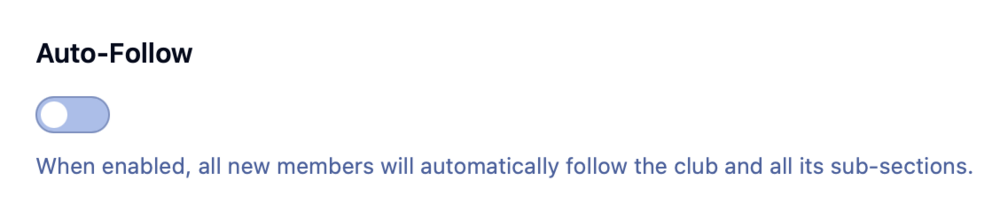
If you use clubs prominently, take a moment to educate your community about the auto follow feature once you upgrade. Club owners have the option to toggle "Auto-Follow" via the club settings. Oh, and the dropdown menu on mobile is so satisfying. It's enabled on our community if you'd like to test it out. Great job, team!
-
 Leaders must show upVisible, active leadership sets the culture, drives trust, and sparks engagement. Communities reflect their leaders. If leaders are present, transparent, and approachable, the community thrives. If leaders are absent, culture drifts toward noise, conflict, or apathy. Members look for cues from the top. People follow your lead. Show how you want others to behave. Culture is contagious. Silence leaves space for chaos. Engagement sticks. People stay when leaders make them feel valued. Communities succeed when leaders act as participants. Be an active leaderLeadership isn’t about dropping in with polished statements and disappearing. It’s about being part of the daily rhythm. Members need to see you asking questions, joining conversations, and sharing in the wins. That visibility signals that participation matters. You don’t need to be online every hour. What matters is consistency and authenticity. Share weekly updates or thought-starters. Reply to posts, not all, but enough to be noticed. Rotate leadership visibility across your team to avoid burnout. A few minutes of genuine presence beats hours of distant oversight. The psychology of participationWhy do members hold back? Fear of being ignored, embarrassed, or excluded. Why do they engage? Because they see leaders modeling the behavior, they trust it’s safe, and they feel appreciated when they contribute. When people know participation is encouraged, safe, and celebrated, they’ll step forward. As a leader, you can create those conditions: Social proof: Model the behavior you want. Members will mirror it. Safety: Welcome all questions and feedback. Set the tone that mistakes and disagreements are okay. Recognition: Say thank you. Highlight wins. Shine a light on contributions. Make it clear: “You belong here.” Build trust, Keep itTrust doesn’t come from titles. It comes from consistency, transparency, and how you handle tough moments. Community members notice if you respond, if you explain, and if you live by the same rules as they do. Show up reliably. Build a rhythm members can count on. Be transparent. Share decisions, admit mistakes, and explain why. Tackle conflict. Don’t go silent. Address issues calmly and fairly. Empower members. Share ownership. Let others lead projects or groups. Model fairness. Apply the same rules to yourself as everyone else. Trust is earned daily. Managing vs ParticipatingManaging Participating Community Leadership Enforcing rules Building relationships Show up consistently One-way announcements Two-way conversations Foster peer connections Distance unless crisis Everyday presence Recognize contributions publicly Members as “users” Members as partners Communicate openly and transparently Traditional management looks like top-down control. Community leadership is different. It’s collaborative and participatory which is closer to hosting than managing. Leaders who join the journey create stronger, more resilient communities. Real-World Examples Salesforce Trailblazers: Executives engage directly with members, answer questions, and empower MVP volunteers. The result? A 3M+ member community that drives product success. Stack Overflow: Founders participated daily, modeled quality interactions, and gave ownership back to the community. Trust was earned through transparency and responsiveness. Wikipedia: Leadership facilitated consensus instead of dictating decisions. Community-driven policies created long-term resilience. Share community ownershipCommunities flourish when leaders actively nurture and partake in the world they’re building. Your leadership team’s job isn’t just to set rules or watch from the sidelines. It’s to model the behavior you want, build trust through transparency, and share ownership so the community becomes stronger than any one person. Communities succeed when leaders lead by doing.
 -
Leaders must show upVisible, active leadership sets the culture, drives trust, and sparks engagement. Communities reflect their leaders. If leaders are present, transparent, and approachable, the community thrives. If leaders are absent, culture drifts toward noise, conflict, or apathy. Members look for cues from the top. People follow your lead. Show how you want others to behave. Culture is contagious. Silence leaves space for chaos. Engagement sticks. People stay when leaders make them feel valued. Communities succeed when leaders act as participants. Be an active leaderLeadership isn’t about dropping in with polished statements and disappearing. It’s about being part of the daily rhythm. Members need to see you asking questions, joining conversations, and sharing in the wins. That visibility signals that participation matters. You don’t need to be online every hour. What matters is consistency and authenticity. Share weekly updates or thought-starters. Reply to posts, not all, but enough to be noticed. Rotate leadership visibility across your team to avoid burnout. A few minutes of genuine presence beats hours of distant oversight. The psychology of participationWhy do members hold back? Fear of being ignored, embarrassed, or excluded. Why do they engage? Because they see leaders modeling the behavior, they trust it’s safe, and they feel appreciated when they contribute. When people know participation is encouraged, safe, and celebrated, they’ll step forward. As a leader, you can create those conditions: Social proof: Model the behavior you want. Members will mirror it. Safety: Welcome all questions and feedback. Set the tone that mistakes and disagreements are okay. Recognition: Say thank you. Highlight wins. Shine a light on contributions. Make it clear: “You belong here.” Build trust, Keep itTrust doesn’t come from titles. It comes from consistency, transparency, and how you handle tough moments. Community members notice if you respond, if you explain, and if you live by the same rules as they do. Show up reliably. Build a rhythm members can count on. Be transparent. Share decisions, admit mistakes, and explain why. Tackle conflict. Don’t go silent. Address issues calmly and fairly. Empower members. Share ownership. Let others lead projects or groups. Model fairness. Apply the same rules to yourself as everyone else. Trust is earned daily. Managing vs ParticipatingManaging Participating Community Leadership Enforcing rules Building relationships Show up consistently One-way announcements Two-way conversations Foster peer connections Distance unless crisis Everyday presence Recognize contributions publicly Members as “users” Members as partners Communicate openly and transparently Traditional management looks like top-down control. Community leadership is different. It’s collaborative and participatory which is closer to hosting than managing. Leaders who join the journey create stronger, more resilient communities. Real-World Examples Salesforce Trailblazers: Executives engage directly with members, answer questions, and empower MVP volunteers. The result? A 3M+ member community that drives product success. Stack Overflow: Founders participated daily, modeled quality interactions, and gave ownership back to the community. Trust was earned through transparency and responsiveness. Wikipedia: Leadership facilitated consensus instead of dictating decisions. Community-driven policies created long-term resilience. Share community ownershipCommunities flourish when leaders actively nurture and partake in the world they’re building. Your leadership team’s job isn’t just to set rules or watch from the sidelines. It’s to model the behavior you want, build trust through transparency, and share ownership so the community becomes stronger than any one person. Communities succeed when leaders lead by doing. View full blog entry
-
 Over the past year, Gatorade Performance Partner has built something special for athletic trainers, coaches and other sports performance practitioners: the Gatorade Fieldhouse. Gatorade Fieldhouse is a member‑only hub where professionals can ask questions, share best practices, and stay in touch long after an event ends. The online community was prominently featured at this summer’s National Athletic Trainers’ Association (NATA) conference in June 2025, where Gatorade’s booth invited attendees to “join the conversation.” A digital home for sports health professionalsGatorade Fieldhouse.mp4 Gatorade Fieldhouse is the first cross‑discipline digital forum for sports health and performance professionals. Inside the community you’ll find: Ask + Answer forums – members can pose questions, share experience and crowd‑source real‑world advice. Events and webinars – the team hosts regular science spotlights and mentorship talks, such as “The Value of Mentorship for Athletic Trainers” and “How cross‑discipline collaboration can improve athlete performance.” Curated resources – information from Gatorade Sports Science Institute (GSSI) and partners gives members credible, science‑backed answers. Hot topics – Gatorade Fieldhouse surfaces trending discussions and encourages members to dive into conversations. These features make Gatorade Fieldhouse more than a message board. It feels like walking into a professional development hub where athletic trainers, sports dietitians, strength coaches, and other sports performance professionals learn from each other. That atmosphere was recreated in Orlando at the NATA conference, where the booth hosted panel discussions and Q&A sessions. Seeing a crowd gather around the stage for a talk on mentorship underlines how thirsty practitioners are for this kind of connection. Bridging in‑person and online experiencesOne of the biggest challenges at any trade show is turning a one‑off conversation into a lasting relationship. Gatorade addressed that by introducing Quests, a new gamification system created in collaboration with Invision Community. Quests lets you design challenges that reward real‑world actions. Attendees scan a QR code to join the community and start their first quest. Once completed, the achievement automatically syncs to the member’s online profile. At the NATA booth, attendees were encouraged to get to know the Gatorade Fieldhouse by participating in a digital scorecard hosted on the platform. They completed a few quick tasks around the Gatorade Fieldhouse, which were checked off automatically. Once all tasks were completed, attendees received a special gift. Why Gatorade Fieldhouse mattersGatorade Fieldhouse shows how a brand can move beyond transactional marketing and build a genuine community, and our Quests feature is just one piece of a broader strategy: Lowering barriers to entry – a simple QR code in the booth lets anyone join within seconds. Encouraging participation – small challenges and scorecards nudge visitors to engage, both on‑site and online. Rewarding expertise – sharing answers or attending webinars earns recognition, giving practitioners a reason to return. Mobile friendly – Gatorade Fieldhouse works great on phones, and it's easy to install the community like a native app. The result is a platform that continues conversations all year rather than for one weekend. By rewarding actions at conferences and synchronizing them with online profiles, Gatorade keeps members invested in each other’s success. A model for other communitiesNot every brand can set up a giant orange roof in the middle of a trade show, but every community can learn something from Gatorade Fieldhouse’s approach. Quests lower the friction between in-person and online engagement, while mentorship talks, science spotlights, and discussion forums keep members coming back. It’s a space that brings practitioners together through genuine connections, shared knowledge, and experiences that carry well beyond the event floor.
 -
Over the past year, Gatorade Performance Partner has built something special for athletic trainers, coaches and other sports performance practitioners: the Gatorade Fieldhouse. Gatorade Fieldhouse is a member‑only hub where professionals can ask questions, share best practices, and stay in touch long after an event ends. The online community was prominently featured at this summer’s National Athletic Trainers’ Association (NATA) conference in June 2025, where Gatorade’s booth invited attendees to “join the conversation.” A digital home for sports health professionalsGatorade Fieldhouse.mp4 Gatorade Fieldhouse is the first cross‑discipline digital forum for sports health and performance professionals. Inside the community you’ll find: Ask + Answer forums – members can pose questions, share experience and crowd‑source real‑world advice. Events and webinars – the team hosts regular science spotlights and mentorship talks, such as “The Value of Mentorship for Athletic Trainers” and “How cross‑discipline collaboration can improve athlete performance.” Curated resources – information from Gatorade Sports Science Institute (GSSI) and partners gives members credible, science‑backed answers. Hot topics – Gatorade Fieldhouse surfaces trending discussions and encourages members to dive into conversations. These features make Gatorade Fieldhouse more than a message board. It feels like walking into a professional development hub where athletic trainers, sports dietitians, strength coaches, and other sports performance professionals learn from each other. That atmosphere was recreated in Orlando at the NATA conference, where the booth hosted panel discussions and Q&A sessions. Seeing a crowd gather around the stage for a talk on mentorship underlines how thirsty practitioners are for this kind of connection. Bridging in‑person and online experiencesOne of the biggest challenges at any trade show is turning a one‑off conversation into a lasting relationship. Gatorade addressed that by introducing Quests, a new gamification system created in collaboration with Invision Community. Quests lets you design challenges that reward real‑world actions. Attendees scan a QR code to join the community and start their first quest. Once completed, the achievement automatically syncs to the member’s online profile. At the NATA booth, attendees were encouraged to get to know the Gatorade Fieldhouse by participating in a digital scorecard hosted on the platform. They completed a few quick tasks around the Gatorade Fieldhouse, which were checked off automatically. Once all tasks were completed, attendees received a special gift. Why Gatorade Fieldhouse mattersGatorade Fieldhouse shows how a brand can move beyond transactional marketing and build a genuine community, and our Quests feature is just one piece of a broader strategy: Lowering barriers to entry – a simple QR code in the booth lets anyone join within seconds. Encouraging participation – small challenges and scorecards nudge visitors to engage, both on‑site and online. Rewarding expertise – sharing answers or attending webinars earns recognition, giving practitioners a reason to return. Mobile friendly – Gatorade Fieldhouse works great on phones, and it's easy to install the community like a native app. The result is a platform that continues conversations all year rather than for one weekend. By rewarding actions at conferences and synchronizing them with online profiles, Gatorade keeps members invested in each other’s success. A model for other communitiesNot every brand can set up a giant orange roof in the middle of a trade show, but every community can learn something from Gatorade Fieldhouse’s approach. Quests lower the friction between in-person and online engagement, while mentorship talks, science spotlights, and discussion forums keep members coming back. It’s a space that brings practitioners together through genuine connections, shared knowledge, and experiences that carry well beyond the event floor. View full blog entry
-
This should help 😁 Clipboard-20250812-233749-347.mp4 Step-by-step guide
-
 When someone lands on your community for the first time, their decision to stay or leave happens in seconds. A confusing layout, long registration form or silent homepage can drive them away. To keep them around, provide an engaging first impression with clear next steps and a sense of progress. This guide will provide the tools and guidance community managers need to build a smooth onboarding experience for their community. 🛠️ Your onboarding toolsSocial & Enterprise SSO - One‑click registration with Google, Apple, and enterprise SSO protocols. Alert System - Send must‑acknowledge messages (welcome notes, rules updates) to individuals or groups. Profile Completion - Request additional profile details after a simple registration; supports mandatory/optional steps and quick registration. Achievements & Quests - Gamify onboarding with badges, points and quests; define rules for events like posting or completing profiles. Featured Content & Tags - Highlight standout content and aggregated content members can follow. Clubs - Sub‑communities with their own forums, galleries and calendars; support various membership models. Community Experts - Automatically identify and badge members who provide solutions and helpful content. Leaderboard - Highlight top members and content over different periods and award daily badges. Make a great first impressionPeople decide whether a site feels worth their time based on visible activity. You can use our Page Builder to showcase Featured Content containing suggested content at the top of your homepage. Combining this with curated tags and trending discussions will provide visitors with a lively mix of content. Simplify sign‑upLowering barriers to entry leads to more members. The Complete My Profile system emphasizes that registration can be as simple as display name, email and password; additional information can be requested after sign‑up through profile completion steps. We also offer Social Sign‑On (Google, Apple, Custom) and enterprise SSO via protocols like SAML and OAuth to make sign‑in a one‑click experience. Avoid lengthy forms and enable quick registration and SSO where possible. Make navigation obvious and explain your purposeA new visitor should instantly know where to go. Use clear menus, descriptive forum names and a mobile‑friendly layout. A short mission statement on your homepage or a pinned post clarifies why the community exists and what members love about it. Don’t assume visitors will hunt for information; guide them to the right place. Greet EVERY member A warm welcome signals that members matter, and our Alert System allows you to send a message that must be acknowledged before the user continues browsing. Alerts can target individuals or groups, include start and expiry dates, and be configured so they only appear for new members. When used for onboarding, a welcome alert can greet new sign‑ups, thank them for joining and invite them to post an introduction. Alerts can be sent anonymously or as yourself and can optionally allow replies, turning the conversation into a private message. Use this to deliver a friendly, personalised greeting while ensuring it isn’t missed. Encourage profile completionPeople feel more comfortable engaging when they know who they’re talking to. Our Profile Completion wizard shows a progress bar prompting members to upload an avatar, write a short bio or answer any custom fields you require. Administrators configure which steps are mandatory or optional in the Admin Control Panel; members see a dismissible progress bar reminding them to finish. This gentle nudge helps your community feel more human and builds trust. To motivate completionKeep the initial registration simple (name, email, password), then request additional info using profile completion tasks. Consider making essential fields (avatar, bio) mandatory and let members skip others, so they don’t feel forced. Provide a clear starting pointOrientation reduces hesitation. Give newcomers a structured path so they know what to do first. Pin a “Start Here” guide – Create a pinned post or forum section explaining how to navigate, where to post introductions and where to find help. Link to tag pages, popular forums or key resources. Offer a short onboarding course or quest – Our Quests feature lets you design a sequence of lightweight tasks. A “Welcome Quest” could encourage new members to complete their profile, post an introduction and follow a few other members. When they finish, they can be rewarded with a badge or voucher, giving them a sense of accomplishment. Use an introductions space – Provide a dedicated forum where new members can post a hello. Staff or volunteer ambassadors should reply promptly to every introduction to build rapport. By giving members a clear first action like posting an introduction or completing a quest, you remove ambiguity and boost the likelihood they’ll participate. Help members get early winsEarly wins build small victories, encouraging new members to keep coming back. Suggest a simple action – Direct new members to an easy, low‑pressure task. This might be answering a poll, reacting to a post or following a tag. A clear link in your welcome alert or quest removes friction. Highlight beginner‑friendly conversations – Use Featured Content to surface casual prompts, polls or threads designed for newcomers. Ensure there’s content available that’s accessible to first‑timers. Invite them personally – Tag new members in relevant discussions. A personal invitation like “@Mike Gitkos , I’d love to hear your thoughts on this!” can turn a lurker into a contributor. Create an onboarding quest – As described above, quests can guide members through tasks and reward them on completion. Follow up on the first post – Use Achievements to trigger an automatic badge or thank‑you message after a member’s first post. Positive reinforcement makes people feel appreciated. Encourage content discovery and joining inAfter members introduce themselves, show them how to explore topics and connect with others. Teach them to follow tags or forums – Our tagging system reimagines content discovery. Tags have dedicated pages with cover photos that aggregate content and can be followed for email digests. In your onboarding messages, show members how to follow tags that match their interests, so their feed feels personalised. Create member traditions – Start weekly threads like “Welcome Wednesday” or “Showcase Sundays” where newcomers can share something about themselves. Consistency offers easy, predictable entry points. There is less friction in posting an easy reply compared to creating a new topic. Promote Clubs – Clubs are sub‑communities with their own forums, galleries, calendars and downloads. They support membership types from public to private and can be open, closed or read‑only. Invite new members to join Clubs aligned with their interests. Smaller group spaces feel intimate and encourage connection. Highlight community experts – Our system automatically identifies experts based on metrics like solutions, helpful votes and response speed. Experts are displayed with badges next to their posts and can be followed by members. Introduce newcomers to your experts so they know who to trust and where to seek help. Reward early contributionsRecognition fuels engagement. Even small acknowledgments make people feel valued. Achievements – Use the Achievements system to award points and badges for milestones (first post, reacting to content). Actions like joining a club, following items or logging in can earn points and help members progress through ranks. Group promotions – Automatically move members to another group once they hit a milestone (e.g., five posts, a certain number of reactions). This can be used to graduate active newcomers into “regulars.” and display trust. Celebrate small wins – Publicly acknowledge progress: “Congrats on your 10th post!” or “Thanks for helping a fellow member.” Simple shout‑outs make people feel seen without formal systems. Showcase rising stars – Use the Leaderboard widget to highlight top contributors. The Leaderboard page lists the most active members and content for various timeframes; daily winners are recorded on the Past Leaders tab and receive a badge. Seeing their name on this list can be a proud moment for a newcomer. Identify community experts – As noted above, experts get badges and can help new members. Encouraging new members to aspire to become experts fosters long‑term engagement. Continually improve your onboardingOnboarding is not a set‑and‑forget process. Check your analytics to see where new members drop off. Run surveys or ask newcomers about their experience. Update your “Start Here” guide, welcome messages and quests as your community grows and features change. Ask moderators and ambassadors for feedback on where newcomers struggle and adjust accordingly. Use tools like Profile Completion, Achievements, Alerts, Tags, Clubs, and Community Experts to can create an onboarding journey that feels personal, encourages participation and rewards progress. Focus on the visitor’s perspective: show them a lively, friendly environment; make it easy to register; provide clear next steps; celebrate their contributions; and continually refine the experience. When newcomers feel valued and confident from the moment they arrive, they’re far more likely to become the engaged, long‑term members that make communities flourish.
 -
When someone lands on your community for the first time, their decision to stay or leave happens in seconds. A confusing layout, long registration form or silent homepage can drive them away. To keep them around, provide an engaging first impression with clear next steps and a sense of progress. This guide will provide the tools and guidance community managers need to build a smooth onboarding experience for their community. 🛠️ Your onboarding toolsSocial & Enterprise SSO - One‑click registration with Google, Apple, and enterprise SSO protocols. Alert System - Send must‑acknowledge messages (welcome notes, rules updates) to individuals or groups. Profile Completion - Request additional profile details after a simple registration; supports mandatory/optional steps and quick registration. Achievements & Quests - Gamify onboarding with badges, points and quests; define rules for events like posting or completing profiles. Featured Content & Tags - Highlight standout content and aggregated content members can follow. Clubs - Sub‑communities with their own forums, galleries and calendars; support various membership models. Community Experts - Automatically identify and badge members who provide solutions and helpful content. Leaderboard - Highlight top members and content over different periods and award daily badges. Make a great first impressionPeople decide whether a site feels worth their time based on visible activity. You can use our Page Builder to showcase Featured Content containing suggested content at the top of your homepage. Combining this with curated tags and trending discussions will provide visitors with a lively mix of content. Simplify sign‑upLowering barriers to entry leads to more members. The Complete My Profile system emphasizes that registration can be as simple as display name, email and password; additional information can be requested after sign‑up through profile completion steps. We also offer Social Sign‑On (Google, Apple, Custom) and enterprise SSO via protocols like SAML and OAuth to make sign‑in a one‑click experience. Avoid lengthy forms and enable quick registration and SSO where possible. Make navigation obvious and explain your purposeA new visitor should instantly know where to go. Use clear menus, descriptive forum names and a mobile‑friendly layout. A short mission statement on your homepage or a pinned post clarifies why the community exists and what members love about it. Don’t assume visitors will hunt for information; guide them to the right place. Greet EVERY member A warm welcome signals that members matter, and our Alert System allows you to send a message that must be acknowledged before the user continues browsing. Alerts can target individuals or groups, include start and expiry dates, and be configured so they only appear for new members. When used for onboarding, a welcome alert can greet new sign‑ups, thank them for joining and invite them to post an introduction. Alerts can be sent anonymously or as yourself and can optionally allow replies, turning the conversation into a private message. Use this to deliver a friendly, personalised greeting while ensuring it isn’t missed. Encourage profile completionPeople feel more comfortable engaging when they know who they’re talking to. Our Profile Completion wizard shows a progress bar prompting members to upload an avatar, write a short bio or answer any custom fields you require. Administrators configure which steps are mandatory or optional in the Admin Control Panel; members see a dismissible progress bar reminding them to finish. This gentle nudge helps your community feel more human and builds trust. To motivate completionKeep the initial registration simple (name, email, password), then request additional info using profile completion tasks. Consider making essential fields (avatar, bio) mandatory and let members skip others, so they don’t feel forced. Provide a clear starting pointOrientation reduces hesitation. Give newcomers a structured path so they know what to do first. Pin a “Start Here” guide – Create a pinned post or forum section explaining how to navigate, where to post introductions and where to find help. Link to tag pages, popular forums or key resources. Offer a short onboarding course or quest – Our Quests feature lets you design a sequence of lightweight tasks. A “Welcome Quest” could encourage new members to complete their profile, post an introduction and follow a few other members. When they finish, they can be rewarded with a badge or voucher, giving them a sense of accomplishment. Use an introductions space – Provide a dedicated forum where new members can post a hello. Staff or volunteer ambassadors should reply promptly to every introduction to build rapport. By giving members a clear first action like posting an introduction or completing a quest, you remove ambiguity and boost the likelihood they’ll participate. Help members get early winsEarly wins build small victories, encouraging new members to keep coming back. Suggest a simple action – Direct new members to an easy, low‑pressure task. This might be answering a poll, reacting to a post or following a tag. A clear link in your welcome alert or quest removes friction. Highlight beginner‑friendly conversations – Use Featured Content to surface casual prompts, polls or threads designed for newcomers. Ensure there’s content available that’s accessible to first‑timers. Invite them personally – Tag new members in relevant discussions. A personal invitation like “@Mike Gitkos , I’d love to hear your thoughts on this!” can turn a lurker into a contributor. Create an onboarding quest – As described above, quests can guide members through tasks and reward them on completion. Follow up on the first post – Use Achievements to trigger an automatic badge or thank‑you message after a member’s first post. Positive reinforcement makes people feel appreciated. Encourage content discovery and joining inAfter members introduce themselves, show them how to explore topics and connect with others. Teach them to follow tags or forums – Our tagging system reimagines content discovery. Tags have dedicated pages with cover photos that aggregate content and can be followed for email digests. In your onboarding messages, show members how to follow tags that match their interests, so their feed feels personalised. Create member traditions – Start weekly threads like “Welcome Wednesday” or “Showcase Sundays” where newcomers can share something about themselves. Consistency offers easy, predictable entry points. There is less friction in posting an easy reply compared to creating a new topic. Promote Clubs – Clubs are sub‑communities with their own forums, galleries, calendars and downloads. They support membership types from public to private and can be open, closed or read‑only. Invite new members to join Clubs aligned with their interests. Smaller group spaces feel intimate and encourage connection. Highlight community experts – Our system automatically identifies experts based on metrics like solutions, helpful votes and response speed. Experts are displayed with badges next to their posts and can be followed by members. Introduce newcomers to your experts so they know who to trust and where to seek help. Reward early contributionsRecognition fuels engagement. Even small acknowledgments make people feel valued. Achievements – Use the Achievements system to award points and badges for milestones (first post, reacting to content). Actions like joining a club, following items or logging in can earn points and help members progress through ranks. Group promotions – Automatically move members to another group once they hit a milestone (e.g., five posts, a certain number of reactions). This can be used to graduate active newcomers into “regulars.” and display trust. Celebrate small wins – Publicly acknowledge progress: “Congrats on your 10th post!” or “Thanks for helping a fellow member.” Simple shout‑outs make people feel seen without formal systems. Showcase rising stars – Use the Leaderboard widget to highlight top contributors. The Leaderboard page lists the most active members and content for various timeframes; daily winners are recorded on the Past Leaders tab and receive a badge. Seeing their name on this list can be a proud moment for a newcomer. Identify community experts – As noted above, experts get badges and can help new members. Encouraging new members to aspire to become experts fosters long‑term engagement. Continually improve your onboardingOnboarding is not a set‑and‑forget process. Check your analytics to see where new members drop off. Run surveys or ask newcomers about their experience. Update your “Start Here” guide, welcome messages and quests as your community grows and features change. Ask moderators and ambassadors for feedback on where newcomers struggle and adjust accordingly. Use tools like Profile Completion, Achievements, Alerts, Tags, Clubs, and Community Experts to can create an onboarding journey that feels personal, encourages participation and rewards progress. Focus on the visitor’s perspective: show them a lively, friendly environment; make it easy to register; provide clear next steps; celebrate their contributions; and continually refine the experience. When newcomers feel valued and confident from the moment they arrive, they’re far more likely to become the engaged, long‑term members that make communities flourish. View full blog entry
-
Thanks for confirming!
-
Thanks, Ehren! If people install the PWA on the .10 version, do you know if it will start showing the splash image on .11? Or would it need to be re-installed? PWA's can be funny sometimes.
-
Thanks Cedric, and you make some great points here as well. After a lifetime in the web/digital media world, the "above-the-fold" mindset is impossible to overlook. It's the hook that can make the different between a new community member or a 'bounce'. It's a balancing act, but showing the value while keeping added noise to a minimal is where you want to be.
-
 You've no doubt heard of the term' engagement' many times when designing and managing your community, but what does it mean? Every community is different, but they all share the three main types of engagement. 🚀 Active engagement is centred around creating, including posting, replying, voting, and reacting. 📖 Passive engagement is based around consuming, such as reading, logging in and following content areas that interest them. 🤝 Relational engagement is based around networking, such as following members, private messaging and joining clubs. Every community is unique, so it's essential to start by defining what meaningful engagement means to your community. If you're a support community, then key metrics would be the time taken to answer topics and the percentage that are marked as solved. Brand communities would want to track metrics such as author diversity, positive reactions and feedback interactions. Educational communities would focus on monitoring the quality of replies and the percentage of courses completed. Let's examine some broad strategies you can adapt to suit your community. Community designWhat can people see before they are logged in? Can they see some teaser content and that the site is active and full of life, or do they see empty blocks and 'Please sign in' messages? Ensure your community is set up to provide sufficient content for guest visitors to encourage them to read more. Ensure your home page shows signs of life. Our Page Editor enables you to drag and drop blocks on the home page to display member leaderboards, trending content, and more. Signs of life are key to encouraging membership. Engagement can't happen if those visiting can't see what your community's purpose is and how it can solve their problem. Be transparent and open-endedFinding the balance with moderation is key to a healthy community. Members should feel safe speaking up. Allow debate, moderate fairly but robustly, and avoid rules that focus on penalties. When people understand that their voice matters, they are more likely to show up. Setting healthy boundaries and making them known helps keep bad actors away and the community positive. Interact personally and make it easy to respond. Ending a post or blog with a question or clear call to action works just like it does on YouTube—ask for thoughts, feedback, or shared experiences. The easier it is to jump in, the more likely people will. Lead conversations with tools like Live Topics to host real-time chats and Q&As. These turn into permanent discussion threads and help build momentum through live interaction. Making it easier to contribute to your community can help engage those reluctant to start their own conversations. Creating group topics can help. Some examples of that may be: Weekly themed threads (e.g., "Showcase Sunday") AMAs with staff or key members Quick polls to prompt votes or discussion Questions-and-chat.mp4.b6a143e2047671456d5009d0a86d0697.mp4 Reward and recognize contributorsPeople stay engaged when their efforts are seen. Use built-in tools like: Reputation points Automated achievements with badges and ranks Personal recognition to award custom badges and points Automatic group promotions that unlock perks when milestones are hit Community Experts feature highlights members who consistently help others, making it easy to surface trusted voices and reward helpful behavior. You can also use the Featured Content option to showcase standout posts, questions, or stories from anywhere in the community. It's a great way to recognize quality content and share it with the entire community. Reward.mp4 Try it for yourselfWhen people feel welcomed, heard, and appreciated, they engage more. Keep it simple. Guide first actions, make it easy to respond, recognize outstanding contributions, and repeat what works. That's how communities grow. Spend five minutes a day to welcome someone new, highlight a great post, or start a conversation. The more you show up, the more your community will too.
 -
You've no doubt heard of the term' engagement' many times when designing and managing your community, but what does it mean? Every community is different, but they all share the three main types of engagement. 🚀 Active engagement is centred around creating, including posting, replying, voting, and reacting. 📖 Passive engagement is based around consuming, such as reading, logging in and following content areas that interest them. 🤝 Relational engagement is based around networking, such as following members, private messaging and joining clubs. Every community is unique, so it's essential to start by defining what meaningful engagement means to your community. If you're a support community, then key metrics would be the time taken to answer topics and the percentage that are marked as solved. Brand communities would want to track metrics such as author diversity, positive reactions and feedback interactions. Educational communities would focus on monitoring the quality of replies and the percentage of courses completed. Let's examine some broad strategies you can adapt to suit your community. Community designWhat can people see before they are logged in? Can they see some teaser content and that the site is active and full of life, or do they see empty blocks and 'Please sign in' messages? Ensure your community is set up to provide sufficient content for guest visitors to encourage them to read more. Ensure your home page shows signs of life. Our Page Editor enables you to drag and drop blocks on the home page to display member leaderboards, trending content, and more. Signs of life are key to encouraging membership. Engagement can't happen if those visiting can't see what your community's purpose is and how it can solve their problem. Be transparent and open-endedFinding the balance with moderation is key to a healthy community. Members should feel safe speaking up. Allow debate, moderate fairly but robustly, and avoid rules that focus on penalties. When people understand that their voice matters, they are more likely to show up. Setting healthy boundaries and making them known helps keep bad actors away and the community positive. Interact personally and make it easy to respond. Ending a post or blog with a question or clear call to action works just like it does on YouTube—ask for thoughts, feedback, or shared experiences. The easier it is to jump in, the more likely people will. Lead conversations with tools like Live Topics to host real-time chats and Q&As. These turn into permanent discussion threads and help build momentum through live interaction. Making it easier to contribute to your community can help engage those reluctant to start their own conversations. Creating group topics can help. Some examples of that may be: Weekly themed threads (e.g., "Showcase Sunday") AMAs with staff or key members Quick polls to prompt votes or discussion Questions-and-chat.mp4.b6a143e2047671456d5009d0a86d0697.mp4 Reward and recognize contributorsPeople stay engaged when their efforts are seen. Use built-in tools like: Reputation points Automated achievements with badges and ranks Personal recognition to award custom badges and points Automatic group promotions that unlock perks when milestones are hit Community Experts feature highlights members who consistently help others, making it easy to surface trusted voices and reward helpful behavior. You can also use the Featured Content option to showcase standout posts, questions, or stories from anywhere in the community. It's a great way to recognize quality content and share it with the entire community. Reward.mp4 Try it for yourselfWhen people feel welcomed, heard, and appreciated, they engage more. Keep it simple. Guide first actions, make it easy to respond, recognize outstanding contributions, and repeat what works. That's how communities grow. Spend five minutes a day to welcome someone new, highlight a great post, or start a conversation. The more you show up, the more your community will too. View full blog entry
-
To piggyback off @Marc, it allows you to set default club features and names when a new club is created. Here's how you could set a template that automatically adds the Topics feature. In this example, it would be named "Forum". Clipboard-20250723-144717-323.mp4
-
 Imagine empowering your community members to take real-world actions and instantly see their achievements recognized online. That’s the power of Quests, a brand-new feature coming soon to Invision Community. What are Quests?Quests are a flexible, engaging way to gamify experiences both in-person and online. They’re made up of challenges that members complete to finish a Quest. Each completed Quest rewards your members with badges or other rewards of your choice, fostering deeper connections and continued participation in your community. Real-World ImpactQuests were designed to bridge the gap between in-person experiences and online communities. For example, at an event, attendees can scan a QR code to join your community and instantly start a Quest, such as completing a quick fitness challenge or checking in at a booth to earn a prize—with their achievement automatically synced to their online profile. Use Cases Across IndustriesEvents & Conferences – Reward check-ins, session feedback, or networking interactions Musicians & Artists – Include Quest QR codes at shows to link attendees to specific events and continue the community vibe post-tour Sports Teams – Gamify game-day experiences with rewards tied to attending the game or visiting fan zones Creators & Educators – Create challenges for students or community learners to track progress and celebrate milestones Brands & Retailers – Incentivize in-store visits or product demonstrations with instant online recognition But Quests go far beyond event activations. They’re also a powerful in-community gamification tool, enabling you to create achievement-based experiences that motivate members to take action, engage meaningfully, and keep coming back. Tailored Gamification ExperiencesOur achievements system is a great way to collect points and move upwards through the ranks while interacting with the community on a regular basis. Quests takes this a step further by allow you to create specific pathways through the community to earn rewards. For example, you may set all new members on a "Welcome" quest where you complete your profile, post a welcome story and follow five members. On completion they could get a badge or a voucher for money off their next order from your store. Set your Quest achievement rulesWith Quest Achievement Rules, you can tailor exactly what behaviors are rewarded. Whether you’re encouraging members to engage with your forums, onboarding flow, or live events, Quests give you the flexibility to align incentives with your goals. Here are a few ways Quests can be used in your community. Reacting to posts RSVPing to events Following members and content Attending online events or webinars Scanning event-specific QR codes Quests are coming soon!We’re extremely excited to see how you integrate Quests into your community strategy. Whether it’s to bridge the gap between in-person and online interactions, or to build tailored gamification experiences entirely within your platform, Quests unlocks a whole new level of engagement. Share ideas for Quests and ways you might use them in your community. Quests is available for Invision Community Team plans and above.
 -
Imagine empowering your community members to take real-world actions and instantly see their achievements recognized online. That’s the power of Quests, a brand-new feature coming soon to Invision Community. What are Quests?Quests are a flexible, engaging way to gamify experiences both in-person and online. They’re made up of challenges that members complete to finish a Quest. Each completed Quest rewards your members with badges or other rewards of your choice, fostering deeper connections and continued participation in your community. Real-World ImpactQuests were designed to bridge the gap between in-person experiences and online communities. For example, at an event, attendees can scan a QR code to join your community and instantly start a Quest, such as completing a quick fitness challenge or checking in at a booth to earn a prize—with their achievement automatically synced to their online profile. Use Cases Across IndustriesEvents & Conferences – Reward check-ins, session feedback, or networking interactions Musicians & Artists – Include Quest QR codes at shows to link attendees to specific events and continue the community vibe post-tour Sports Teams – Gamify game-day experiences with rewards tied to attending the game or visiting fan zones Creators & Educators – Create challenges for students or community learners to track progress and celebrate milestones Brands & Retailers – Incentivize in-store visits or product demonstrations with instant online recognition But Quests go far beyond event activations. They’re also a powerful in-community gamification tool, enabling you to create achievement-based experiences that motivate members to take action, engage meaningfully, and keep coming back. Tailored Gamification ExperiencesOur achievements system is a great way to collect points and move upwards through the ranks while interacting with the community on a regular basis. Quests takes this a step further by allow you to create specific pathways through the community to earn rewards. For example, you may set all new members on a "Welcome" quest where you complete your profile, post a welcome story and follow five members. On completion they could get a badge or a voucher for money off their next order from your store. Set your Quest achievement rulesWith Quest Achievement Rules, you can tailor exactly what behaviors are rewarded. Whether you’re encouraging members to engage with your forums, onboarding flow, or live events, Quests give you the flexibility to align incentives with your goals. Here are a few ways Quests can be used in your community. Reacting to posts RSVPing to events Following members and content Attending online events or webinars Scanning event-specific QR codes Quests are coming soon!We’re extremely excited to see how you integrate Quests into your community strategy. Whether it’s to bridge the gap between in-person and online interactions, or to build tailored gamification experiences entirely within your platform, Quests unlocks a whole new level of engagement. Share ideas for Quests and ways you might use them in your community. Quests is available for Invision Community Team plans and above. View full blog entry
-
I’ll share this idea with the dev team. Would you mind creating a topic in the feedback forum as well? Thanks for the suggestion!
-
It's a known issue and will be fixed in an upcoming release. Thanks, NSPN.
-
 Invision Community proudly powers the newly launched AI Skills Hub, created by Innovate UK in partnership with PwC! Invision Community 5 offers a broad range of capabilities beyond just classic forums that enables you to build out an entire interactive website with community at its heart, and that is what we did for Innovate UK. The AI Skills Hub is part of the UK’s national push to upskill workers across high-impact sectors like agriculture, construction, creative industries, and transport. With an urgent need for practical, ethical, and industry-specific AI training, the Hub brings together learners, employers, and training providers in one seamless digital environment. Invision Community is the perfect platform for this project. Let’s take a look at some of the functionality we provide. Organize webinars and eventsThe AI Skills Hub runs a full schedule of in-person and online events along with webinars all organized by our built in Events manager. Members can follow these calendars to get notified instantly when new events are available and confirm attendance with the RSVP system. Create pages, courses, and blogsOur pages application allows AI Skills Hub to create resources, statistics and FAQ that look great across all devices — no need to learn a complicated CMS or how to code. Additionally, leveling up skills is key to the success of the AI Skills Hub. This is where our courses functionality stands out as the backbone of the learning pathway system. Members can learn about tech-stacks, generative AI and more in a structured process. In a fast moving sector, it’s important that members are kept up to date on key topics. Our built-in blogging functionality helps the AI Skills Hub keep their members in the loop. With the ability to subscribe, it’s easy to ensure members are brought back to the site. “AI is here to stay,” said Zlatina Loudjeva of PwC in the official press release. “To benefit, workers must take charge of their development.” We couldn’t agree more—and we’re proud to be part of this project, proving that Invision Community is much more than just a forum platform! To see what Invision Community has to offer, you can start a free 30 day trial (No credit card needed)
 -
Invision Community proudly powers the newly launched AI Skills Hub, created by Innovate UK in partnership with PwC! Invision Community 5 offers a broad range of capabilities beyond just classic forums that enables you to build out an entire interactive website with community at its heart, and that is what we did for Innovate UK. The AI Skills Hub is part of the UK’s national push to upskill workers across high-impact sectors like agriculture, construction, creative industries, and transport. With an urgent need for practical, ethical, and industry-specific AI training, the Hub brings together learners, employers, and training providers in one seamless digital environment. Invision Community is the perfect platform for this project. Let’s take a look at some of the functionality we provide. Organize webinars and eventsThe AI Skills Hub runs a full schedule of in-person and online events along with webinars all organized by our built in Events manager. Members can follow these calendars to get notified instantly when new events are available and confirm attendance with the RSVP system. Create pages, courses, and blogsOur pages application allows AI Skills Hub to create resources, statistics and FAQ that look great across all devices — no need to learn a complicated CMS or how to code. Additionally, leveling up skills is key to the success of the AI Skills Hub. This is where our courses functionality stands out as the backbone of the learning pathway system. Members can learn about tech-stacks, generative AI and more in a structured process. In a fast moving sector, it’s important that members are kept up to date on key topics. Our built-in blogging functionality helps the AI Skills Hub keep their members in the loop. With the ability to subscribe, it’s easy to ensure members are brought back to the site. “AI is here to stay,” said Zlatina Loudjeva of PwC in the official press release. “To benefit, workers must take charge of their development.” We couldn’t agree more—and we’re proud to be part of this project, proving that Invision Community is much more than just a forum platform! To see what Invision Community has to offer, you can start a free 30 day trial (No credit card needed) View full blog entry










