michimachi
Clients
-
Joined
-
Last visited
Everything posted by michimachi
-
Hello, I accidentally deleted a user and its invoices. Is it possible to restore a deleted user and its invoices without restoring the database? Is there a place in ACP where we can see the deleted content and have it recovered the same way that deleted topics/comments are displaed in the MOD are in the frontend? Thanks
-
Hello, I’m currently using Invision integrated with Mailchimp, and I would like to clarify how unsubscribe and sync behavior is handled to avoid potential issues with compliance and billing. Here is my situation: When a user unsubscribes from emails within Invision, the contact is synced to Mailchimp. In Mailchimp, I am now archiving unsubscribed contacts to ensure they: Do not count toward billing limits Do not receive further communications Remain suppressed for compliance purposes My concern is the following: If a contact is archived in Mailchimp but still exists in Invision (as an unsubscribed user), can ACP re-sync that contact back into Mailchimp as an active or new contact in the future? This could potentially: Re-add archived contacts into Mailchimp Increase billing unnecessarily Risk sending emails again to users who have already unsubscribed I want to ensure that: Users who unsubscribe remain fully unsubscribed across both systems Archived contacts in Mailchimp are not unintentionally reintroduced My setup remains compliant and cost-efficient Thank you in advance for your help.
-
I understand about the ratio but... There's not only one image for the coverm there is the 16:9 version and then a non-16:9 ratio when there are different views for the event. So no matter which ratio you'll use, you'll never match both the 16:9 and the non 16:9 one. It's not only one image and ratio, there is more than one.
-
Hello, What is the width and height sizes for the Event's cover photo and the small thumbnails for the other views? I just can't make any image fit properly because they are resized and it will cut everything I design. I can't see an option. for uploading two different images: The cover photo The smaller image seen in other views So it's going to be impossible to fit the image correctly no matter how hard I try. How can I have the image I design fit correctly with the right sizes? Not only that, on my side, the "Drag the cover image to reposition" option doesn't work either. I uploaded a big image, smaller one, I tried different sized, and it won't let me drag it and reposition it. Suggestions: Why don't you show a tooltip with the right width/height sizes for the cover photo? Allowing us to upload two different images, the cover photo and the smaller thumbail version The same should be possible on the user's profile cover photo. As the end user, we are blind as to what are the sizes we need to use to properly fit the images in the cover. Thanks

-
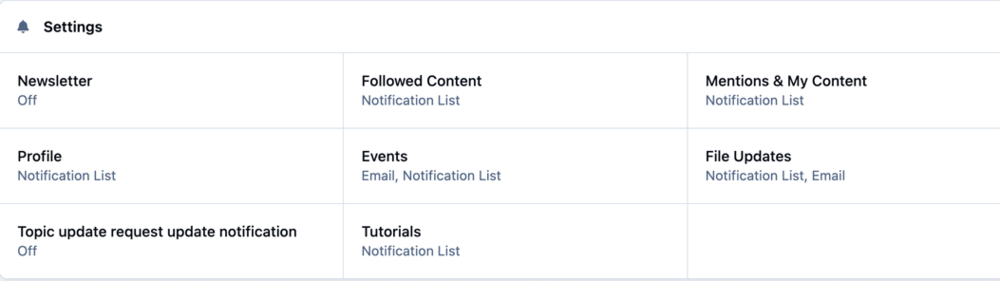
Hello, How can I unsubscribe a member from all email notifications in ACP? Is there a global setting to unsusbcribe a member from all emails? In ACP there are individual options for events, followed content, etc. Where can I unsubscribe a member from all email communication without having to go one by one? It doesn't make sense to go one by one. Thanks
-
Yes, the alert would be fine but the problem is that the alder option is time consuming because: It's not right there where it's needed where the comment is The alert option is a few clicks away and not right there So imagine I get 15 images uploaded and I need to go to the alert system, create an alert, search for the username, write the message, click on allow reply. All that from another window or tab. I don't think anybody would do that. The easiest way woodl be to: Integrate the useful alert feature right where it's needed and right at the post being moderated would be an option Delete -- want to give a reason? Yes. You write it, the user gets the alert. Fast and simple. Not only that, when the comment is deleted the moderated user doesn't receive an email saying hey the message was deleted because it doesn't follow the rules.
-
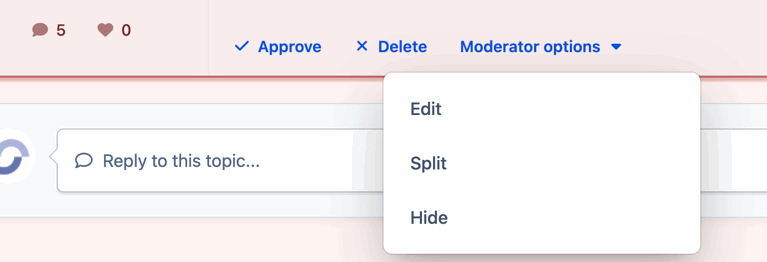
Hello, I’ve configured some forums so that new topics and replies require moderation and approval. This is my first time using moderated posting, and I’m trying to understand how the moderation workflow is intended to work. Specifically, is it possible for a moderator to reply to or notify a member when a post or topic is not approved? When moderating a new post, the available options I see are: Approve Delete Edit, split, and hide What I’m struggling with is the actual moderation feedback process. In my community, members often upload images and must follow strict posting rules. If I delete a moderated post, the content is simply removed and: The member receives no notification There is no option to explain why the post was rejected There is no “Disapprove with reason” or similar action From a user perspective, this feels problematic. A member could submit a chart or image in good faith, have it deleted by moderation, and never understand what rule was broken or how to correct it next time. I would expect some way to: Disapprove a post while providing a short explanation, or Automatically notify the member when a moderated post is deleted, including a reason I understand that for very large communities this may not be practical, but my use case involves low volume, highly structured posts where guidance and feedback are essential. Am I missing an existing feature or setting that allows this? Or is this currently not supported and better handled as a feature request? Thanks in advance for the clarification.
-
Hello, I am struggling how to emove a link in the footer. I guess I added the cookies link in version 4 but now in version 5 cloud, I just cannot find where I can edit the footer and remove the cookies link completely. I can't find it in the theme editor in the front end and I cannot find it in ACP. I could find the copyright area which I can edit but this cookies link is right above the copyright and I cannot find it anywhere. Can anyone help me please? See the attached..I want to remove the cookies link at the footer. Thanks
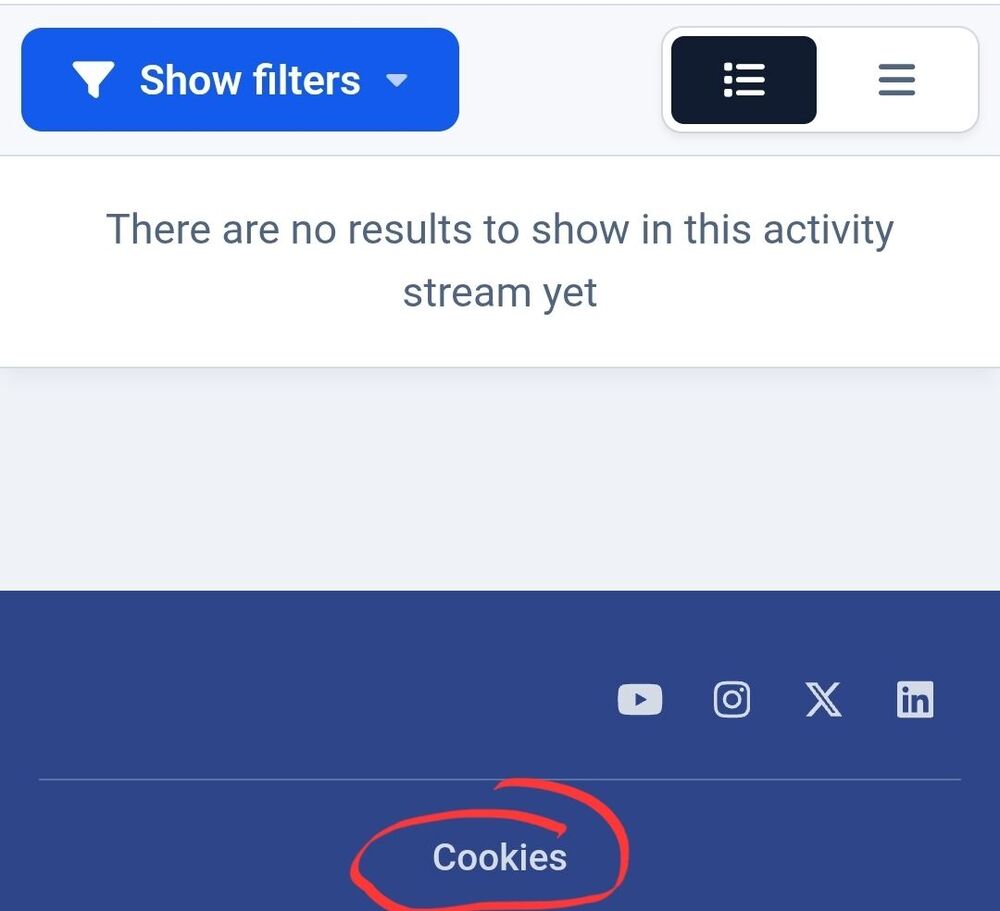
-
Hello. I am using version 5 in the cloud. I don't think I can even edit any PHP file. I don't even have access to a basic FTP. That's why I was asking how to do that from ACP. Thanks
-
Hello, How do I increase the log in timeout in ACP? I have to sign in every few minutes and it's very annoying. How can increase the timeout or even null the timeout so I am signed in as long as I want? Thanks
-
Thanks a lot. I already managed to hide the sub-forums with a custom CSS code in the theme manager.
-
Hello, How do I hide the sub-forums list under the main forum category? I don't like how it looks like, I want to hide the subforums and only leave the title, thumbnails and description. I am trying to figure it out but I can't see any option to hide sub-forums form the main forum page. How do I do that? Thanks
-
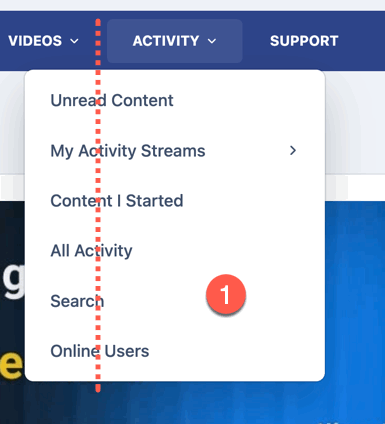
Yes, I understand the distinction between feature requests and feedback. However, this does not address the problem I’m reporting. This is not a feature suggestion. It is a UI regression introduced in the latest update. As shown in the screenshot, the dropdown menus are no longer aligned with their parent menu items. They are displaced significantly to the left, which was not the case earlier today before the update. Dropdown menus are expected to align with their corresponding navigation entries — this is standard behavior and was previously working correctly. Suggesting this as “feedback” implies a design preference, when in reality this is a functional layout issue caused by the recent release. Please treat this as a bug introduced in the latest update and advise whether it is a known issue or if additional information is needed to investigate. Thank you.
-
After the update to 5.0.15, there's something wrong with the main menu. The dropdown menus are displaced. For example, ACTIVITY. The white rectangle with the options should be at the dotted line, now it's displaced to the right. All the dropdowns are no longer centered and displayed to the left :( This happens after the update, with or without one-click dropdown option enabled. It happens everywhere, under my profile, menus, everywhere. I cleared system caches, and it's the same.
-
Hello, I just updated my community and I read in the release that there was an option in the Menu manager that will let us set the dropdown menu without clicking. Right now we must click to unfold the sub-menus. I can't find how to do that, it's not within the Menu Manager in ACP. Where is that option? Thanks I found it, it's in the Theme Editor. Thanks
-
Hello, First of all, thank you for the existing Zapier integration — it already covers several important events such as new users, course enrollments, and other community-level actions. However, there is currently a major limitation that affects many communities using Invision as a paid platform: There is no way to detect the purchase of a specific product via Zapier. At the moment, Zapier can react to: New users Certain content or course events Etc But product purchases are not exposed as triggers, which prevents automating many essential workflows. Why Product Purchase Triggers MatterFor communities selling multiple products, memberships, or bundles, product-level webhooks are critical, not a “nice to have.” Some real-world use cases: Automatically granting or revoking access in external tools based on which product was purchased Tagging users differently in email platforms (Mailchimp) depending on the exact product Triggering onboarding sequences per product (courses, bundles, lifetime access, upgrades) Syncing purchases with CRMs, analytics tools, or accounting platforms Tracking conversions and funnels at the product level instead of just “a user exists” Right now, all of this requires manual work or fragile workarounds, even though the data clearly exists inside Invision. Suggested TriggersAdding one or more of the following Zapier triggers would unlock a huge amount of value: Product Purchased User ID Product ID / Product Name Price Purchase date Transaction ID I believe this feature would bring significant value to a wide portion of your user base, especially those running paid communities, courses, and digital products. Thanks for considering it.
-
Hi, Thank you for the honest and detailed response — I appreciate you taking the time to explain how feature requests are evaluated internally. That said, I’d like to respectfully challenge one part of the reasoning, because it’s something I see repeatedly as a client. You mention that certain features may be valuable to individual clients but not necessarily to a large portion of the user base. My genuine question is: how is that determined if clients are never actively asked or polled? In all the years I’ve been using Invision Community, I’ve never seen polls or structured surveys asking customers what integrations they rely on, what features they actively use, or what would bring them the most value. From the outside, it often feels like those decisions are made internally rather than collaboratively — which naturally creates the perception that clients have very limited influence over the product’s direction, beyond posting feedback and hoping it gains traction. This applies not only to feature requests but also to bugs. For example, I reported a serious issue months ago related to course bundles where prices become mixed and unreliable. That problem directly affects monetization and usability, yet I continue to see releases focused on fixes or additions that feel far less critical in comparison. From a client perspective, that prioritization is difficult to understand. I fully appreciate that not every request can be implemented, nor immediately, nor exactly as suggested. My intention here isn’t to demand a specific outcome, but to highlight a recurring gap between client needs and perceived product priorities — and how the lack of structured client input makes that gap wider. I value Invision Community and wouldn’t invest time providing feedback if I didn’t care about the platform’s future. I just believe there’s room for more transparency and client involvement in understanding what “brings value to everyone.” Thank you again for the conversation.
-
Hello, Invision Community already integrates with Mailchimp, but currently, new members are simply added to a default Mailchimp audience without any tags. I suggest adding a feature where we can automatically assign specific tags based on actions. For example A tag for signing up. Like: source:acp Another for when a course is purchased Another tag when a new product is purchased This would allow us to segment and personalize communications much more effectively right from the start. Right now, the emails are added to the selected audience "naked" so we won't know where that new member (lead) came from (community, ad, form, etc) because the MailChimp integration is not not supporting the use of tags. We should have a section in ACP where we can specify which tags we want for each module, courses, products, new member. Thanks
-
When one of the team members say "Add it as a feature", I have an internal "laugh" saying "what for?". They are never added, not even serious bugs that have been reported, taking months to be fixed. It's sad, to be honest. Because when you suggest and you see that many others suggest and no features are added, you just stop suggesting and then the community you created becomes a "megaphone community" where only those "at the top" dictate what is going to be done. Sorry, I just had to say it. It's sad because that prevents me and probably many others (I read many commnets) from suggesting. Because you say to yourself, what for? They won't do it.
-
Thanks a lot. And that's where exactly there is one thing missing. The email is added "naked" without a tag (mailchimp feature) to manage contacts in the list. So the new members are just lost in MailChimp's without a tag like: source:community or source:acp to distinguish them from other sources. It would be sooooo nice to have that function in Mailchimp integration, otherwise new members are mixed with leads form many other sources, etc.
-
Oppps sorry. Thanks a lot. That's a very elaborated way to do things, slow too. I don't understand why if user groups are critical to managing forums and a community, the widgets do not have options in the front-end to display them to whoever you want. Thanks
-
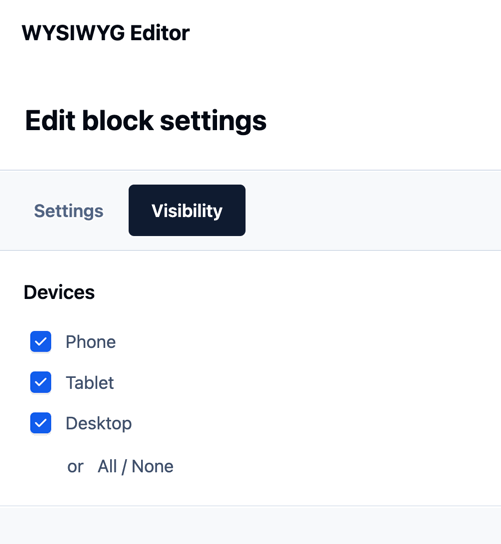
When I add blocks in pages, there is no place where I can select which user gorups can see them. Your suggestion looks great but there is no option there. Take a look at this widget I added in pages. I can only select the devices and not the user groups.
-
Thanks a lot. One question. I've configured and enabled Mailchimp integration by adding the API. So now, every new member is added to Mailchimp in the audience list I added? Do I need to do anything else? I can't find any documentation on how this integration works. Thanks
-
Hello, Where can I see the space used in the cloud by my images? Where can I see the total space allocated and used? Thanks
-
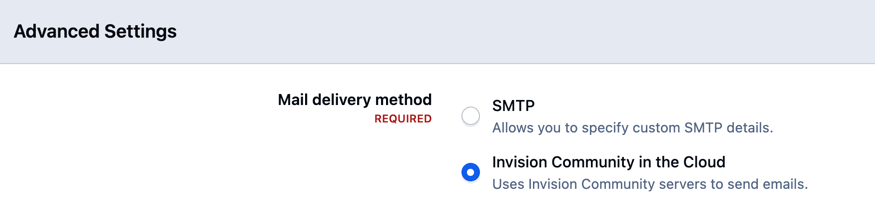
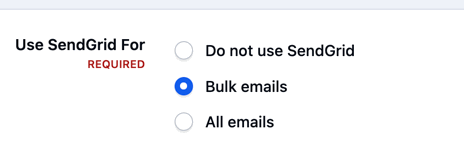
Hello, I've started to use MailChimp API. I congirured it in ACP 5 but I can't see the option to use Mailchimp for transactional emails as I see on SendGrid integration. Mailchimp also has transactional emails. Can't Mailchimp be used to send Bulk emails? Is there an option for that? Is it something that will be added? I can only see SMTP and the cloud. Thanks