


T. Batuhan BULGURLULAR
Members
-
Joined
Everything posted by T. Batuhan BULGURLULAR
-
T. Batuhan BULGURLULAR replied to T. Batuhan BULGURLULAR's topic in Invision Community 5: Beta Testing's Beta DiscussionHello, I just saw it, it's been resolved, thank you :))
-
T. Batuhan BULGURLULAR replied to T. Batuhan BULGURLULAR's topic in Invision Community 5: Beta Testing's Beta DiscussionHello Ester, could you kindly explain step by step how I can create a new blank page in the admin panel? Or could you post a picture of the section where you created it in the admin panel? I couldn’t find it despite searching.
-
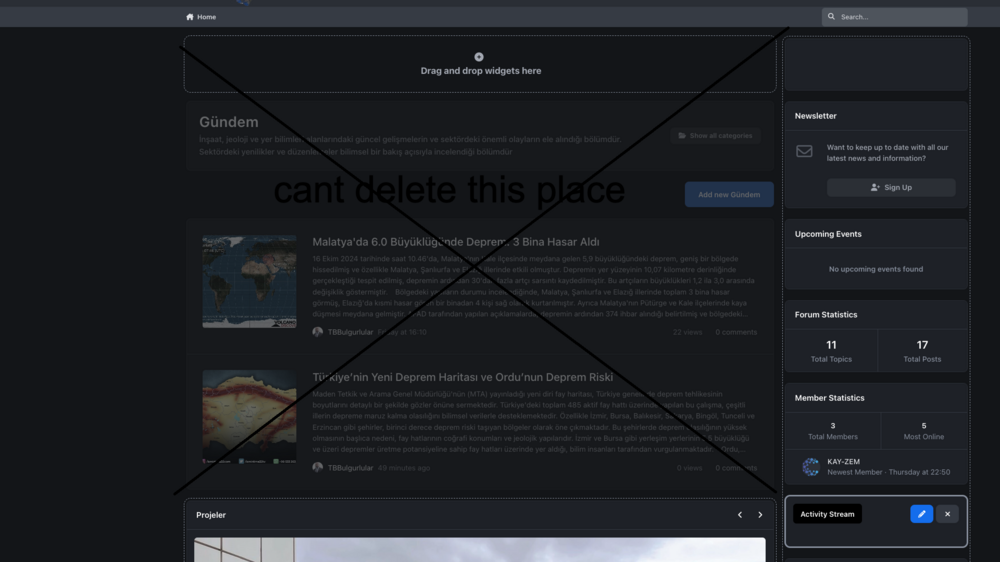
Hello, I want to create an independent page in the Pages section, but I think I didn’t configure the settings correctly. I’d like to create a MAIN PAGE where I can organize all the content, blog posts, and content from the database pages like a news site. However, I couldn’t manage it. In the photo, there is a page I created called Gündem, and I set this as the default homepage. I enter the page editing mode and place the feed widget of the pages I created on the side to organize the content, but I cannot delete the sections that belong to the page above. (Marked in the photo) Is it possible for me to design a completely independent page where I can place only the widgets I want?
-
I’m really excited every time I see it! I wonder how long it takes developers to produce an application. Will we be able to use the themes and applications made for version 4?

