Code Name Jessica
Members
-
Joined
-
Last visited
Everything posted by Code Name Jessica
-
But… are they? You're travelling through another dimension, a dimension not only of sight and sound but of mind; a journey into a wondrous land whose boundaries are that of imagination - Next stop, the Twilight Zone! (I had to look it up... I thought I could remember it all)
-
Ok, I probably should have said SOFT RELEASE, because clearly, that’s the hill to die on here. -- Whatever, what I was trying to say "Is there a difference between v5B14.2 and v5.0.0?" I think we all possess the mental faculties to grasp the point, but I deeply appreciate you swooping in to correct the phrasing of the exact release name and type. Truly, where would we be without that?
-
Is there a change log for this RC1?
-
Code Name Jessica replied to Code Name Jessica's topic in Invision Community 5: Beta Testing's Beta DiscussionSeriously though... I should probably put in a bug report... {2 months later} IPS Version 5 Beta 574 now live! I am just kidding you devs/testers/managers are doing amazing.
-
Code Name Jessica replied to Code Name Jessica's topic in Invision Community 5: Beta Testing's Beta DiscussionBut my post is funny right? Come on, my insecurities are extremely low, I need the praise of approvals... -- Spoken in the voice of the great Ryan Reynolds I am weird, just ignore me.

-
My topic titles are so stupid, but you clicked on it, and you are here, so I win! I noticed, well, let me tell you when I actually noticed: 'right now' yes, just right now, so is it a bug? Is it a feature? Did it change 20 years ago, did it change in v5? I don't know, but I noticed that when you quote someone, so, like... when you highlight part of their text, and click on the little quote button. It jumps right to the reply, and... Why does it not show WHO and WHERE you are quoting? I thought it would be something like this: {Username} - {link to post} Something really important was quoted here, is it good? is it bad? Do you want to make someone feel uncomfortable? I don't know, let's quote their exact message and criticize them about it. Maybe you just want to highlight what they are talking about, so what your talking about doesn't look so stupid, anyways how fun could this be? What else would quotes be good for?
-
Can you private message me your logs, look I won't pretend to know exactly where they are on an EC2, but if you're running apache, it should be in the /var/log/apache/error.log, if you are running nginx, it could be in the /var/log/nginx/error.log. As for mine, I have custom errors turned on, since I have my own custom built log rotating system, as well as log reporting to another server, I have to go to /var/log/system/reporting/cnj/nginx/error/log. A good way to find out is to look in your apache.conf (sites-available) or nginx.conf (sites-enabled) folders. To take it out of this topic, send me a private message and I will try to help navigate a report, or possibly help resolve.
-
Did you all get it fixed or are you stuck?
-
"Oh, I wish it were that simple! But when I click 'Upgrade Now,' my forum apparently takes one look at me and decides: Sorry, you are not in the capable mindset to handle such a critical operation. Please consult a responsible adult before proceeding. Or… something equally condescending. In reality, what actually happens is that it just refuses to continue and tells me I have to manually upgrade. So here I am, manually extracting, copying, and praying that rm -rf doesn’t make me regret my choices. 😆
-
So I was re-reading my post above, and this command cd ips_* && cp -r /var/www/{wherever you have your forum}/ && rm -rf ips_* is a joke, I was just trying to be funny, but then realized someone might actually do it and it WILL fail. There are things that are left out, if you really want one to work, I have created a script that does it with some checks and safety things first. Still just don't blindly use it, make sure you understand what it does. I added some comments in it to help with that. #!/bin/bash set -e # Exit immediately if a command fails set -u # Treat unset variables as errors # Define variables ZIP_FILE=$(ls IPS*.zip 2>/dev/null | head -n 1) # Get the first matching ZIP file EXTRACT_DIR=$(ls -d ips_* 2>/dev/null | head -n 1) # Extracted folder DEST_DIR="{YOUR FORUM DIRECTORY}" # Put your forum directroy location here BACKUP_DIR="~/backup_$(date +%F_%T)" # If you use the backup argument, put a place you want to backup your forum here # Ensure a ZIP file exists if [[ -z "$ZIP_FILE" ]]; then echo "No IPS*.zip file found. Exiting." exit 1 fi echo "Extracting $ZIP_FILE..." unzip -q "$ZIP_FILE" || { echo "Extraction failed!"; exit 1; } # Ensure extraction was successful if [[ -z "$EXTRACT_DIR" || ! -d "$EXTRACT_DIR" ]]; then echo "Extraction directory not found. Exiting." exit 1 fi cd "$EXTRACT_DIR" || { echo "Failed to enter $EXTRACT_DIR. Exiting."; exit 1; } # Ensure the destination exists before proceeding if [[ ! -d "$DEST_DIR" ]]; then echo "Destination directory $DEST_DIR does not exist. Exiting." exit 1 fi # Optional backup step if the backup argument was used. Highly recommend, change the backup folder at the top of this script. if [[ "${1:-}" == "backup" ]]; then echo "Creating a backup at $BACKUP_DIR..." # copy the forum to the backup folder sudo cp -r "$DEST_DIR" "$BACKUP_DIR" || { echo "Backup failed!"; exit 1; } # Ensure new directory is created for fresh files sudo mkdir -p "$DEST_DIR" fi # Copy files safely with rsync (better than cp -r) echo "Copying extracted files to $DEST_DIR..." sudo rsync -a --info=progress2 ./ "$DEST_DIR/" || { echo "File copy failed!"; exit 1; } # Cleanup with confirmation read -p "Are you sure you want to delete the extracted folder ($EXTRACT_DIR) and ZIP file ($ZIP_FILE)? (yes/no): " CONFIRM if [[ "$CONFIRM" =~ ^[Yy][Ee]?[Ss]?$ ]]; then echo "Cleaning up..." cd .. sudo rm -rf "$EXTRACT_DIR" rm -f "$ZIP_FILE" echo "Cleanup complete!" else echo "Cleanup aborted. You can manually remove $EXTRACT_DIR and $ZIP_FILE later." fi echo "Upgrade completed successfully!"
-
For a brief moment, I thought I had nuked my entire forum when I got a lovely little message about my SQL Database taking an unscheduled vacation. But, like any overly caffeinated human, I clicked the magical "Try Again" button, and voilà! Admin CP and Visit Site options appeared as if nothing had happened. Crisis averted. Of course, as per usual, the upgrade still requires me to manually finish the job. But hey, I’m a sysadmin by trade with over 20 years of NodeJS dev experience, so this is just another Thursday. The routine? cd ips_* && cp -r /var/www/{wherever you have your forum}/ && rm -rf ips_* Yep, that’s it. Works like a charm. Now all jokes aside: Now, that last part (rm -rf ips_*) is not just a fun little command; it’s a one-way ticket to "why is my forum gone?" land. Make sure your forum doesn't start with ips_ But hey, live and learn, right? 😏
-
Code Name Jessica replied to FeigelInc's topic in Invision Community 5: Beta Testing's Beta DiscussionOk, let me give you an example of what I do, although people have to register to post anything on my site. Also, make sure you have fail2ban installed and working. 1. Create a file. I use /var/www/forum/custom/php/seclayer.phpThis is the file that is added to my auto_prepend_file in my php.ini settings <?php /** * Security Layer - Syncs with Fail2Ban * Logs bad actors to Fail2Ban log and updates blacklist.json dynamically. * By Jessica Brown v4.1.2 - 2006 - 2025 */ define('SECURITY_LAYER', true); $blacklistFile = "/var/www/forum/custom/php/blacklist.json"; $fail2banLog = "/var/log/forum-security.log"; // Fail2Ban monitored log $logFile = "/var/www/forum/custom/php/security.log"; // Internal log // Load blacklist $blacklist = file_exists($blacklistFile) ? json_decode(file_get_contents($blacklistFile), true) : []; if (!is_array($blacklist)) { $blacklist = ["user_agents" => [], "ips" => [], "patterns" => []]; } // User details $userAgent = $_SERVER['HTTP_USER_AGENT'] ?? 'Unknown'; $userIP = $_SERVER['REMOTE_ADDR'] ?? 'Unknown'; // Define attack patterns $defaultPatterns = [ "/<script.*?>/i", "/javascript:/i", "/union select/i", "/benchmark\(/i", "/sleep\(/i", "/into outfile/i", "/load_file/i", "/\balert\(/i" ]; // Merge blacklist patterns $patterns = array_merge($defaultPatterns, $blacklist['patterns']); // Check if an input is malicious function isMalicious($data, $patterns) { foreach ($patterns as $pattern) { if (preg_match($pattern, $data)) { return true; } } return false; } // Block blacklisted IPs if (in_array($userIP, $blacklist['ips'])) { header("HTTP/1.1 403 Forbidden"); exit("Access Denied: Your IP has been blocked."); } // Block blacklisted User Agents foreach ($blacklist['user_agents'] as $badUA) { if (stripos($userAgent, $badUA) !== false) { header("HTTP/1.1 403 Forbidden"); exit("Access Denied: Your user agent is blocked."); } } // Check and block GET/POST data foreach (array_merge($_GET, $_POST) as $key => $value) { if (isMalicious($value, $patterns)) { logThreat($userIP, $userAgent, $_SERVER['REQUEST_URI'], $value); header("HTTP/1.1 403 Forbidden"); exit("Malicious request detected."); } } // Log threat and update Fail2Ban log function logThreat($ip, $agent, $url, $data) { global $logFile, $fail2banLog, $blacklistFile, $blacklist; $logEntry = date("Y-m-d H:i:s") . " | IP: $ip | UA: $agent | URL: $url | Data: " . json_encode($data) . PHP_EOL; // Log for Fail2Ban file_put_contents($fail2banLog, "[$ip] Malicious request detected\n", FILE_APPEND); // Internal log file_put_contents($logFile, $logEntry, FILE_APPEND); // Add to blacklist if not already listed $update = false; if (!in_array($ip, $blacklist['ips'])) { $blacklist['ips'][] = $ip; $update = true; } if (!in_array($agent, $blacklist['user_agents'])) { $blacklist['user_agents'][] = $agent; $update = true; } // Save updated blacklist if ($update) { file_put_contents($blacklistFile, json_encode($blacklist, JSON_PRETTY_PRINT)); } } ?>2. Create a /var/www/forum/custom/php/sync_fail2ban.php <?php $blacklistFile = "/var/www/forum/custom/php/blacklist.json"; $fail2banLog = "/var/log/forum-security.log"; // Load existing blacklist $blacklist = file_exists($blacklistFile) ? json_decode(file_get_contents($blacklistFile), true) : []; if (!is_array($blacklist)) { $blacklist = ["user_agents" => [], "ips" => [], "patterns" => []]; } // Read Fail2Ban log for banned IPs $bannedIPs = []; if (file_exists($fail2banLog)) { $logContents = file($fail2banLog, FILE_IGNORE_NEW_LINES | FILE_SKIP_EMPTY_LINES); foreach ($logContents as $line) { if (preg_match('/\[(.*?)\] Malicious request detected/', $line, $matches)) { $ip = trim($matches[1]); if (filter_var($ip, FILTER_VALIDATE_IP)) { $bannedIPs[] = $ip; } } } } // Add new banned IPs to blacklist.json $updated = false; foreach ($bannedIPs as $ip) { if (!in_array($ip, $blacklist['ips'])) { $blacklist['ips'][] = $ip; $updated = true; } } // Save updated blacklist if ($updated) { file_put_contents($blacklistFile, json_encode($blacklist, JSON_PRETTY_PRINT)); } ?>3. Create cron job for every 5 minutes running sync_fail2ban.php this is what syncs with my fail2ban custom jail I created.*/5 * * * * php /var/www/forum/custom/php/sync_fail2ban.php4. Create a simple /var/www/forum/custom/php/blacklist.json fileI am not going to show my blacklist.json file, but I will throw a couple of sample things in so you can see what it looks like { "user_agents": [ "BadBot", "CrawlerX", "SpamBot", "AttackBot" ], "ips": [ "203.0.113.45", "45.33.32.156" ], "patterns": [ "\/cmd=\/i", "\/wget \/i", "\/curl \/i" ] }You will need to create your fail2ban items: /etc/fail2ban/filter.d/forum-security.conf [Definition] failregex = ^\[\s*<HOST>\s*\].*Malicious request detected ignoreregex =and /etc/fail2ban/jail.local [forum-security] enabled = true filter = forum-security logpath = /var/log/forum-security.log maxretry = 3 bantime = 86400 # Ban for 1 day findtime = 600 # 10 minutes window action = iptables-multiport[name=forum-security, port="http,https"]Restart your fail2ban and add the auto_prepend_file=/var/www/forum/custom/seclayer.php Watch the IPs and bad things be blocked. Oh, and you can add your own items to that list as well. I just manually edit the blacklist, and if I add an IP, go to the IP section and add it in JSON node format, same way with other areas.
-
Code Name Jessica replied to FeigelInc's topic in Invision Community 5: Beta Testing's Beta DiscussionI want to start out by saying that I do not understand your setup, it sounds like you have an open board that you allow guests to post before they register. Please let me know if this is wrong. If that is the case, then there may be ways that to include some type of captcha (even in injected with JS), or before they post setup a moderated system to approve posts. If it is not an open board, then are they being approved by email? I guess, there needs to be more information. I have had a forum for about 20 years, not ICS, only have had them for about a month now. But other systems, I have used several ways to prevent spam. One of my favorite ways, in my php settings I have an auto_prepend_file = "/path/to/prepend.php" and in that file I have a script that does several checks for the user agents and block or accept. Then in all forms, it will check for keywords. I just create a file that contains a JSON of all of the things I want to block, then use REGEX to block any inputs, user agents, etc.
-
Code Name Jessica replied to Code Name Jessica's topic in Invision Community 5: Beta Testing's Beta DiscussionI am using Version 8.3.6
-
Code Name Jessica replied to Code Name Jessica's topic in Invision Community 5: Beta Testing's Beta DiscussionThank you teraByte, I mentioned in the first sentence of my OP, This was a work around for the issue, for those who wanted to use it. Marc asked me to put in a Bug Request, so I did. I appreciate you letting me know.
-
Code Name Jessica replied to Code Name Jessica's topic in Invision Community 5: Beta Testing's Beta DiscussionI appreciate it Marc, already done... Just throwing out a notice in case it was something to look into or not.
-
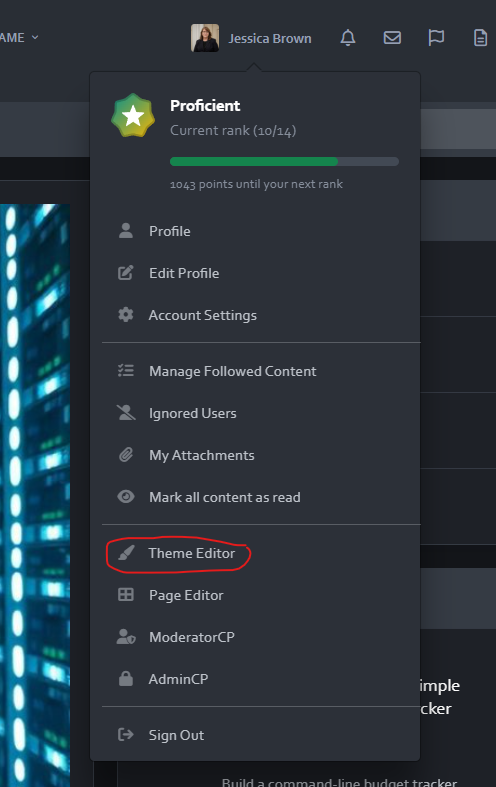
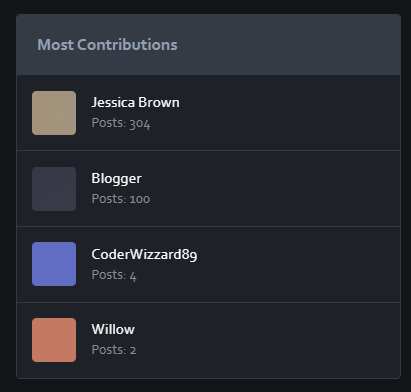
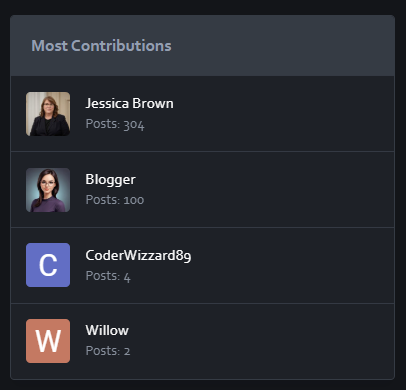
I noticed somewhere someone said the images were not showing on their board. I found a work around for those who want to use it: Open the Theme editor (Click on your name at the top right of the screen) Then Click on the Custom CSS icon </> and add this code: .ipsUserPhoto--fluid { display: block !important; visibility: visible !important; opacity: 1 !important; width: auto !important; height: auto !important; max-width: 100% !important; max-height: 100% !important; position: relative !important; } That will turn: back into:
-
Code Name Jessica replied to Code Name Jessica's topic in Invision Community 5: Beta Testing's Beta DiscussionNope, I was on B10.
-
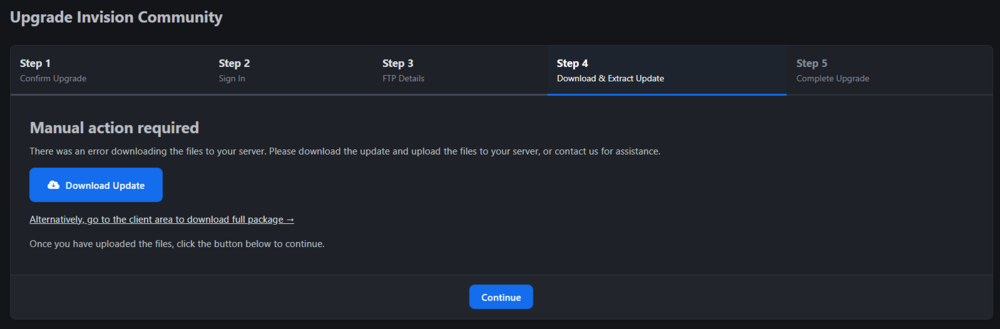
Not sure if it is a bug or something with my server. It does not give details for me to investigate. I can manually do it, it is not a problem. Just wanted to let you know that I received this message:
-
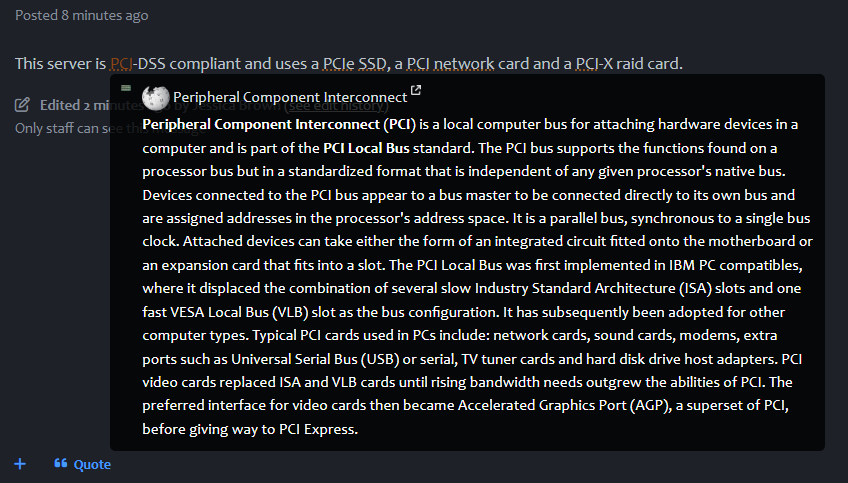
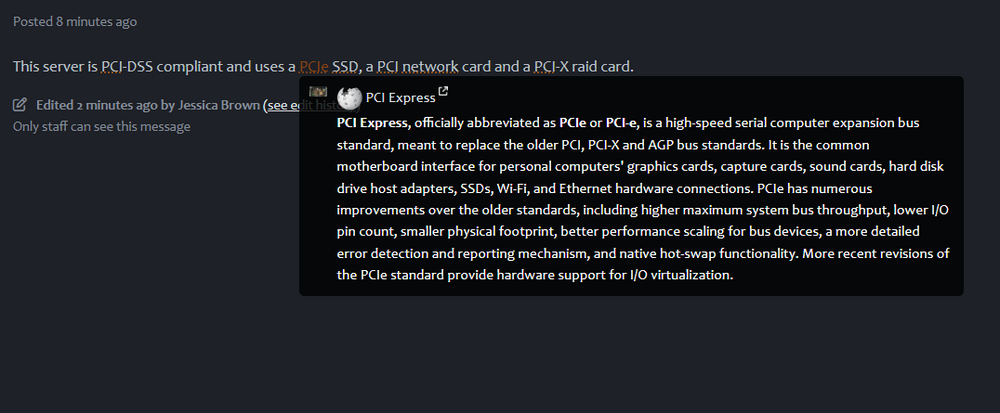
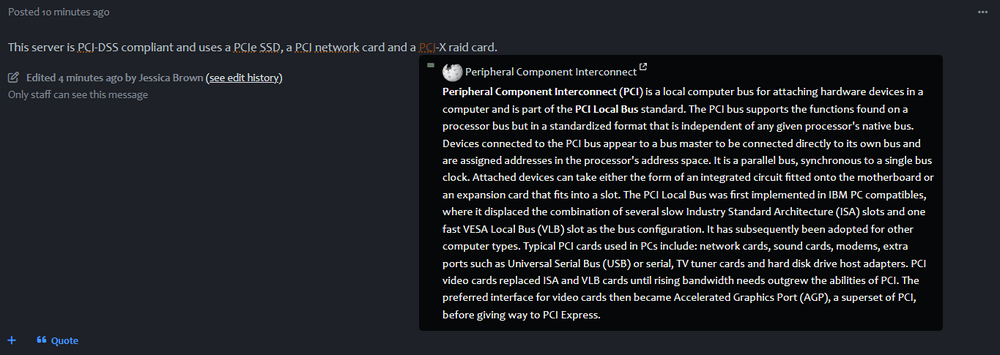
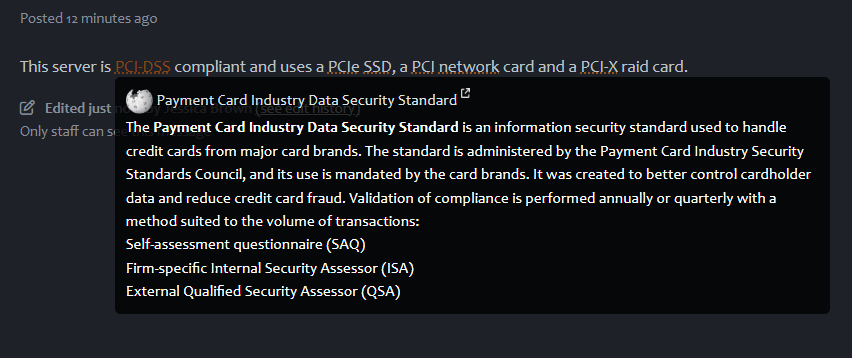
Code Name Jessica replied to Code Name Jessica's topic in Invision Community 5: Beta Testing's Beta DiscussionBug Report Update Title: {Bug} IC v5 Beta 10 - Word Expansion Matching (Additional Findings) Description: Following my initial bug report regarding the Word Expansion feature in IC v5 Beta 10, I have discovered that deleting and re-adding the affected word expansion "PCI" temporarily resolves the issue. Once re-added, the system correctly matches each term, such as "PCI", "PCIe", "PCI-DSS", and "PCI-X", without triggering incorrect expansions. This behavior suggests a potential issue with how word expansions are initially cached or indexed. Steps to Verify Fix: Delete the "PCI" expansion from the Word Expansion list. Re-add "PCI" with the same settings. Retest by editing the forum post created with the terms specified. Observe that the system now matches each term correctly. Impact: While this workaround solves the issue temporarily, it may confuse users who are unaware of the need to manually reset word expansions. Suggested Fix: I have no idea... Didn't look 🙂 Reported by: Jessica Date: January 12, 2025 (Sorry just saw the Bug tracker...) - I can move (well create a new one) in there if you like.
-
Description of the Bug: The Word Expansion feature in Invision Board Community v5 Beta 10 exhibits incorrect matching behavior when multiple word expansions share similar prefixes. The issue arises when word expansions such as: PCI PCIe PCI-DSS PCI-X are added to the Word Expansion list. The system does not differentiate between these variations correctly and applies expansions incorrectly when terms with similar prefixes are used in posts or comments. Steps to Reproduce: Navigate to the Admin Control Panel (ACP). Go to System > Settings > Posting & Editor > Word Expansions. Add the following word expansions: PCI PCIe PCI-DSS PCI-X Save the changes. Create a new forum post or comment with the text: "This server is PCI-DSS compliant and uses a PCIe SSD, a PCI network card and a PCI-X raid card." Observe the applied word expansions in the post. Expected Behavior: Each word expansion should apply only to the exact matching term in the text. For example: PCI should expand only when the standalone term "PCI" is used. PCIe should expand only when the term "PCIe" is used. PCI-DSS should expand only when the term "PCI-DSS" is used. PCI-X should expand only when the term "PCI-X" is used. Actual Behavior: The word expansion logic applies expansions inconsistently. For example: "PCIe" triggers the "PCIe" expansion. "PCI-DSS" triggers "PCI" expansions. "PCI-X" triggers the "PCI" expansion. "PCI" triggers the "PCI" expansion. This incorrect matching behavior causes confusion and unintended text replacements. Impact: Users experience incorrect text replacements in their forum posts. This can lead to confusion, especially in technical forums where precise terminology is crucial. It diminishes the usability of the Word Expansion feature. Suggested Fix: Update the Word Expansion matching algorithm to ensure it matches whole words or specific phrases accurately. Implement a stricter matching mechanism that differentiates between exact terms and terms with similar prefixes. Environment: Platform: Linux (Ubuntu 24.04) Web Server: nGinX PHP Version: 8.2 Database: MySQL 8.0 Browser: Microsoft Edge Attachments:
-
Code Name Jessica replied to PanSevence's topic in Invision Community 5: Beta Testing's Beta DiscussionYeah, I am not one of the developers, I completely understand, that is frustrating when the ACP says no limit, but it is limited in SQL. Curious... I am in the middle of an application currently, but I am wondering if... Let me think about this, maybe another application can be made to create a new table for images, videos, large files, etc. Then call that when uploading or viewing that in community. Let me finish my current project, and I will get back to you if I create something like that.
-
Code Name Jessica replied to PanSevence's topic in Invision Community 5: Beta Testing's Beta DiscussionI was refencing this topic: and this topic (Mark's comment at the end of that topic):
-
Code Name Jessica replied to PanSevence's topic in Invision Community 5: Beta Testing's Beta DiscussionYou are correct, once I made the changes, I get the Database problems error in the Get Support of the admin. That is a shame, I thought they would have changed that.
-
Code Name Jessica replied to PanSevence's topic in Invision Community 5: Beta Testing's Beta DiscussionI have a dev site... I am going to run: ALTER TABLE core_attachments MODIFY COLUMN attach_filesize BIGINT(20) NOT NULL; I'll let you know what happens.