


CreatorPete88
Clients
-
Joined
-
Last visited
-
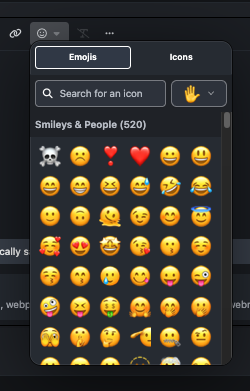
How do i go about removing these emojis and other sets but keep my own ones? Also removing icons as well. Thank you
-
Hi, where do you get the language packs from? I googled/gpt and it said it is in your marketplace but I could not find it.
-
I added the language options and tried to test them. I had VPN to say Japan, i cleared the system cahce, I set my edge browser to Japanese language, i changed the bottom to Japanese but the whole thing is still in English?
-
Hi, i have global traffic/customers from all over the world. from time to time, people say they can't access my website or drops out. They report these to me. what are the reasons?


-
I still cant get it to work. <iframe src="https://free.timeanddate.com/countdown/ia9l3qzp/n152/cf12/cm0/cu4/ct0/cs0/ca0/cr0/ss0/cac000/cpc000/pcfff/tcfff/fs100/szw320/szh135/tatTime%20left%20to%20Event%20in/tac000/tptTime%20since%20Event%20started%20in/tpc000/mac000/mpc000/iso2026-01-31T00:00:00" allowtransparency="true" frameborder="0" width="180" height="69"></iframe>

-
Hi Marc, Is this how i am meant to set it up? Thank you

-
Hi, I want to add an iframe to the post section, but I can't get it to work:? I've seen many forums have it, but i can only find that i have to pay for a program? I read that there's a program/software that involves a cos,t, but I've seen many old school forums have embeds. Would like some guidance. Example: https://www.timeanddate.com/clocks/freecountdown.html <iframe src="https://free.timeanddate.com/countdown/ia9l3qzp/n152/cf12/cm0/cu4/ct0/cs0/ca0/cr0/ss0/cac000/cpc000/pcfff/tcfff/fs100/szw320/szh135/tatTime%20left%20to%20Event%20in/tac000/tptTime%20since%20Event%20started%20in/tpc000/mac000/mpc000/iso2026-01-31T00:00:00" allowtransparency="true" frameborder="0" width="180" height="69"></iframe> Thank you.


