


Brian Lane_61409
Clients
-
Joined
-
Last visited
Everything posted by Brian Lane_61409
-
Thanks for your reply, I will try this out! 👌
-
I want to use a widget to feature a link and snippet to randomized post from an information forum, that will change each visit (or even just daily) for my members to click and read.. But I have only been able to do the latest post in the forum. Does anyone know how to achieve this?
-
Whoops! Worked it out 😆
-
Thanks! I need a bit more help sorry. I uploaded the new default avatar I want to my theme resources - but the link that I get to use it is much longer than what you have in your CSS. Do I need to edit the link it gives me? My resource is this: {resource="custom/feather icon.png" app="core" location="front"} so tried doing this: /* Replace default_photo.png avatar */ .ipsUserPhoto:has([src$="default_photo.png"]){ background-image: url("https://site.com/avatar.png"); background-size: cover; } .ipsUserPhoto:has([src$="{resource="custom/feather icon.png" app="core" location="front"}"]) img{ display: none; }
-
We have a set of old-favourite emojis we use, which look too small now. Does anyone know how to make that set bigger with css, or the acp? Cheers
-
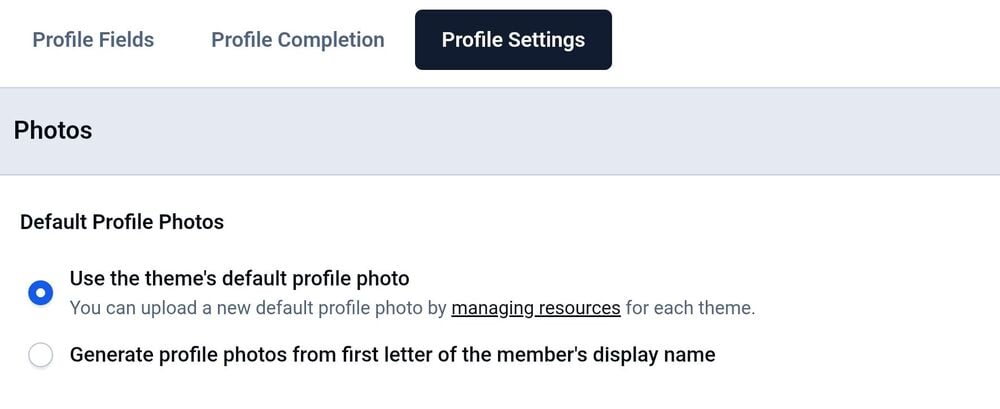
I searched for default profile photos, and found the tip that a default profile pic can be added to the theme resource. So I uploaded my image, and now need to know how to have the ste recognizets for use as the default for guests?
-
Hmm, is that V5? When I go into Members, I dont see a members settings link?
-
Fabulous, Thanks Gary 👌
-
Hi I would like to change the avatar for guests to our forum. It is currently the default silhouette figure, and I want to use a custom graphic instead. Is that in the acp? Thanks
-
Aw pity. I saw an option to enable anonymous replies, could that help this issue? It's not ideal, but I could run it by the mod team if that's possible?
-
Thanks for that link! This is looking hopeful. Do I understand it correctly that this app only lets users create new topic, but not reply to topics? Or does this mean they can only reply to topics created after the apps install? Cheers Relevant text from linked app notes Linked Accounts is integrated into the Login system of IPS4, so to control the number of failed logins, Reset failed login count (minutes) on ACP -> Login Handlers -> Login Settings. Since hooks cannot be used, the option to reply to topics using linked accounts has been removed in this version. You can only create topics using linked accounts from now on.
-
We used have a linked account app, but it is lost with our upgrade to Version 5 It was really useful for our members who have different logins for varying roles, to easily switch into their different logins. Is there a invision compatible app available for the new version? Moderators also miss being able to change post author, is there perhaps some css that can enable that? Thanks
-
Nice. I'll look into that now. thanks for th speedy reply 👌
-
On the front page just under the header, "Forums" is on the.left, and "start a new topic" is on the right. It seemed to be the default.
-
I want to change to text to say Game Boards, instead of Forums. Is it possible to do that?
