


Vero Pepperrell
-
Joined
-
Last visited
Posts posted by Vero Pepperrell
-
-
-
Edited by Vero Pepperrell
I'll attempt to replicate the issue here.
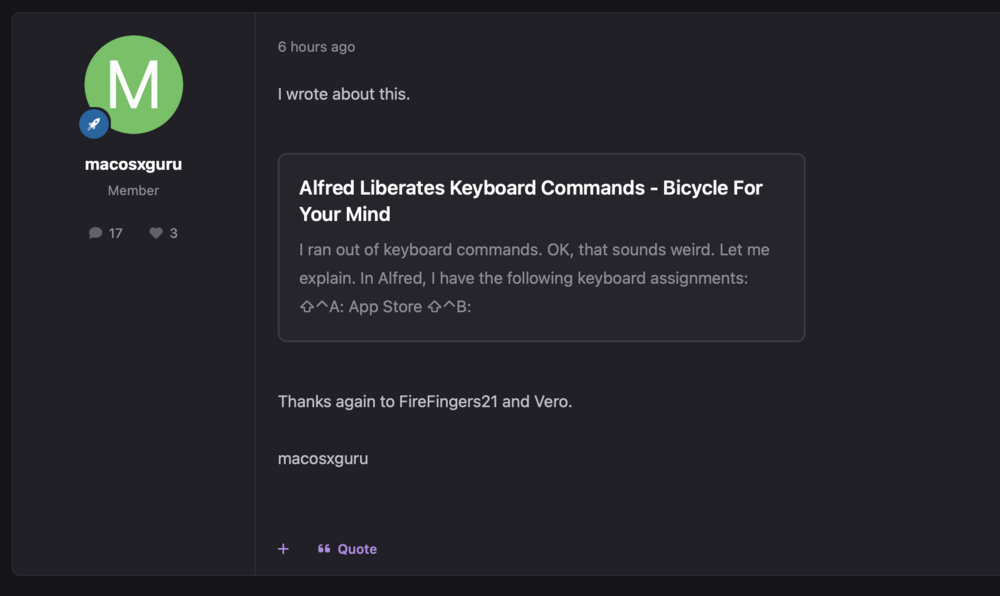
On our forum, a user posted the following link, which was automatically turned into an embedded "feature" box, and appears to be missing any clickable element to it.
https://bicycleforyourmind.com/alfred-liberates-keyboard-commands
I'm not sure how his link is turned into an embedded one, whereas the feature seems disabled here.
See the screenshot of how it looks on our forum - None of that central box is clickable to go through to the link:
-
Previously, our moderators would remove images (such as profile image + profile header) when banning a spammer from the forum. This could be done easily by clicking on the user's icon / header and choosing to remove it, but since upgrading to v5, this no longer seems possible.
I've checked and the mods have been set to yes for "Can edit members' profiles?" under Members > Staff > Moderators > [Choose a mod group] > Member Management.
Have I missed a setting somewhere?
Contextual username suggestion when responding to a thread
in Ideas and Requests
·
Edited by Vero Pepperrell
When responding to a thread, if I start typing @ and a username, a list of suggested usernames pops up. I'm fairly certain that in the previous version of IPBoard, priority would be given to relevant usernames (e.g. who had responded earlier in the thread)
Now when typing @ followed by a username, we get a long alphabetical list of users, so if there are 10 usernames beginning with "matt" before the one I'm responding to, I get a whole irrelevant list of usernames rather than the ones active in the current thread.
It would be really helpful to bring back this contextual suggestion list.