Jake Middleton
Clients
-
Joined
-
Last visited
Everything posted by Jake Middleton
-
That is quite a good way to do it, I have post count groups set up but the permissions are not as advanced as that. Thank you for the advice. Jake
-
Thank you for pointing that out. It was actually the google AI mode which told me it was on your site - but that AI frequently gets things wrong. Its nice to actually talk to the owner of that site. Jake
-
Hello I am admin and owner of a site hosted on the invision cloud and using the creator plan. One of the very useful ways to catch scammers is being able to sign in as any member's account and view their message history. I have intercepted such messages and banned accounts in this manner before. It is time consuming signing into members accounts individually and checking their messages, or indeed looking for private message sending in the IP address tools. What I would like is to be able to read every private message sent that day as a sort of newsfeed. Or something like that. It would make this all so much quicker, and easier to keep my users safe. I have read that there is a pluggin for the forum called "PM viewer" or something like that on https://www.sosinvision.com.br Before I even investigate making a modification or addition to the admin CP though I need to ask: 1: is the site a known and trusted source of pluggins? https://www.sosinvision.com.br/ this is especially pertinent, considering the recent PHP vulnerability findings 2: is there actually a better way of going about what I am trying to do? 3: any other advice regarding keeping my users safe in this way. Thank you for reading Best wishes Jake
-
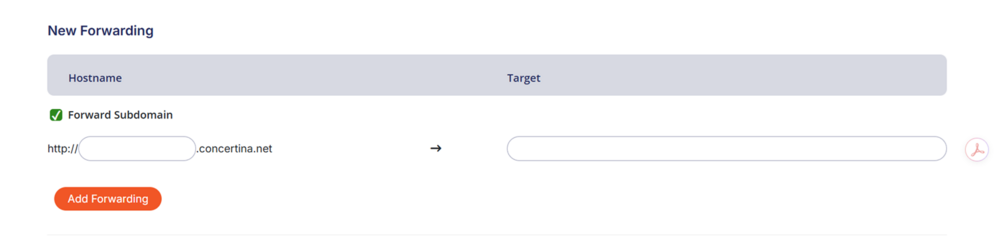
Hello I am the owner/admin for the site https://www.concertina.net/ it is set up with invisions creator package. It is cloud hosted. I have a problem which is that if someone types concertina.net into their browser it does not automatically forward to https://www.concertina.net/. It just loads for ever and eventually errors out. For some people it does this and for some it does not - probably dependent on what browser they use, anyway I use chrome and it just errors out. One has to type www. before concertina.net (the horror!!!). Invision say they cannot set up a permanent 301 redirect and that has to be done through my domain registrar. My domain registrar www.pairdomains.com cannot set up forwarding from https to https, they can only do it from http to https, I have attached an image of the dialogue box on my account interface below. My understanding is invision sites don't have an .htaccess file in any way which is accessible or usable, which would be an easy way around this problem to do it on there. I think what I need to do is set up the following two redirects: https://*.concertina.net → https://www.concertina.net https://concertina.net → https://www.concertina.net I already have two set up which are as above but go FROM http. They don't solve the issue. But neither invision nor my domain registrar say they can add the above redirects. So what is my best way forwards here? From what I can see it might be: 1: change domain registrar to one that supports redirects from https 2: somehow do this through couldflare? My forum has cloudflare built in and I have heard you can do redirects through that 3: use an external redirece service like redirect.pizza - probably free with my quantity of redirect traffic, I have no idea if this causes any security issues or affects SEO What do you all think? Thanks for reading. Jake