


Gary Lewis
Clients
-
Joined
-
Last visited
Everything posted by Gary Lewis
-
@Cedric V - So "bulk mail" and "newsletter" are the same thing? To a newbie admin that isn't intuitively obvious to the casual observer.
-
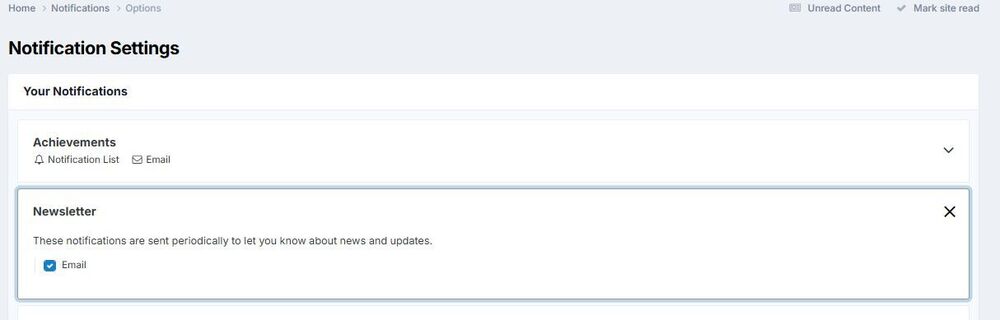
Folks, some of my members have asked how they can turn bulk mailing on. So I have two questios: Is it Account Settings/Notifications/Newsletter, as shown below? If so, it seems like there's a terminology issue. To send a message you go to Bulk Mail Management, but in Account Settings it is Newsletter. Are those the same things? If so, can we get the terminology to say that? Or at least under Newsletter have Bulk Mailing mentioned?
-
@James Hargreaves - That helps, thanks. We really need to think about columns like that, but part of the problem is that we have the Invision forum embedded on a Weebly website. So it isn't straightforward. (Yes, we'd be better off with our hundreds of pages of web content on Invision, but that's a LOT of work.) And I do understand about having bulk mailing on by default. Truthfully we are way too far down the pike to do that 'cause there are almost 2500 members who wouldn't be affected. And, by the way, I saw something on your page that brought up a memory - Hatfield House. Was there in about '85 for a banquet with people serving in period-correct costumes. It was lovely. I was on assignment in London from the US and got tickets to it for my wife and I. Then we moved to Moor Park in '87 and were there for a couple of years. So I've been in what appears to be your area. @STLAR - Thanks, but my problem isn't that the system wouldn't send more than 100. In fact, it appears to have successfully sent 210. But the vast majority of my members have bulk mail turned off, and only the 210 allow it.
-
@James Hargreaves - Could you show me a screenshot of one of your pages with the signup block on it? Thanks in advance. I don't have any extra columns and I'm not sure I want to add one, but need to understand what can be done with them. Having said that, I doubt many of my users understand "bulk mail". We've been on Invision for roughly a year and this is the first time we've tried to use it. So that's hardly spam. I wonder if there's a default setting where bulk mail would be turned on as a new member joins unless they specifically turn it off?
-
Thanks, Marc. I won't ignore their wishes.
-
Thanks, folks. @Marc I did that and got 8 pages at 25/page plus 1 page with 11, so a total of 211. That's only one more than the 210 it said were sent, so there must be a banned member in there. But most of my members have obviously turned bulk mailings off. Is there another way to reach them easily? @teraßyte Preview step? Sorry, but I don't know how to do that? Could you please explain?
-
This morning I sent a bulk mail message that I had hoped would go to all 2500+ members. But the system says it went to only 210, and save for myself I've not found any of the other members that got it. I've looked at the filters but nothing stands out as a problem, with everything showing "all" or "any". So, is there any way to figure out what I did wrong? Thanks in advance.

